Gemini Enterprise Agent Platform: Introduction, Editions, and Integration with Google Workspace and Google Cloud
-
 Mohit
Mohit - 14 Jun, 2026
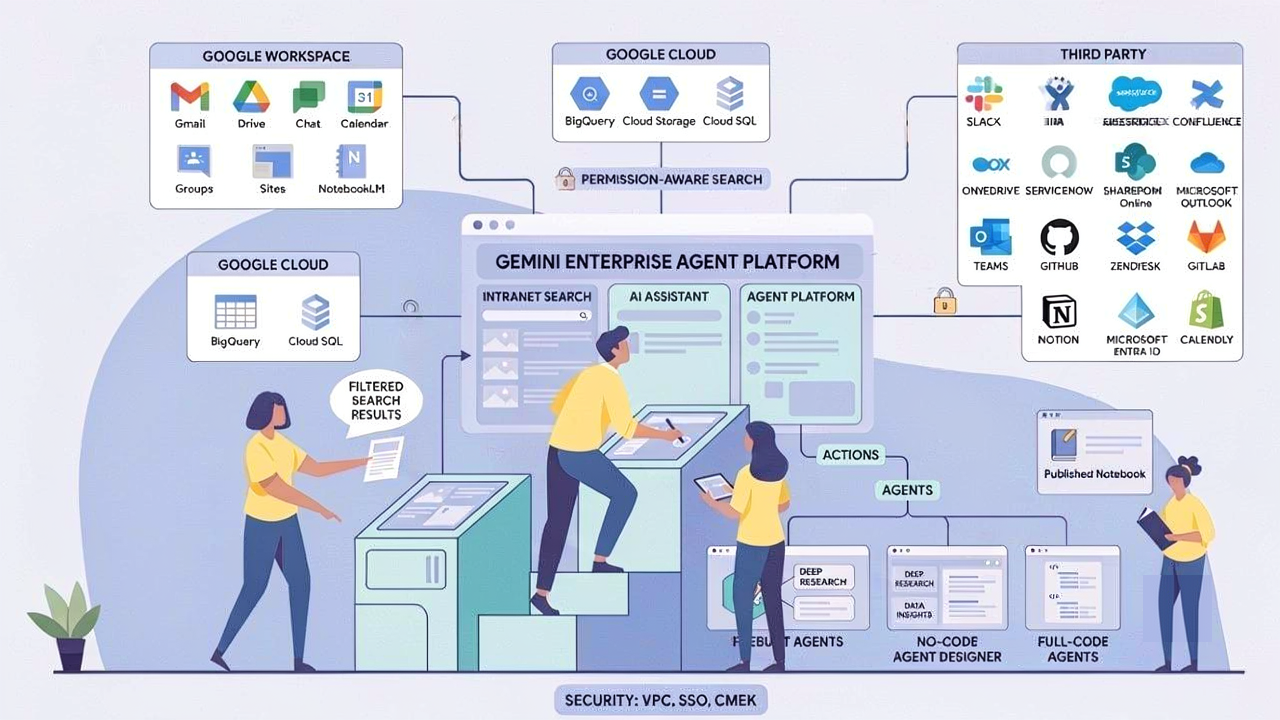
If you’ve been following Google Cloud closely, you may have noticed the name “Vertex AI” quietly stepping aside in favor of something new: Gemini Enterprise. This isn’t just a rebrand. Gemini Enterprise is a full platform — an AI-powered intranet search, conversational assistant, and agent-hosting environment — built specifically for organizations that want to connect their scattered data, automate knowledge work, and run AI agents without stitching together a dozen separate tools.
This guide covers everything in plain language: what Gemini Enterprise actually is, how its editions compare, how it plugs into Google Workspace and Google Cloud, what the third-party connector ecosystem looks like, and what you need to know before getting started.
The 30-second summary
Before diving in, here’s the short version:
- Gemini Enterprise is Google’s enterprise AI platform that combines permission-aware search, a conversational AI assistant, and a system for deploying and managing AI agents — all in one place.
- It connects to your existing data: Gmail, Google Drive, Google Chat, Confluence, Jira, SharePoint, Slack, Salesforce, and dozens more.
- The AI assistant can search, summarize, answer questions, generate content, and take actions — all grounded in your own company’s data.
- It comes in four editions — Business, Standard, Plus, and Frontline — each targeting a different scale and feature set.
- Security is built in from the ground up: SSO, Workforce Identity Federation, VPC Service Controls, and Customer Managed Encryption Keys.
What is Gemini Enterprise, exactly?
Think of Gemini Enterprise as a smart, AI-powered layer on top of all the data your organization already has. Instead of your employees opening five different apps to find a policy document, a Jira ticket, a Slack conversation, and a Salesforce record — they ask Gemini Enterprise, and it pulls from all of them at once, with their individual access permissions respected.
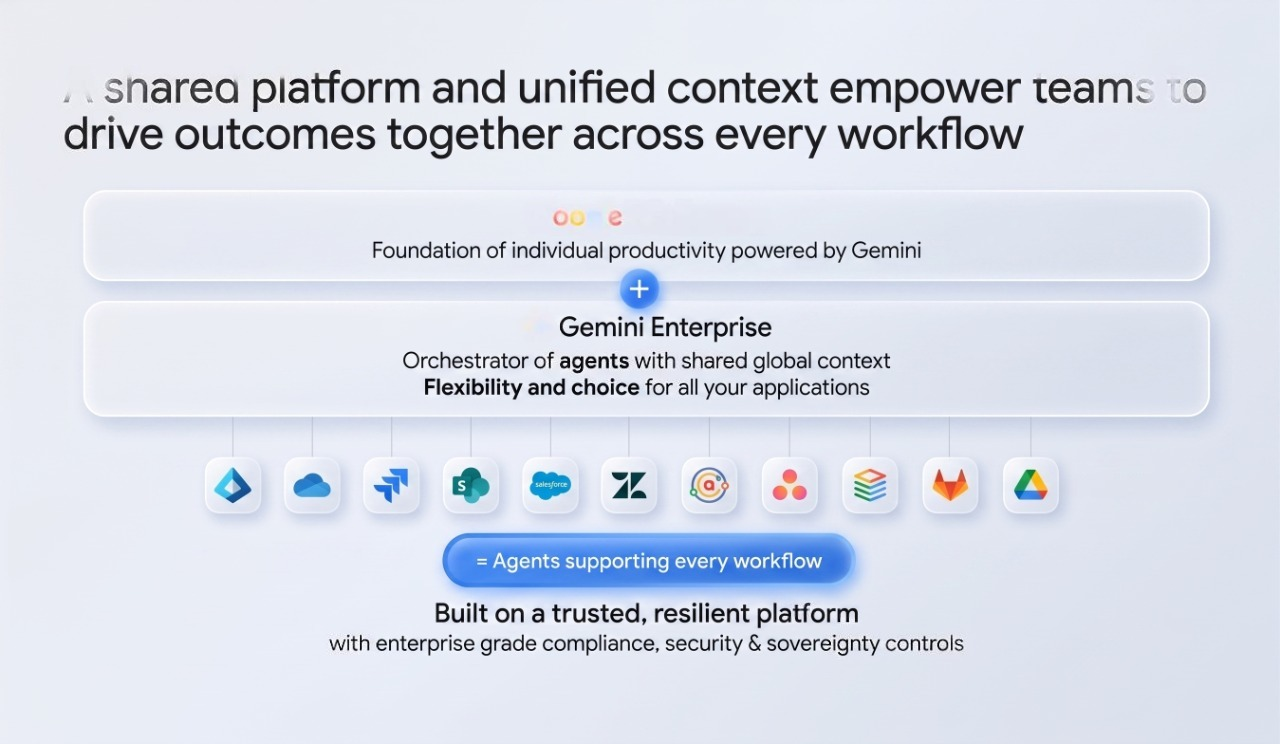
Concretely, it does three things:
Intranet search — You connect your data sources (Google Drive, Confluence, ServiceNow, SharePoint, and more), and Gemini Enterprise indexes them into searchable data stores. When an employee searches, they only see results they have permission to access — not everything in the company.
AI assistant — The built-in assistant doesn’t just return search results. It reads those results and generates a natural-language answer. You can ask it to summarize a PDF you’ve uploaded, analyze a 10-K report, draft a message based on prior conversations, or find talking points for an upcoming customer call.
Agent platform — Beyond answering questions, Gemini Enterprise can host AI agents that take action. These agents can create calendar events, file Jira tickets, update ServiceNow records, or run multi-step research workflows — all triggered from a single chat interface.
The result is that knowledge workers spend less time switching between tools and more time doing actual work.
Gemini Enterprise and Vertex AI: What changed?
Gemini Enterprise evolved from what was previously known as the Vertex AI Search and Conversation platform. Google consolidated and rebranded those capabilities under the Gemini Enterprise umbrella to reflect the shift from search-only to a full agent and assistant platform.
If you worked with Vertex AI Search for enterprise use cases before, Gemini Enterprise is its direct successor. The APIs, data store concepts, and connector ecosystem are the same foundation — significantly expanded. References to Vertex AI are still visible in the backend (for example, the Vertex AI API must be enabled to use Gemini Enterprise), but the product surface, branding, and admin experience are now all under the Gemini Enterprise name.
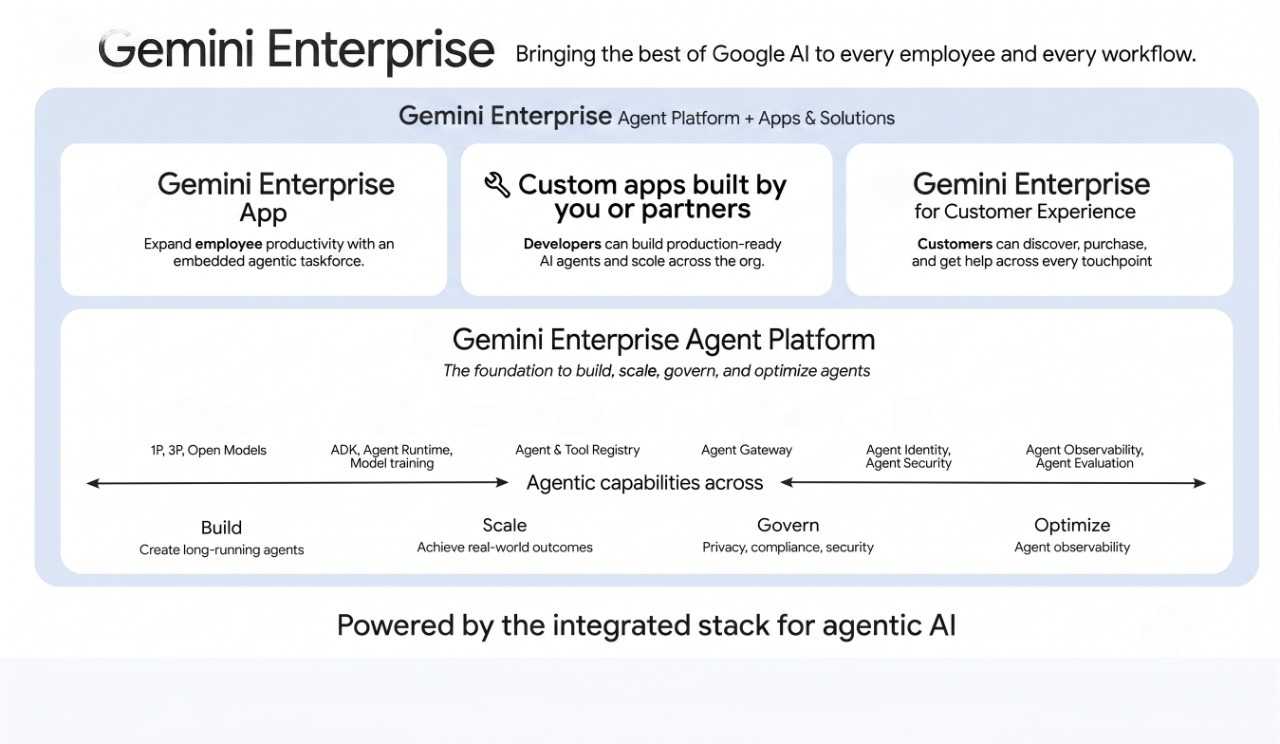
The key concepts you need to know
Before getting into integrations and editions, it helps to understand how Gemini Enterprise is organized internally.
| Concept | What it means in practice |
|---|---|
| Data sources | The external systems you connect to — Gmail, Jira, SharePoint, BigQuery, etc. |
| Data stores | Where indexed content lives inside Gemini Enterprise. Each connector type gets its own data store. A Jira Cloud connection, for example, creates separate data stores for issues, attachments, comments, and worklogs. |
| Apps | The search and assistant experience you deploy to users. An app connects to one or more data stores. When multiple data stores feed a single app, this is called blended search. |
| Assistant | The in-app chat box your employees interact with. It generates answers grounded in your data stores, cites sources, can analyze documents you upload, and can generate images and reports. |
| Actions | The assistant’s ability to do things, not just answer. For data stores that support actions (like Gmail, Google Calendar, Jira Cloud, and Outlook), the assistant can create events, edit tickets, or send messages on behalf of the user. |
| Agents | Pre-built or custom AI agents available in an Agent Gallery, or built using a no-code Agent Designer. Agents handle multi-step processes, automate research, and generate new content. |
| Analytics | A Looker-powered dashboard showing search usage trends, query quality, and end-user engagement — so admins can measure how well the platform is working. |
Editions at a glance
Gemini Enterprise comes in four editions. Here’s how they compare on the dimensions that matter most for buying decisions.
| Business | Standard | Plus | Frontline | |
|---|---|---|---|---|
| Seats | 1–300 | 1 or more | 1 or more | 150+ (of Standard/Plus) |
| Storage per user per month | 25 GiB pooled | 30 GiB pooled | 75 GiB pooled | 2 GiB pooled |
| Full data connector ecosystem | ✗ | ✔ | ✔ | ✔ |
| Priority access to latest Gemini models | ✗ | ✔ | ✔ | ✗ |
| Permission-aware search | ✔ | ✔ | ✔ | ✔ |
| Blended search + generative answers | ✔ | ✔ | ✔ | ✔ |
| Generate media (images and videos) | ✔ | ✔ | ✔ | ✔ |
| Grounding with Google Search | ✔ | ✔ | ✔ | ✔ |
| Web grounding | ✔ | ✔ | ✔ | ✔ |
| NotebookLM Enterprise (create and publish) | ✔ | ✔ | ✔ | ✗ |
| NotebookLM Enterprise (view and chat) | ✔ | ✔ | ✔ | ✔ |
| Gemini Code Assist Standard | ✗ | ✔ | ✔ | ✗ |
| No-code agent builder (build) | ✔ | ✔ | ✔ | ✗ |
| No-code agent builder (use) | ✔ | ✔ | ✔ | ✔ |
| Deep Research (Made by Google) | ✔ | ✔ | ✔ | ✔ |
| Data Insights (Made by Google) | ✗ | ✔ | ✔ | ✔ |
| Full-code custom agents | ✗ | ✔ | ✔ | ✔ (use only) |
| Agent Marketplace access | ✗ | ✔ | ✔ | ✔ |
| Enterprise-grade security and compliance | ✗ (base level) | ✔ | ✔ | ✔ |
A few notes that don’t fit neatly into the table:
- Business is capped at 300 users and is the lightest edition. It’s suitable for smaller organizations getting started with AI search, but it doesn’t get the full connector ecosystem or enterprise security and compliance certifications at the same level as higher tiers.
- Standard is where most teams end up when they want the full feature set with unlimited seats and all connectors.
- Plus triples the storage per user and is the right pick when your organization has heavy indexing needs — large document libraries, high-volume email, or deeply integrated third-party data.
- Frontline is a supplemental license, not a standalone edition. It’s designed for “read-only” users who need to consume search results and interact with agents but don’t need to create agents or manage data stores. It requires at least 150 Standard or Plus base licenses.
How Gemini Enterprise integrates with Google Workspace
If your organization runs on Google Workspace, Gemini Enterprise fits in naturally. It has purpose-built connectors for the major Workspace services, and each connector is permissions-aware — users only see content they could already access in the native app.
Gmail
The Gmail connector indexes emails and threads from your users’ inboxes, allowing the assistant to answer questions like “What did the legal team say about the vendor contract last month?” or “Summarize the email thread from our client about the project delay.” The connector uses OAuth, so each user’s email is accessed under their own credentials. Admins can configure scope filters (date ranges, labels, specific senders) to narrow what gets indexed.
The assistant can also take actions on Gmail when actions are enabled: composing drafts, moving messages, or creating follow-up tasks.
Google Drive
The Google Drive connector indexes files stored in Drive — documents, spreadsheets, presentations, PDFs, and more. It respects Drive sharing permissions exactly: if a file is restricted to a specific team, only that team can find it in Gemini Enterprise search results. Shared drives are supported as well.
Admins can add filters to control what gets indexed (specific folders, file types, or Drive labels). This is particularly useful when you want to limit indexing to official company documents rather than everyone’s personal drafts.
Google Chat
Google Chat messages and spaces can be connected as a data store. This lets the assistant surface relevant conversations when someone asks a question — for example, pulling up the Chat thread where a team discussed a particular architectural decision. Like the other connectors, Chat results are permission-aware: private messages and restricted spaces are not surfaced to users who don’t have access.
Admins can set filters on Chat data stores — by space type, date range, or other metadata — to keep indexing focused on high-value conversations.
Google Calendar
The Calendar connector allows the assistant to reason about scheduling. Users can ask things like “What meetings do I have tomorrow with external participants?” or “Book a conference room for next Tuesday at 10 AM.” When actions are enabled for Calendar, the assistant can actually create or modify calendar events on the user’s behalf.
Google Groups, Sites, and People
Beyond the core Workspace apps, Gemini Enterprise also supports connectors for Google Groups (directory groups and mailing lists), Google Sites (internal wikis and intranet pages), and People data (the organizational directory). Connecting People data lets the assistant answer questions like “Who is the head of the data science team and what’s their role?” — pulling from your actual org structure, not a static org chart someone forgot to update.
NotebookLM Enterprise as a data source
One integration that often surprises people: you can enable NotebookLM Enterprise notebooks as a search source within Gemini Enterprise. This means that research notebooks your team has built in NotebookLM — with their sources, summaries, and analysis — become queryable alongside your other enterprise data. Frontline users can chat with published notebooks even without a NotebookLM creation license.
Google Cloud integrations
For organizations using Google Cloud infrastructure, Gemini Enterprise connects directly to the data layer — not just the productivity tools.
BigQuery
BigQuery is Google’s serverless data warehouse, and you can import structured data from it directly into Gemini Enterprise data stores. This is how you make analytics tables or structured business data searchable alongside unstructured content. A practical use: your business intelligence team publishes clean, approved datasets to BigQuery, and Gemini Enterprise makes those datasets conversationally queryable for non-technical employees.
Cloud Storage
Cloud Storage holds large volumes of unstructured files — PDFs, HTML documents, JSON, images, and more. The Cloud Storage connector lets you import this content into a data store for search and AI grounding. If your organization stores archived documents, contracts, or bulk data exports in Cloud Storage, they become part of the searchable knowledge base.
Cloud SQL, Spanner, Firestore, Bigtable, and AlloyDB
Gemini Enterprise supports data imports from the full range of Google Cloud databases: Cloud SQL (for relational data in MySQL, PostgreSQL, or SQL Server), Spanner (globally distributed relational), Firestore (document store), Bigtable (wide-column NoSQL), and AlloyDB for PostgreSQL. This means structured operational data — product catalogs, customer records, support tickets — can be surfaced through the same AI assistant that handles document search.
For AlloyDB specifically, there are two connection modes: a batch import mode (import data into Gemini Enterprise data stores) and a live query mode (connect directly to AlloyDB data without full ingestion). The live query mode is particularly useful when data freshness is critical.
Terraform support
If your organization manages infrastructure as code, Gemini Enterprise data stores can be created and configured using Terraform, keeping your AI search setup within your existing infrastructure lifecycle.
Custom MCP servers
Gemini Enterprise also supports the Model Context Protocol (MCP) for connecting custom data sources. If you have a proprietary internal system that doesn’t have a prebuilt connector, you can set up a custom MCP server as the bridge. This makes Gemini Enterprise genuinely extensible — the connector ecosystem isn’t limited to what Google has built.
Third-party connectors
The third-party connector ecosystem is where Gemini Enterprise earns its claim to be a universal enterprise knowledge layer. As of mid-2026, prebuilt connectors include tools across every major category.
Project and issue tracking: Jira Cloud, Jira Data Center, Linear, Asana, Wrike, Monday, PandaDoc, PagerDuty
Documentation and wikis: Confluence Cloud, Confluence Data Center, Notion, Microsoft Learn
CRM and sales: Salesforce, HubSpot
Customer support: ServiceNow, Zendesk, Freshservice
File storage and documents: Dropbox, Box, Microsoft OneDrive, Docusign, Smartsheet
Communication and collaboration: Slack, Microsoft Teams, Microsoft Outlook
Internal and intranet sites: Microsoft SharePoint Online
Developer tools: GitHub, GitLab
Identity and directory: Microsoft Entra ID
E-commerce: Shopify
Productivity and scheduling: Calendly
Each third-party connector creates one or more data stores in Gemini Enterprise, indexed with the permissions from the source system. For connectors that support actions (like Jira Cloud and ServiceNow), the assistant can also create, update, or transition records in those systems.
For systems that don’t have a prebuilt connector, you can build a custom connector using Gemini Enterprise’s custom connector framework, or use a custom MCP server as the bridge.
The agent layer: from search to action
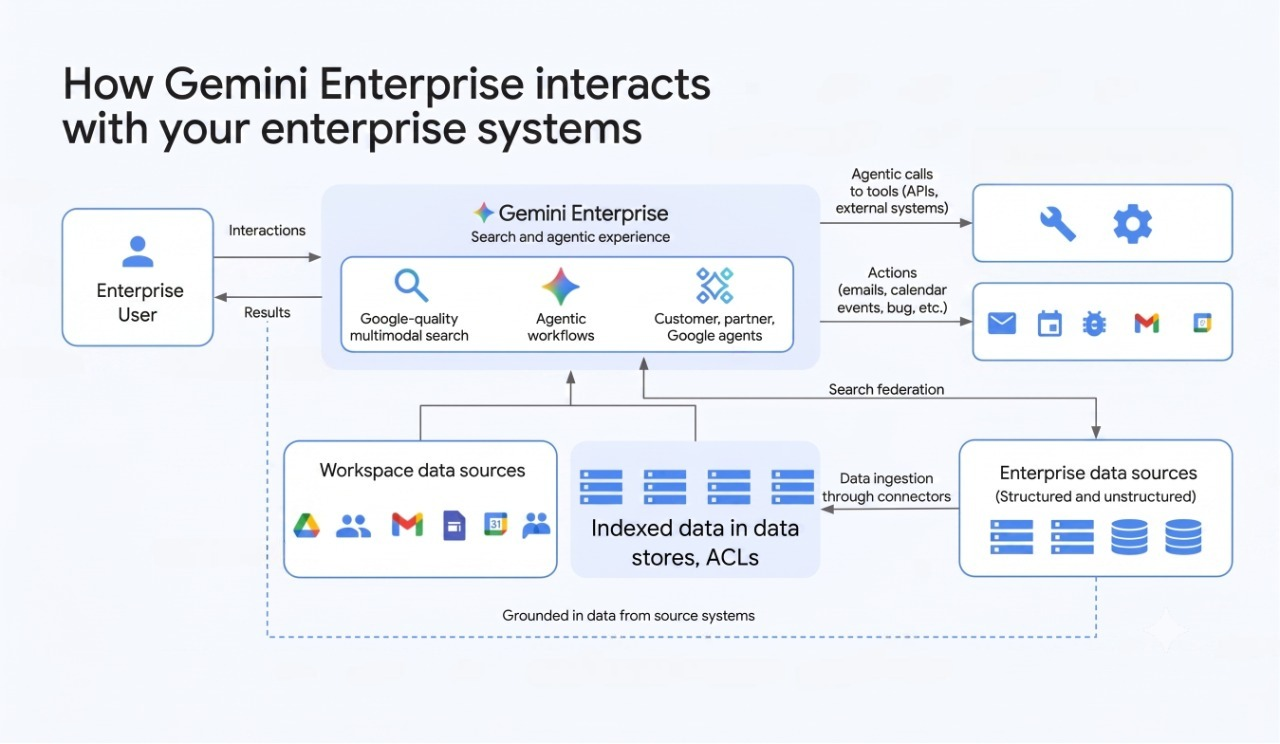
The assistant answering questions is useful. But Gemini Enterprise’s agent layer is what makes it genuinely different from a smarter intranet search.
Prebuilt agents from the Agent Gallery
The Agent Gallery hosts ready-made agents from Google and third parties. Deep Research (Made by Google) runs multi-step research across your connected data and the public web, synthesizing a comprehensive answer. Data Insights (Made by Google) acts as a conversational data analyst — connected to your structured data sources, it can answer quantitative questions without requiring SQL knowledge.
Additional agents can be found in the Google Cloud Marketplace and added to your Gemini Enterprise app.
Build your own agents with no-code Agent Designer
Business, Standard, and Plus editions include access to a no-code agent builder. Admins and authorized users can create custom agents that follow multi-step workflows, integrate with specific data stores, and apply custom logic — without writing code. Published agents are then available to users in the main interface.
Full-code agents for more complex needs
For engineering teams that want to build production-grade agents with custom logic, Gemini Enterprise supports Dialogflow-based agents, Agent Development Kit (ADK) agents, Agent-to-Agent (A2A) agents, and A2UI agents. These agents can be deployed and registered with Gemini Enterprise and made available to users through the same interface — so end users don’t need to know or care that an agent was built externally.
Security and compliance
Enterprise AI platforms handle sensitive data, and Gemini Enterprise takes that seriously.
Identity and access
The platform supports three authentication frameworks: Google Identity (for Google Workspace organizations), Workforce Identity Federation (recommended when connecting third-party data sources, since it supports external identity providers), and Workload Identity Federation (for service-to-service authentication). IAM roles and permissions control who can administer apps, manage data stores, and access analytics.
For apps with custom data sources, external identities can be mapped to Google Cloud identities, so access controls from external systems are respected inside Gemini Enterprise.
Data security
VPC Service Controls are supported, allowing you to define a security perimeter around your Gemini Enterprise project and restrict which services and users can interact with it. This is the standard Google Cloud mechanism for limiting data exfiltration risk.
Data is encrypted by default, and you can bring your own encryption keys using Customer Managed Encryption Keys (CMEK). External Key Manager (EKM) and Hardware Security Module (HSM) integrations are supported for organizations with stricter key management requirements.
For third-party connectors that interact with external APIs, Gemini Enterprise applies granular VPC Firewall rules — restricting outbound connections to only the specific FQDNs of the external systems you’ve configured.
Compliance
Gemini Enterprise provides access transparency logs, audit logging, and compliance certifications across relevant frameworks. Data deletion follows Google Cloud’s standard policies — user-requested data is removed within 60 days. Specific compliance certifications and regional data residency options (Gemini Enterprise locations) are available in the official compliance documentation.
What you need to enable before starting
Getting Gemini Enterprise running requires several Google Cloud APIs to be active in your project: Vertex AI API, the Gemini Enterprise (Discovery Engine) API, Cloud Storage API, and the Identity and Access Management API. After those are enabled, the quickstart process walks through creating your first data store and connecting it to an app.
For organizations already on Google Workspace, the license assignment process happens through the Google Admin console. Gemini Enterprise licenses are assigned per user, and different users can hold different editions — a common setup is Standard for most employees, with Plus for power users who work with large document libraries. If your organization isn’t yet on Google Workspace, getting that in place first is the practical prerequisite before activating Gemini Enterprise.
Editions comparison: how to choose
Rather than a tier-by-tier framework, here’s a practical decision guide.
Choose Business if:
- Your organization has fewer than 300 users and is just starting out with enterprise AI search
- You primarily want grounded search and a conversational assistant within Google data sources
- The full third-party connector ecosystem isn’t a day-one priority
Choose Standard if:
- You want the complete connector ecosystem — Jira, Confluence, SharePoint, Slack, Salesforce, and the rest
- Full-code custom agent development matters
- You want priority access to new Gemini model versions as they release
- Gemini Code Assist is something your engineering team would use
Choose Plus if:
- Your organization has deep indexing needs — large Drive libraries, heavy email volume, or many connected data sources
- The 30 GiB per user limit on Standard would be a constraint
- You want the maximum available storage headroom without hitting limits mid-year
Add Frontline if:
- You have a large population of users who need read access to search results and agents but don’t manage data or build agents
- Frontline is priced as a supplemental license and requires at least 150 Standard or Plus base licenses, so it’s mainly relevant for larger deployments
Frequently asked questions
Is Gemini Enterprise the same as Gemini for Google Workspace? No, these are different products. Gemini for Google Workspace is the AI assistant built directly into apps like Gmail, Docs, and Sheets — the “Help me write” button in Gmail, for example. Gemini Enterprise is a separate cloud platform that builds a searchable knowledge layer across your enterprise data and hosts AI agents. The two products complement each other but address different problems. That said, both sit on top of Google Workspace, as the foundation — so if your team isn’t already using it, that’s the natural starting point before evaluating either product.
Does Gemini Enterprise replace Vertex AI Search? Yes, for enterprise use cases. Vertex AI Search and Conversation has been unified under the Gemini Enterprise platform. If you were using Vertex AI Search for internal enterprise search, Gemini Enterprise is its successor. The underlying technical APIs (still called Discovery Engine in some places) are the same.
Can I connect data sources from outside Google Cloud? Yes. Third-party connectors — Confluence, Jira, Slack, Salesforce, SharePoint, and many more — are a core part of the platform. These connect to external APIs and sync data into Gemini Enterprise data stores. For systems without a prebuilt connector, custom connectors and custom MCP servers let you extend the platform.
What happens if a user doesn’t have permission to access a document in the source system? Gemini Enterprise enforces permissions at the search result level. If a user doesn’t have access to a file in Google Drive, a page in Confluence, or an issue in Jira, that content will not appear in their search results or in the assistant’s answers — even if the content exists in the data store.
Can the assistant take actions, or does it only answer questions? Both. By default, the assistant answers questions and generates content. When assistant actions are enabled for specific connectors (Gmail, Google Calendar, Jira Cloud, Outlook, and ServiceNow in private preview), the assistant can also take actions in those systems — creating calendar events, updating tickets, sending email drafts — on behalf of the user.
How often is the data refreshed? It depends on the connector. Some connectors support real-time or near-real-time sync (using webhooks). Others use scheduled batch imports. The frequency can be configured per data store, and admins can also manually trigger data refreshes.
Is there a way to limit what data gets indexed? Yes. Most connectors support filters at the data store level — by date range, folder, metadata, space type, label, or other criteria specific to that connector. For example, you can configure the Google Drive connector to only index files in specific shared drives, or the Google Chat connector to only index public spaces.
Wrapping up
Gemini Enterprise fills a real gap: most organizations have knowledge spread across dozens of systems, and employees waste meaningful time searching across all of them separately. By connecting those systems, enforcing original access permissions, and adding a conversational AI layer on top, Gemini Enterprise makes that knowledge accessible without replicating or centralizing the data itself.
The agent capabilities push it further — from a better search to something that can actually carry out multi-step tasks on your behalf. For organizations that have moved beyond asking “should we use AI at work?” to “how do we make AI actually useful at scale?”, Gemini Enterprise is where that conversation tends to land.
The right edition depends on your user count, storage needs, and how much of the connector and agent ecosystem matters to you. Business covers the basics for smaller teams. Standard and Plus cover everything for larger ones. Frontline handles read-only access at scale without needing to license every worker at the full tier.
Feature availability and connector support reflect Gemini Enterprise as of June 2026. Google regularly updates this platform — edition features, available connectors, and agent capabilities in particular change frequently. Always verify against the official Google Cloud documentation before making licensing decisions.