RAG on Google Cloud: Choosing Between RAG Engine, Agent Search, Vector Search, and Agent Retrieval
Compare Google Cloud RAG options: Gemini Enterprise, Agent Search, Vertex AI RAG Engine, Vector Search, and Agent Retrieval, and when to use each.

Checked against Google's official documentation, last updated 04 Nov, 2026. See what changed

Retrieval-augmented generation (RAG) is how AI answers from your data: retrieve the right passages, add them to the model’s context, and generate a grounded, cited answer. Google Cloud offers at least five ways to do it, and the names changed in 2026, which makes choosing harder. If you knew Vertex AI RAG Engine, for example, it is now simply RAG Engine.
This guide compares Gemini Enterprise search, Agent Search (formerly Vertex AI Search), RAG Engine, Vector Search, and Agent Retrieval (formerly Vector Search 2.0), explains what each one manages for you, and gives a decision framework with example architectures.
If most of your knowledge lives in Google Workspace, the first option may already cover your needs.
Key Takeaways
- For employees, Gemini Enterprise is RAG you don’t have to build.
- Agent Search gives apps managed, Google-quality retrieval with almost no pipeline work.
- RAG Engine is a managed pipeline with choices of chunking, embeddings, and vector store.
- Vector Search and Agent Retrieval are the raw retrieval engines for platform teams.
- Clean sources, metadata, and evaluation matter more than the product you pick.
Table of contents
Open Table of contents
- The RAG Pipeline in One Minute
- The Options at a Glance
- Gemini Enterprise: RAG You Don’t Build
- Agent Search: Google-Quality Search, Fully Managed
- RAG Engine: A Framework With Choices
- Vector Search: The Vector Database
- Agent Retrieval: Vector Search, Reimagined
- Decision Framework
- Example Architectures
- Common RAG Failure Modes and Fixes
- Getting RAG Quality Right
- Conclusion
The RAG Pipeline in One Minute
Every RAG system does the same six things. The products differ in how many of them they do for you:
- Ingest: pull documents from sources (Cloud Storage, Drive, connectors)
- Transform: parse, OCR, and split into chunks
- Embed: turn chunks into vectors that capture meaning
- Index: store vectors and metadata for fast search
- Retrieve: find the most relevant chunks for a query (and often rerank them)
- Generate: give those chunks to a model to write a grounded answer with citations
The Options at a Glance
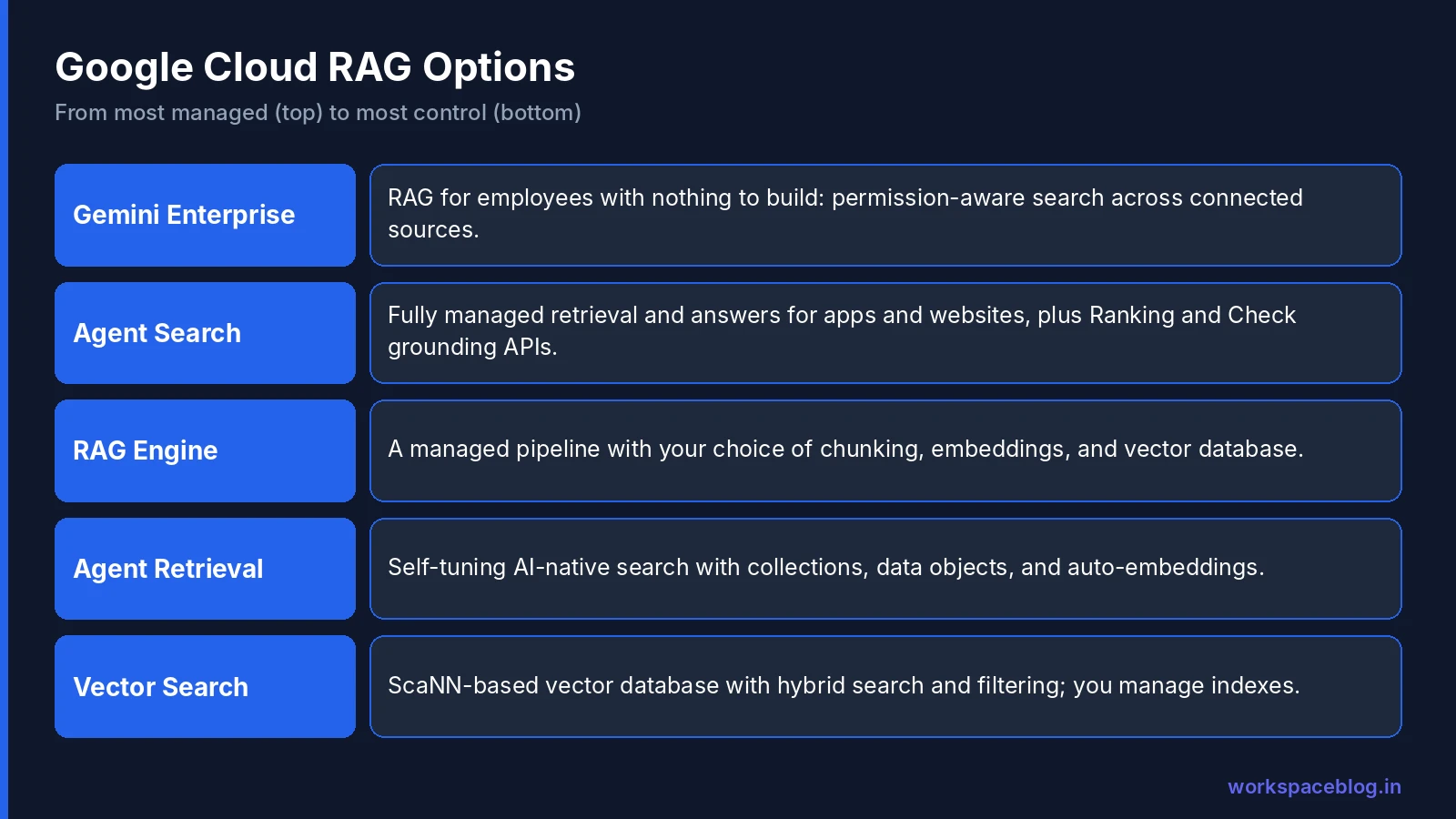
| Product | Formerly | What it is | You manage |
|---|---|---|---|
| Gemini Enterprise | Agentspace | The employee app: permission-aware search, assistant, agents | Connectors and settings |
| Agent Search | Vertex AI Search | Fully managed retrieval and answer generation for apps and websites | Data stores and app configuration |
| RAG Engine | (unchanged) | A RAG data framework on Agent Platform | Pipeline choices: chunking, embeddings, vector store |
| Vector Search | Vertex AI Vector Search | Managed vector database (ScaNN-based) with hybrid search and filtering | Embeddings, indexes, deployments |
| Agent Retrieval | Vector Search 2.0 | Self-tuning AI-native search engine with collections and auto-embeddings | Collections, schemas, data objects |
Gemini Enterprise: RAG You Don’t Build
For employees, Gemini Enterprise already is a RAG system. It connects to Drive, Gmail, SharePoint, Jira, Confluence, ServiceNow, and dozens of other sources, enforces each user’s permissions, and grounds answers with citations, plus Deep Research and notebooks on top. If the goal is “help our people find and use company knowledge,” start here; see our connectors guide.
Build your own RAG only when the experience lives outside Gemini Enterprise: inside your product, a customer-facing chatbot, a custom agent, or an automated pipeline.
Agent Search: Google-Quality Search, Fully Managed
Agent Search is Google’s Search-quality retrieval and answer-generation system on Agent Platform. It’s the fastest way to add RAG to an application.
What it does for you: ETL, OCR, chunking, embedding, indexing, storage, input cleaning, schema adjustment, retrieval, and summarization, configured in a few clicks.
| Feature | Detail |
|---|---|
| Data types | Websites, structured data, unstructured data (one search app per type) |
| Generative features | Multi-turn follow-ups, multimodal queries, summaries above results, citations |
| Connectors | Read-only connectors for apps such as Jira, Confluence, and Salesforce |
| DIY grounding APIs | Document AI Layout Parser, Ranking API, Grounded generation API, Check grounding API |
| Compliance | HIPAA, ISO 27000-series, SOC 1/2/3; VPC Service Controls; CMEK in Preview |
Best for: website search, intranet search inside your own portal, customer support bots, and grounding for apps where you’d rather not tune a pipeline. Agent Studio agents can also use Agent Search as a tool through the Agent Search MCP server.
The Ranking API and Check grounding API are useful even if you build your own pipeline: rerank results from any retriever, and verify that a generated answer is actually supported by sources.
RAG Engine: A Framework With Choices
RAG Engine is a data framework for context-augmented LLM applications on Agent Platform. It runs the full pipeline but lets you choose the pieces.
| Stage | Options |
|---|---|
| Ingestion | Local files, Cloud Storage, Google Drive, and more |
| Transformation | Configurable chunking |
| Embedding | Google embedding models |
| Vector database | RagManagedDb (the default), Vector Search / Agent Retrieval, Pinecone, Feature Store (Preview), Weaviate (Preview), or Agent Platform Search |
| Generation | Gemini models through Agent Platform |
Parsing options
How documents are parsed decides retrieval quality, and RAG Engine offers two optional parsers beyond basic chunking:
| Parser | What it does | Limits and costs |
|---|---|---|
| Document AI layout parser | Extracts text, tables and lists, and keeps each chunk within one layout element such as a heading or list (Google suggests chunk size 1024, overlap 256) | 20 MB per file, 500 pages per PDF; Document AI pricing and quotas apply; files already imported without it must be deleted and re-imported |
| LLM parser | Uses a Gemini model to parse PDFs and images, describe charts and images, and follow a custom parsing prompt | PDF, PNG, JPEG, WebP, HEIC, HEIF; Gemini 3.x parsing models run only in global, us and eu; model usage is billed to your project |
Neither parser supports data residency or Access Transparency controls.
Security: VPC Service Controls and CMEK are supported; Google lists data residency and Access Transparency as not supported for RAG Engine, which matters for regulated workloads. Google lists RAG Engine in 22 regions: only a few are GA (some of those need an allowlist), and most are in Preview.
Cost note: if you use a RAG Engine-managed Spanner instance as the vector database (RagManagedDb in GA locations), you’re billed for that instance.
Best for: developers who want a managed pipeline but need control over chunking, embeddings, or the vector store, including teams standardized on Pinecone or Weaviate.
Vector Search: The Vector Database
Vector Search is a managed vector database built on Google Research’s ScaNN algorithm, used for search, recommendations, and generative AI.
| Feature | Detail |
|---|---|
| Nearest-neighbor search | Fast similarity search at scale |
| Hybrid search | Combine dense (semantic) and sparse (keyword) embeddings |
| Filtering (“restricts”) | Boolean rules on numeric and text attributes |
| Deployment | Private Service Connect (recommended), public endpoint, or VPC peering |
| Pricing | VMs hosting deployed indexes, plus index build and update costs; Google cites minimal setups under $100 per month |
Best for: teams that want full control over embeddings and indexes (large-scale semantic search, recommendations, ad serving) or a custom RAG stack.
Gotchas: heavy filtering increases memory use, and dataset size and restricts drive the number of shards, so test with realistic data before sizing.
Agent Retrieval: Vector Search, Reimagined
Agent Retrieval (formerly Vector Search 2.0) is described as a “self-tuning, fully managed, AI-native search engine”: a storage and retrieval system, not just an index.
| Concept | Meaning |
|---|---|
| Collection | A container of related JSON objects, like a table |
| Data Object | One JSON record |
| Schema | Strict or relaxed structure for data objects |
| Collection Index | Enables approximate nearest-neighbor search; several per collection |
| Auto-embeddings | Built-in models populate embedding fields for you |
| BYOE | Bring your own embeddings if you prefer |
The big change from Vector Search 1.0: you work with collections of data objects instead of managing indexes as the primary resource, and the system tunes itself. No separate store needed for the payload. Pricing has usage-based and resource-based options.
Regions include asia-east1, asia-northeast1, asia-southeast1, europe-north1, europe-west2, europe-west4, us-central1, us-east4, and us-west1.
Best for: new vector-search projects that want less infrastructure tuning and simpler data modeling.
Decision Framework
| If you need… | Choose |
|---|---|
| Employees searching company knowledge | Gemini Enterprise |
| RAG in your app with minimal engineering | Agent Search |
| Website search with generative answers | Agent Search |
| A managed pipeline with control over chunking and vector store | RAG Engine |
| Your existing Pinecone or Weaviate investment | RAG Engine |
| Full control of embeddings, hybrid search, massive scale | Vector Search |
| A modern, self-tuning vector store with auto-embeddings | Agent Retrieval |
| Better relevance from any retriever | Add the Ranking API |
| Proof an answer is supported by sources | Add the Check grounding API |
Questions that settle it
- Who’s the user? Employees → Gemini Enterprise. Customers or an app → the others.
- How much engineering capacity do you have? Little → Agent Search. Some → RAG Engine. A platform team → Vector Search or Agent Retrieval.
- Do you need data residency or Access Transparency? Check each product: RAG Engine lists them as unsupported.
- Where does the data live? Connectors favor Agent Search and Gemini Enterprise; data already in BigQuery or Cloud Storage works everywhere.
Example Architectures
Customer support assistant
Agent Search over help-center articles and product manuals → Gemini model generates the answer → Check grounding API verifies support → answer shown with citations.
Contract analysis agent
Agent Runtime agent built with ADK → RAG Engine with a contract corpus and custom chunking by clause → Pro-class model for analysis → results written back to a review queue.
Product search with recommendations
Vector Search with hybrid embeddings and filters for price, stock, and region → Ranking API for final ordering.
New internal knowledge app
Agent Retrieval collections with auto-embeddings → ADK agent → published to employees through Gemini Enterprise.
Common RAG Failure Modes and Fixes
| Symptom | Usual cause | Fix |
|---|---|---|
| Answers cite the wrong document version | Old and new versions both indexed | Remove outdated content; add version or date metadata and filter on it |
| ”I couldn’t find that” for questions you know are covered | Chunks split the answer from its heading; poor OCR | Re-chunk by section; check parsing with the Layout Parser |
| Correct document, wrong passage | Retriever returns too few candidates | Retrieve more, then rerank with the Ranking API |
| Users see content they shouldn’t | Access control not applied at retrieval | Use ACL-aware data stores; never filter permissions only in the UI |
| Confident answers with no support | Model fills gaps when retrieval is weak | Require citations; use the Check grounding API; tell the model to say when it doesn’t know |
| Good in testing, poor in production | Test questions don’t match real ones | Build the evaluation set from real user queries |
| Slow responses | Too many chunks in context; large model for every query | Fewer, better chunks; smaller model for simple questions |
| Stale answers | Ingestion runs rarely | Schedule re-ingestion or streaming updates |
Most of these are data problems, not model problems, which is why switching products rarely fixes a weak RAG system on its own.
Getting RAG Quality Right
Whatever you choose, the same practices decide quality:
- Clean sources: remove duplicates and outdated versions before indexing
- Sensible chunking: chunks that keep headings and context together
- Metadata: dates, owners, product, region, and access groups for filtering
- Permissions: enforce access at retrieval time (Gemini Enterprise and Agent Search support ACLs)
- Reranking: retrieve more candidates, then rerank
- Evaluation: a test set of real questions with expected sources; measure retrieval and answer quality separately
- Freshness: schedule re-ingestion or streaming updates
- Grounding checks: verify answers against sources for high-stakes uses
Conclusion
Google Cloud’s RAG options line up along one axis: how much the product does for you. Gemini Enterprise gives employees RAG with no building. Agent Search gives apps Google-quality retrieval with almost no pipeline work. RAG Engine offers a managed pipeline with choices. Vector Search and Agent Retrieval give platform teams the raw retrieval engine, with Agent Retrieval removing much of the tuning.
Pick based on the user, your engineering capacity, and compliance needs, and invest in clean sources, metadata, and evaluation, because those matter more than the product. If your knowledge lives in Google Workspace, start with Gemini Enterprise for employees, and add a custom RAG stack only where an application truly needs one.
Official Google documentation:
- RAG Engine overview
- Use Document AI layout parser with RAG Engine
- Use the LLM parser
- Vector Search overview
- Agent Retrieval (formerly Vector Search 2.0)
- Agent Search on Gemini Enterprise Agent Platform
Related reading:
- Gemini Enterprise Connectors and Data Stores: RAG for employees without building it.
- Model Garden: Choosing Gemini, Claude, Gemma, and Open Models: pick the generation model.
- Vertex AI Is Now Gemini Enterprise Agent Platform: the 2026 name changes.
This guide contains referral or affiliate links. If you sign up through one, Workspace Blog may earn a commission at no extra cost to you. Read our referral and advertising disclosure.
Frequently Asked Questions
- What is RAG and why does it matter?
- Retrieval-augmented generation (RAG) retrieves relevant information from your own data and adds it to a model's context before it answers. It grounds answers in your documents, reduces hallucinations, keeps responses current without retraining a model, and lets you cite sources.
- What is the difference between RAG Engine and Agent Search?
- Agent Search (formerly Vertex AI Search) is a fully managed, Google Search-quality retrieval and answer system that handles ETL, OCR, chunking, embedding, indexing, retrieval, and summarization for you, with connectors and grounding APIs. RAG Engine is a data framework on Agent Platform that gives developers more control over each pipeline stage (ingestion, chunking, embedding, and the choice of vector database) for custom RAG applications.
- Which vector databases can RAG Engine use?
- Google's documentation lists RagManagedDb, Agent Platform Vector Search (including Vector Search 2.0, now Agent Retrieval), Feature Store, Weaviate, Pinecone, and Agent Platform Search as vector database options for RAG Engine.
- What is Agent Retrieval?
- Agent Retrieval, formerly Vector Search 2.0, is a self-tuning, fully managed, AI-native search engine. Instead of managing indexes as the primary resource, you store JSON data objects in collections with a schema, can generate embeddings automatically with built-in models or bring your own, and filter by vector similarity and payload data.
- Do I need to build RAG if I have Gemini Enterprise?
- Often not. Gemini Enterprise already provides permission-aware search and grounded answers across connected data stores like Drive, SharePoint, Jira, and Confluence for employees. Build with Agent Search, RAG Engine, or Vector Search when you need RAG inside your own application, agent, or customer-facing product.