Gemini Enterprise Rollout Plan: A 90-Day Deployment Guide for IT Leaders
A practical 90-day Gemini Enterprise rollout plan: readiness, security setup, pilot, success metrics, training, governance, and scaling.

Checked against Google's official documentation, last updated 04 Nov, 2026. See what changed

Licensing Gemini Enterprise is the easy part. The hard part is the 90 days after: getting data connected safely, picking the right people for a pilot, proving value with numbers, training users, and scaling without creating a mess of over-shared documents and orphaned agents.
This guide is a practical, week-by-week plan for IT leaders. It pulls together the security, connector, billing, and agent topics from this series into one program you can adapt. If your organization runs Google Workspace, you’re starting with a big advantage: identity, Drive, Gmail, and Calendar are already in place.
Key Takeaways
- Run the rollout as a change program: prepare (weeks 1–4), pilot (5–8), scale (9–13).
- Clean up over-shared content before connecting any data source.
- Set measurable pilot targets so the expansion decision uses numbers.
- Give pilot teams three real tasks each, plus champions and short training.
- Scale in waves with agent ownership rules and monthly governance reviews.
Table of contents
Open Table of contents
- The Gemini Enterprise Rollout Plan at a Glance
- Phase 0: Decide (Before Day 1)
- Phase 1: Prepare (Weeks 1–4)
- Phase 2: Pilot (Weeks 5–8)
- Phase 3: Scale (Weeks 9–13)
- Pilot Use Cases by Department
- Training Plan by Role
- Communication Plan
- Risks and How to Handle Them
- After Day 90
- Your First-Week Checklist
- Conclusion
The Gemini Enterprise Rollout Plan at a Glance
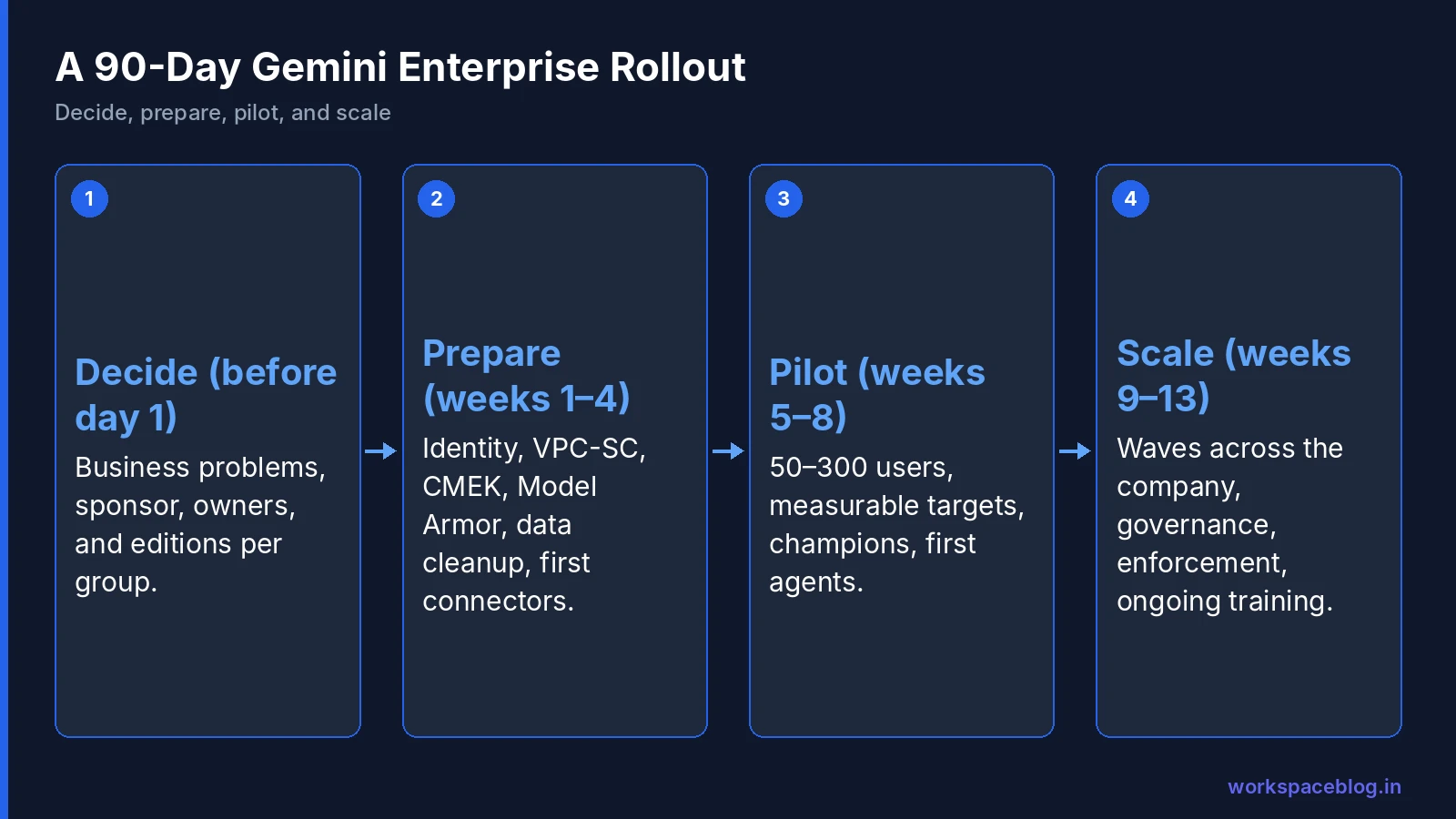
| Phase | Weeks | Goal |
|---|---|---|
| 0. Decide | Before day 1 | Business goals, sponsor, budget, editions |
| 1. Prepare | 1–4 | Identity, security controls, data cleanup, connectors |
| 2. Pilot | 5–8 | 50–300 users, measured outcomes |
| 3. Scale | 9–13 | Waves across the company, agents, governance |
Phase 0: Decide (Before Day 1)
Name the problems you’re solving
“Roll out AI” isn’t a goal. Pick three to five measurable problems:
- Support agents spend 20 minutes per ticket searching for answers
- Sales reps take two hours preparing for each account meeting
- New hires take six weeks to become productive
- Analysts spend days on competitor research
Appoint owners
| Role | Responsibility |
|---|---|
| Executive sponsor | Sets priorities, removes blockers |
| Program lead | Runs the plan |
| Platform admin | Gemini Enterprise and Google Cloud configuration |
| Security and privacy | Controls, compliance, data classification |
| Data owners | Clean up and approve each source |
| Change and training lead | Communication, training, champions |
Choose editions per group
| Group | Typical edition |
|---|---|
| Knowledge workers | Standard |
| Power users, agent builders, analysts | Plus |
| Frontline staff (needs 150+ Standard or Plus users) | Frontline |
| Pilots and unpredictable usage | Pay-as-you-go |
See our billing guide for quotas, overages, and spend limits. Google also offers a 30-day Gemini Enterprise Plus trial. Our Gemini Enterprise add-on guide explains what each edition adds for Workspace users.
Phase 1: Prepare (Weeks 1–4)
Week 1: Foundations
- Google Cloud project structure: separate projects for production, pilot, and agent development
- Location decision: global,
us,eu, or in-country. See our data residency guide - Identity: Google identity (Workspace or Cloud Identity) or workforce identity federation for Entra ID or Okta
- Admin roles: least-privilege Gemini Enterprise admin assignments
Subscriptions and licenses. Create the subscription in the Google Cloud console under Manage subscriptions, choosing the billing account, number of licenses, project and location type. Licenses are tied to one project and one location: a user who needs both the US multi-region and global needs two licenses. Then assign them on the Manage users page:
- Manual: add pilot users by email address, which keeps the pilot to the people you chose
- Automatic: turn on Assign licenses automatically and each user without a license gets one from the selected subscription at first sign-in. Leave this off until the scale phase, or the pilot pool runs out
- Roles: assigning licenses needs Gemini Enterprise Admin, managing the subscription needs Billing Account Administrator and Service Usage Consumer, and every licensed user needs at least Gemini Enterprise User
Week 2: Security controls
The order matters:
- VPC Service Controls perimeter (dry run, then enforce): before creating data stores
- CMEK keys registered: before creating apps and data stores
- Model Armor templates in Inspect only mode (Model Armor guide)
- Cloud Logging and audit log export to your SIEM
- Budgets with alerts at 50/80/100% and a spend limit
Week 3: Data cleanup
This is the most important week of the program. Gemini Enterprise is permission-aware, so it surfaces exactly what people can already access, including everything that’s over-shared.
- Find files and folders shared with the whole organization or “anyone with the link”
- Review SharePoint sites shared with “Everyone except external users”
- Archive or delete outdated content (old policies, superseded price lists)
- Assign an owner to each major shared drive and site
Our Shared Drives guide and Google Workspace data loss prevention (DLP) guide help with the Workspace side.
Week 4: Connectors
- Start with Google Drive, Gmail, and Calendar, plus one or two high-value third-party sources (for example Confluence and Jira for IT, Salesforce or HubSpot for sales)
- Choose federated vs. ingested per source (connectors guide)
- Schedule identity syncs frequently; full syncs at least daily for sensitive sources
- Set up Cloud Monitoring alerts on connector failures
- Test permissions with accounts from different groups before any user sees results
Phase 2: Pilot (Weeks 5–8)
Choose pilot users
- 50–300 users from three to five teams with repeatable knowledge work
- Include managers who’ll sponsor adoption and a few skeptics
- Make sure every pilot team’s key data source is connected
Set targets before you start
| Metric | Example target |
|---|---|
| Weekly active users | 70% of pilot users by week 4 |
| Queries per active user per week | 15+ |
| Time saved on named tasks | 20% reduction (measured) |
| Answer accuracy (spot checks) | 85%+ correct with valid citations |
| User satisfaction | 4 out of 5 |
| Cost | Within budget; no unplanned overages |
Week 5: Launch
- 45-minute kickoff per team with real examples from their own work
- A one-page “how to ask good questions” guide
- A Chat space for questions and sharing wins
- Champions named in each team (one per 15–25 users)
Weeks 6–7: Build habits and first agents
- Weekly tips: one feature per week (search, Deep Research, notebooks, Workflow Builder)
- Each team builds one agent or workflow for a real process: an inbox triage workflow or a policy Q&A agent (Workflow Builder guide)
- Office hours twice a week
Week 8: Measure and decide
- Survey users and measure time on named tasks
- Review usage dashboards, Model Armor detections, connector health, and costs
- Collect the top 10 user complaints and fix what you can
- Go/no-go decision for scaling, with numbers
Phase 3: Scale (Weeks 9–13)
Roll out in waves
| Wave | Who | Size |
|---|---|---|
| 1 | Remaining members of pilot departments | ~20% of company |
| 2 | Departments with high knowledge-work intensity | ~40% |
| 3 | Everyone else | ~40% |
Before each wave, connect the data sources that wave needs and run a permissions check.
Governance that scales
- Agent rules: who can create and share agents, a named owner for every agent, approval for agents that change data
- Agent Registry for shared agents and MCP servers (agent security guide)
- Monthly AI governance review: usage, costs, incidents, new connector requests
- Offboarding: transfer agent ownership when people leave
Switch protections to enforce
- Model Armor from Inspect only to Inspect and block
- Overages: decide per edition with spend limits in place
- Retire pilot-only exceptions
Keep training going
- Role-based learning paths (sales, support, managers, builders)
- A monthly “show and tell” of agents and workflows
- An internal prompt library maintained by champions
Pilot Use Cases by Department
Give each pilot team three concrete tasks to try in week one. Generic “try asking it something” launches stall.
| Department | Task 1 | Task 2 | Task 3 |
|---|---|---|---|
| Sales | Account briefing before a meeting | Draft a follow-up email from call notes | Compare our offer with a competitor’s public pricing |
| Customer support | Find the fix for a ticket from past cases and docs | Draft a reply in the right tone | Summarize a long ticket thread for escalation |
| IT | Search runbooks and Jira for a known issue | Build an inbox-triage workflow | Draft a change notice for users |
| HR | Answer policy questions from the handbook | Draft a job description from a template | Summarize engagement survey comments |
| Finance | Explain a variance using internal reports | Research a vendor before onboarding | Draft month-end commentary |
| Marketing | Deep Research on a market segment | Turn a product doc into campaign copy | Create a notebook with brand guidelines |
Ask each team to record minutes spent before and after for at least one task. Those numbers make the week-8 decision easy.
Training Plan by Role
| Audience | Format | Content |
|---|---|---|
| All users | 45-minute live session + recording | Asking good questions, checking citations, what not to share, where to get help |
| Managers | 30-minute briefing | Leading by example, team use cases, what to measure |
| Champions | Two-hour workshop | Advanced prompts, Deep Research, notebooks, Workflow Builder, answering colleagues’ questions |
| Agent builders | Half-day workshop | Workflow Builder or Agent Studio, connectors and actions, approval steps, ownership rules |
| Admins and support desk | Half-day technical session | Connectors, sync health, permissions troubleshooting, quotas, usage dashboards |
| Security team | Technical briefing | Model Armor, audit logs, VPC-SC, agent identities, incident playbooks |
Keep sessions short and specific. The best training uses examples from the audience’s own documents and processes.
Communication Plan
| When | Message | Channel |
|---|---|---|
| Two weeks before pilot | Why we’re doing this; who’s in the pilot | Sponsor email; team meetings |
| Pilot launch | How to get started; three tasks to try | Kickoff sessions; Chat space |
| Weekly during pilot | One tip and one success story | Chat space; short email |
| End of pilot | Results in numbers; what happens next | Sponsor update |
| Before each wave | What’s coming; training dates; data that will be searchable | Department leads; intranet |
| Monthly after rollout | New features, new agents, usage highlights | Newsletter; show-and-tell session |
Be explicit about privacy: tell users that results respect existing permissions, what data is connected, and how AI activity is logged. Clear answers up front prevent rumors later.
Risks and How to Handle Them
| Risk | Mitigation |
|---|---|
| Sensitive content surfaces in answers | Week 3 cleanup; permission tests; DLP; Model Armor |
| Low adoption after launch | Real examples, champions, weekly tips, manager sponsorship |
| Poor answer quality | Connect the right sources; remove outdated content; check sync health |
| Cost overruns | Spend limits, budget alerts, overages off until patterns are known |
| Agent sprawl | Ownership rules, registry, quarterly review |
| Connector failures go unnoticed | Monitoring alerts and a weekly health check |
| Compliance objections late in the project | Involve security and legal in Phase 0 |
After Day 90
The end of the plan is the start of operations. Hand over to a small AI platform team with a monthly rhythm: review usage and costs, approve new connectors and shared agents, retire what nobody uses, and publish a short update on new features and wins. Revisit your original business problems every quarter and measure them again. That’s how the program keeps its funding.
Your First-Week Checklist
- Executive sponsor and program lead named
- Three to five measurable business problems agreed
- Editions chosen per group; trial or pilot licenses ready
- Location and compliance requirements documented
- Google Cloud projects created (prod, pilot, dev)
- Security and privacy reviewers engaged
- Data owners identified for each planned source
- Pilot teams shortlisted
Conclusion
A successful Gemini Enterprise rollout looks less like a software install and more like a change program: decide what problems you’re solving, set up security in the right order, clean up permissions before connecting data, pilot with measurable targets, then scale in waves with governance and ongoing training.
Follow the 90-day structure, adapt the timings to your organization, and make the expansion decision with numbers. With identity and data already in Google Workspace, most of the groundwork is done: the rest is preparation, people, and patience.
Official Google documentation:
- Gemini Enterprise product page
- Compare editions of Gemini Enterprise
- Get subscriptions and assign licenses
- Introduction to connectors and data stores
- Secure your app with VPC Service Controls
Related reading:
- Gemini Enterprise Connectors and Data Stores: the data foundation of your rollout.
- Gemini Enterprise Data Residency, VPC-SC, and CMEK: security setup in the right order.
- Gemini Enterprise Workflow Builder Guide: first agents and workflows for pilot teams.
This guide contains referral or affiliate links. If you sign up through one, Workspace Blog may earn a commission at no extra cost to you. Read our referral and advertising disclosure.
Frequently Asked Questions
- How long does a Gemini Enterprise rollout take?
- A well-run rollout for a mid-sized organization typically takes about 90 days: roughly four weeks to prepare data, identity, and security controls, four weeks for a pilot with a few hundred users, and four to five weeks to scale in waves. Large or regulated organizations often take longer because of data cleanup, compliance reviews, and connector work.
- What should we do before buying Gemini Enterprise licenses?
- Clarify the business problems you want to solve, inventory data sources and their sharing hygiene, decide on location and compliance needs, pick editions per user group, and run a small pilot: Google offers a 30-day Gemini Enterprise Plus trial without contacting sales. Fixing over-shared content before connecting it is the single most important preparation step.
- Which users should be in the Gemini Enterprise pilot?
- Pick 50 to 300 users from three to five teams with clear, repeatable knowledge work (for example sales, support, IT, finance, and HR) including managers who will sponsor adoption and a few skeptics who will give honest feedback. Make sure the data sources those teams need are connected before the pilot starts.
- How do we measure Gemini Enterprise success?
- Track adoption (weekly active users, queries per user, agent and Deep Research use), productivity (time saved on named tasks, measured by before-and-after surveys or task timing), quality (answer accuracy and citation checks), and cost (licenses, overages, and storage). Set targets before the pilot so the expansion decision is based on evidence.
- What are the most common Gemini Enterprise rollout mistakes?
- Connecting data sources before fixing over-sharing, launching company-wide without a pilot, giving no training beyond a launch email, ignoring connector sync failures, enabling overages without spend limits, and letting anyone build and share agents without ownership rules.