Agent Runtime on Gemini Enterprise Agent Platform: How to Deploy, Scale, and Operate AI Agents in Production
-
 Mohit
Mohit - 24 Oct, 2026
- Updated 27 Oct, 2026

Building an agent that works on a laptop is the easy part. Running it for thousands of users (with versioning, rollbacks, memory, security controls, and monitoring) is where most agent projects stall. Agent Runtime (formerly Vertex AI Agent Engine) is Google’s managed answer to that problem.
Agent Runtime is part of Gemini Enterprise Agent Platform (formerly Vertex AI) and was called Vertex AI Agent Engine until April 2026. This guide covers what it provides, the five ways to deploy, revisions and traffic splitting, sessions and memory, security, observability, and a production checklist.
If you haven’t built an agent yet, start with our ADK tutorial or Agent Studio guide, then come back here to ship it.
It’s the runtime behind many agents that employees use through Gemini Enterprise and Google Workspace.
Key Takeaways
- Agent Runtime (formerly Agent Engine) runs agents for up to seven days with sub-second cold starts.
- Five deployment methods cover notebooks, Git, source files, Dockerfiles, and container images.
- Revisions and traffic splitting enable canary rollouts (Preview).
- Enable Agent Identity, Private Service Connect, and VPC-SC for production.
- Alert on error rate, latency, tool failures, and cost.
Table of contents
Open Table of contents
What Agent Runtime Provides
Google describes Agent Runtime as a fully managed environment for deploying and scaling agents without managing infrastructure. Its main capabilities:
| Capability | What it gives you |
|---|---|
| Fast, scalable runtime | Sub-second cold starts; scales with demand |
| Long-running agents | Operations of up to 7 days for multi-day asynchronous tasks |
| Revisions and traffic management | Immutable versions and percentage-based traffic splits (Preview) |
| Sessions | Conversation state within an interaction, with custom session IDs |
| Memory Bank | Long-term memories that persist across sessions |
| Code Execution and Sandbox | Run model-generated code and computer-use tasks in isolation |
| Bidirectional streaming | Real-time audio and video interactions |
| A2A agents | Publish agents other agents can call over Agent2Agent |
| Agent Gateway routing | Send agent traffic through a policy enforcement point |
| Terraform | Provision agents as infrastructure-as-code |
Supported frameworks
ADK, Agent2Agent, LangChain, LangGraph, AG2, LlamaIndex, and custom agents. With container-based deployment, any language works.
The Five Deployment Methods
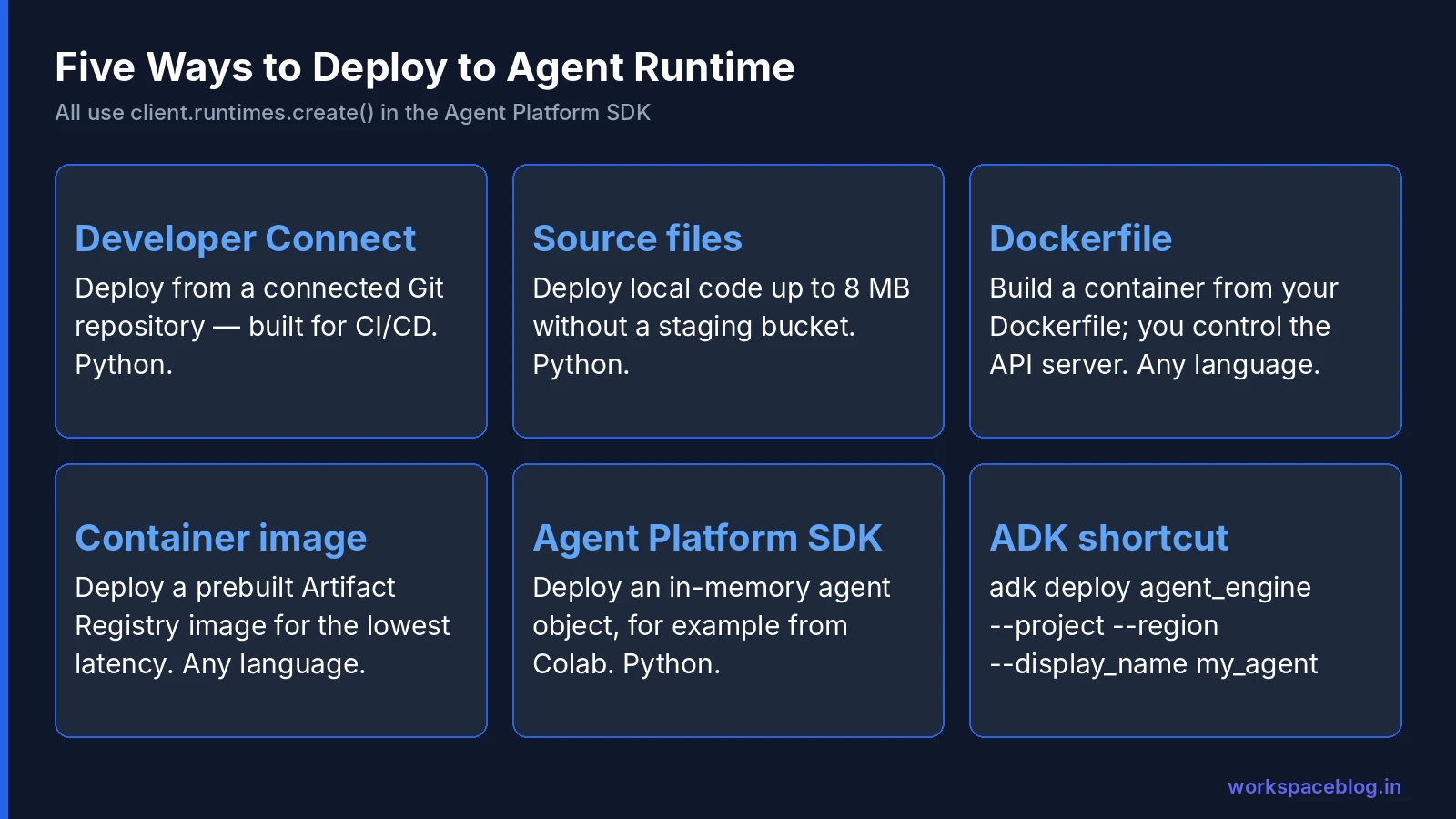
| Method | Best for | Languages | Key requirement |
|---|---|---|---|
| 1. Developer Connect | Git-based CI/CD | Python | A Developer Connect repository link |
| 2. Source files | CI/CD and Terraform without a staging bucket | Python | requirements.txt; total source ≤ 8 MB |
| 3. Dockerfile | Control over the API server | Any | Container follows the runtime contract |
| 4. Container image | Lowest deployment latency, full build control | Any | Image in Artifact Registry; SDK google-cloud-aiplatform>=1.144 |
| 5. Agent Platform SDK | Interactive work in notebooks such as Colab | Python | A serializable in-memory agent object |
The SDK uses client.runtimes.create() for all five. A few examples from Google’s documentation:
From a Git repository (Developer Connect):
remote_agent = client.runtimes.create(
    config={
        "developer_connect_source": {
            "git_repository_link": "projects/PROJECT_ID/locations/LOCATION/connections/CONNECTION_ID/gitRepositoryLinks/REPO_ID",
            "revision": "main",
            "dir": "path/to/dir",
        },
        "entrypoint_module": "agent",
        "entrypoint_object": "root_agent",
    },
)
From a prebuilt container:
remote_agent = client.runtimes.create(
    config={
        "container_spec": {
            "image_uri": "us-central1-docker.pkg.dev/my-project/my-repo/my-image:tag",
        },
        "display_name": "Container image agent",
    },
)
The returned object is an AgentRuntime, and the underlying API resource is still a reasoningEngines resource: one of several places where pre-rename names live on in the API.
ADK shortcut: ADK users can skip the SDK and run adk deploy agent_engine --project=... --region=... --display_name="..." my_agent.
Which method should you choose?
- Prototyping in a notebook → Agent Platform SDK
- Python agents with CI/CD → Developer Connect or source files
- Non-Python agents or custom servers → Dockerfile or container image
- Strict change control → container image, built and scanned in your pipeline, then deployed by tag
Revisions and Traffic Splitting
Every time you create an agent or change its versioned fields, Agent Runtime creates an immutable revision. This feature is in Preview (v1beta1 API).
| Concept | Meaning |
|---|---|
| Active revision | Can serve queries (but may receive 0% traffic) |
| Archived revision | Permanently retired; can’t be restored |
| Manual split | Whole-number percentages across active revisions, totaling 100 |
| Always latest | Each new revision automatically gets all traffic |
A safe rollout
- Deploy the new revision
- Send 10% of traffic to it and 90% to the current revision
- Watch errors, latency, evaluation scores, and cost for a day
- Move to 50%, then 100%
- If something goes wrong, shift traffic back to the previous active revision
In the console: Govern → Deployments → your agent → Revisions → Manage traffic. In the SDK, call client.runtimes.update() with a traffic_config.
Limits and gotchas
- Up to 950 revisions per agent and 6,000 per project per region (not adjustable)
- Automatic cleanup removes old revisions only if they’re active with 0% traffic
- Queries sent directly to a specific revision bypass traffic rules: useful for testing
- Changing the Agent Gateway binding archives all existing revisions, and requires all traffic on the latest revision first. Plan gateway changes as a deliberate cutover.
Sessions and Memory
Agents need two kinds of memory:
| Sessions | Memory Bank | |
|---|---|---|
| Scope | One interaction | Across sessions |
| Stores | Conversation history and state | Curated long-term memories: preferences, decisions, account history |
| Example | The steps of today’s support chat | ”This customer prefers email and is on the Enterprise plan” |
Custom session IDs let you map sessions to records in your CRM or database. Memory Bank can extract memories using structured schemas you define, and Memory Profiles give low-latency recall. We’ll cover Memory Bank in depth later in this series.
Billing note: since September 1, 2026, session and Memory Bank compute is metered on the Agent Platform compute SKU, and Memory Bank embedding SKUs changed. Watch for these line items.
Security and Compliance
Google lists these enterprise controls for Agent Runtime:
| Control | Supported |
|---|---|
| VPC Service Controls | Yes |
| Customer-managed encryption keys (CMEK) | Yes |
| Data residency at rest | Yes |
| HIPAA | Yes |
| Access Transparency | Yes |
| Access Approval | Yes |
Plus:
- Agent Identity: each agent gets its own IAM principal, so you grant permissions to the agent rather than to a shared service account, and audit logs show exactly which agent acted
- Private Service Connect interfaces: connect agents to your VPC and control their internet access
- Agent Gateway: route traffic through a central policy point with Model Armor protection
- Secrets: store keys in Secret Manager; when you pass secrets as environment variables with an agent identity, grant
roles/secretmanager.secretAccessorto the Agent Platform Service Agent, which reads the secret values during deployment
Least privilege in practice: if an agent only reads one BigQuery dataset and writes to one Cloud Storage bucket, its identity should have exactly those two permissions. Nothing at project level.
Observability
Agent Runtime integrates with Google Cloud’s operations tools:
- Cloud Trace: trace query response times and each operation inside an agent run
- Cloud Logging: agent and framework logs
- Metrics and alerts: built-in metrics, custom metrics, and alerting
- ADK telemetry metrics: available for ADK 2.6.0 and later (added August 2026)
On top of this, Agent Platform’s Agent Observability provides turnkey dashboards and execution traces, and Agent evaluation can score live traffic for quality drift.
What to alert on
| Signal | Why |
|---|---|
| Error rate per revision | Catch a bad rollout quickly |
| P95 latency | Users abandon slow agents |
| Tool-call failures | Broken integrations look like “the AI is wrong” |
| Tokens and cost per day | Runaway loops show up here first |
| Long-running operations past expected duration | Stuck multi-day jobs |
Cost Control
Agent Runtime is a paid service. You pay for the runtime resources your agents use, model tokens, and (since September 2026) session and Memory Bank compute. To keep costs predictable:
- One project per agent or team, with a Cloud Billing budget and spend cap
- Right-size models: route simple steps to faster, cheaper models
- Cap long-running jobs: set your own time and step limits, even though the platform allows up to seven days
- Clean up: delete unused agents and archived revisions’ dependencies
For how Gemini Enterprise and Agent Platform charges appear on invoices, see our billing guide.
Agent Runtime vs. Cloud Run vs. GKE
ADK agents can also run on Cloud Run or Google Kubernetes Engine. When is the managed runtime worth it?
| Agent Runtime | Cloud Run | GKE | |
|---|---|---|---|
| What you manage | Agent code only | Container and service config | Cluster, nodes, networking |
| Sessions and Memory Bank | Built in | Build or wire up yourself | Build or wire up yourself |
| Revisions and traffic split | Agent-aware (Preview) | Service revisions | Your deployment tooling |
| Long-running agent tasks | Up to 7 days | Request and job time limits apply | Whatever you design |
| Agent Identity and Gateway | Native | Via service accounts and your own controls | Via workload identity and your own controls |
| Best for | Most agent workloads | Agents inside existing web services | Teams with Kubernetes platforms and special hardware needs |
For most teams, Agent Runtime is the default: it removes the plumbing (state, memory, identity, gateway routing) that otherwise takes weeks to build. Cloud Run makes sense when the agent is one endpoint inside a larger service you already run there. GKE fits organizations that standardize everything on Kubernetes or need fine control over hardware and networking.
Production Readiness Checklist
| Area | Ready when… |
|---|---|
| Code | In Git, reviewed, deployed by pipeline (Developer Connect, source files, or container) |
| Identity | Agent Identity with least-privilege roles; no developer credentials |
| Secrets | In Secret Manager, accessed by the agent identity |
| Network | Private Service Connect where internal systems are involved; controlled internet egress |
| Gateway | Traffic routed through Agent Gateway with Model Armor |
| Perimeter | VPC Service Controls for sensitive data |
| Evaluation | Test set passes; online evaluation monitors configured |
| Rollout | Revision-based canary plan; rollback steps documented |
| Monitoring | Alerts on errors, latency, tool failures, and cost |
| Budget | Spend cap and alerts on the project |
| Ownership | Named owner and on-call contact |
Publishing to Employees
Agents on Agent Runtime can be registered in Agent Registry and made available to employees through the Gemini Enterprise app, where people already search company data and use the Gemini agent. Your own full-code agents require the Standard, Plus, Pay-as-you-go, or Frontline (provisioned agents) editions.
Conclusion
Agent Runtime turns an agent from a demo into a service: five deployment paths to fit your pipeline, immutable revisions with traffic splitting for safe rollouts, sessions and Memory Bank for context, long-running jobs of up to seven days, and the security controls regulated teams expect. The API still speaks in reasoningEngines and the ADK command still says agent_engine, but the platform behind them has grown up considerably.
Treat agents like any other production service (pipelines, least privilege, canaries, alerts, and budgets) and they’ll be ready to serve the people across your organization, including teams working in Google Workspace through Gemini Enterprise.
Official Google documentation:
- Scale agents with Agent Runtime
- Deploy an agent
- Manage revisions and traffic
- Agent Platform release notes
Related reading:
- Google Agent Development Kit (ADK) Tutorial: build the agent you deploy here.
- Agent Studio: Build AI Agents Visually: design and deploy from the console.
- Vertex AI Is Now Gemini Enterprise Agent Platform: why Agent Engine became Agent Runtime.
This guide contains referral or affiliate links. If you sign up through one, Workspace Blog may earn a commission at no extra cost to you. Learn more.
Frequently Asked Questions
- What is Agent Runtime?
- Agent Runtime is the fully managed environment on Gemini Enterprise Agent Platform for deploying and scaling AI agents without managing infrastructure. It was called Vertex AI Agent Engine before April 2026. It provides sub-second cold starts, long-running agents that can run for up to seven days, sessions, Memory Bank, code execution and sandboxing, bidirectional streaming, A2A support, and built-in observability.
- Which agent frameworks can run on Agent Runtime?
- Google lists the Agent Development Kit (ADK), Agent2Agent (A2A), LangChain, LangGraph, AG2, LlamaIndex, and custom agents. With the Dockerfile or container image deployment methods you can run agents written in any language, as long as the container follows Agent Runtime's runtime contract.
- What are the ways to deploy an agent to Agent Runtime?
- Google documents five methods: Developer Connect (deploy from a connected Git repository), source files (deploy local code up to 8 MB without a Cloud Storage bucket), Dockerfile (build a container from your Dockerfile), container image (deploy a prebuilt image from Artifact Registry), and the Agent Platform SDK (deploy an in-memory agent object, for example from Colab). ADK users can also run adk deploy agent_engine.
- Does Agent Runtime support canary deployments?
- Yes, in Preview. Every change to versioned fields creates an immutable revision, and you can split traffic between active revisions by whole-number percentages that total 100, or route everything to the latest revision. A typical rollout sends about 10% of traffic to a new revision and increases it as results look good. Each agent can have up to 950 revisions.
- Is Agent Runtime suitable for regulated workloads?
- Google lists support for VPC Service Controls, customer-managed encryption keys, data residency at rest, HIPAA, Access Transparency, and Access Approval, plus IAM agent identity and Private Service Connect interfaces to connect agents to your VPC and control internet access. Confirm each control against your own compliance requirements.