Gemini Enterprise Connectors and Data Stores: Federated vs. Ingested Data, Syncs, and Permissions Explained
-
 Mohit
Mohit - 22 Oct, 2026
- Updated 27 Oct, 2026

An AI assistant is only as useful as the data it can reach. In Gemini Enterprise, that reach comes from connectors and data stores: the plumbing that lets one question search Google Drive, SharePoint, Jira, Confluence, ServiceNow, and your databases at once, while showing each person only what they’re allowed to see.
Connector choices also drive cost (ingested data counts against your storage quota), freshness (how often data syncs), and risk (federated queries leave Google Cloud). This guide explains how connectors work, federated vs. ingested data stores, sync schedules, permissions, actions, and a practical setup plan.
If you use Google Workspace, the Google data sources (Drive, Gmail, Calendar) are your starting point. Microsoft 365 sources get their own guide later in this series.
Table of contents
Open Table of contents
- How Gemini Enterprise Connectors Fit: Apps, Connectors, and Data Stores
- Federated vs. Ingested: The Most Important Decision
- Gemini Enterprise Connectors List: Supported Data Sources
- How Syncing Works
- Permission-Aware Search
- Actions: Connectors That Do Things
- Data Residency, Encryption, and Network
- Operating Connectors
- A Practical Setup Plan
- Conclusion
How Gemini Enterprise Connectors Fit: Apps, Connectors, and Data Stores
| Term | What it is |
|---|---|
| App | What users interact with. It provides search results, actions, and agents. In the API it’s called an engine. |
| Connector | The integration with a source system, such as Jira Cloud or SharePoint. Third-party data stores are also called data connectors. |
| Data store | Holds one type of data from a source. Each document is a record: a Jira issue, a table row, or a file. |
| Entity | A type of object in a source. Jira Cloud has issues, attachments, comments, and worklogs. |
Two things surprise new admins:
- One connector creates several data stores. Gemini Enterprise creates a separate data store for each entity, so setting up Jira produces a collection of data stores.
- Apps and data stores are many-to-many. Connecting several data stores to one app is called blended search. Standard and Frontline editions are rate-limited for blended search; Plus gives unlimited and enhanced blended search. The quota that bites first is per project: 100 data stores, where each entity counts as one.
Data stores are unstructured (documents in TXT, PDF, HTML, DOCX, PPTX, XLSX, and XLSM formats) or structured (records with a schema, which can be auto-detected or defined through the API).
Federated vs. Ingested: The Most Important Decision
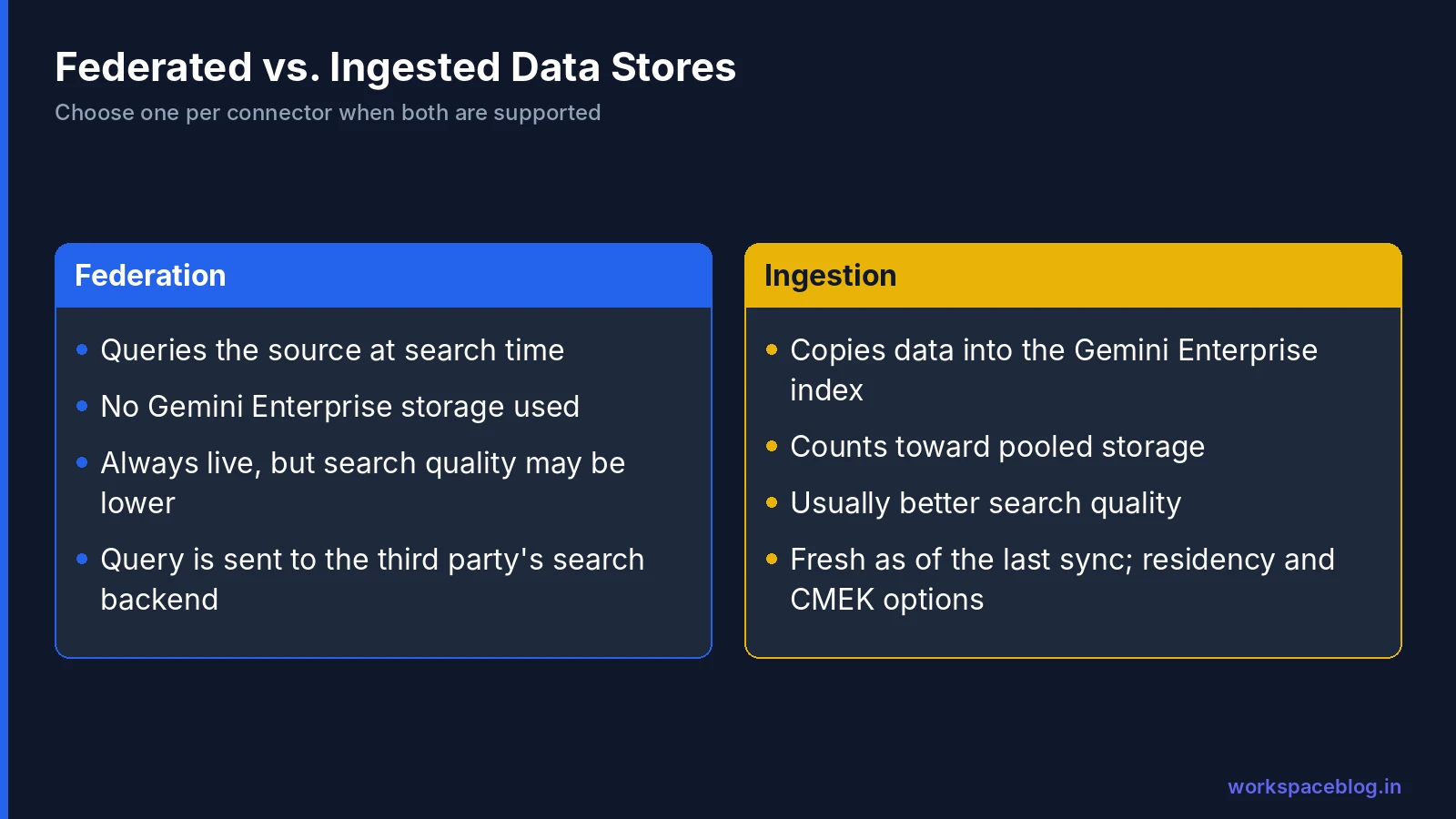
| Federation | Ingestion (indexing) | |
|---|---|---|
| How it works | Queries the source directly at search time | Copies data into the Gemini Enterprise index |
| Storage | None used | Counts toward your pooled storage quota |
| Search quality | May be lower | Usually better |
| Freshness | Live | As fresh as the last sync |
| Setup time | Fast | Initial sync takes time |
| Data flow | Your query is sent to the third party’s search backend, under its terms and privacy policy | Data is stored in Google Cloud in your chosen location |
If a connector supports both, you pick one.
When to choose each
Choose federation when:
- The source has a good search API and content changes constantly (chat, tickets)
- You can’t or won’t copy the data out of the source
- Storage cost matters and the source is very large
Choose ingestion when:
- Search quality is the priority: for policies, knowledge bases, and documentation
- You need data residency in Google Cloud (US or EU) with optional CMEK
- The source’s own search is weak
Federated query for databases
On October 2, 2026, Google added a federated query mode (Preview) for AlloyDB, BigQuery, Cloud SQL, and Spanner connectors, plus Knowledge Catalog integration (Preview), so agents can query live databases using your official business definitions instead of copying tables.
Gemini Enterprise Connectors List: Supported Data Sources
Google sources
| Source | Status |
|---|---|
| Google Drive, Gmail, Google Calendar | Generally available |
| Sync people data | Generally available |
| Google Sites | Generally available (federated, so content isn’t ingested) |
| Google Groups sync | Preview |
| Google Chat | Preview |
| Cloud Storage and BigQuery imports | Available for structured and unstructured data |
Google Workspace sources need a Google Workspace organization account and your Customer ID. Personal Google accounts aren’t supported.
Major third-party sources
| Category | Generally available | Preview |
|---|---|---|
| Microsoft | SharePoint, OneDrive, Outlook, Teams, Entra ID | Dynamics 365, Microsoft Learn |
| Atlassian | Jira Cloud, Confluence Cloud, Jira Data Center, Confluence Data Center | On-premises Data Center ingestion (private preview) |
| IT service management | ServiceNow | Freshservice, PagerDuty |
| Collaboration and content | Slack, Box, Dropbox | Notion, Egnyte, Miro, Smartsheet, Asana |
| Developer | GitHub | GitLab, Linear, Sourcegraph |
| CRM and sales | HubSpot | Salesforce, Gong, Zoho CRM, ZoomInfo |
| Support | - | Zendesk, Intercom |
| Custom | - | Custom MCP servers |
The Preview list is long and growing: Google added dozens of data stores through 2026, including financial data (FactSet, Moody’s, S&P Global, D&B) and legal sources (iManage, NetDocuments, Relativity). Check the connector list before planning around a Preview source, and expect behavior to change before GA.
How Syncing Works
Each sync pulls identity data (users, groups, permissions) and/or entity data (the content).
| Sync type | What it captures | Notes |
|---|---|---|
| Full sync | Everything, including additions, updates, deletions, and identity | Replaces the data store’s contents |
| Incremental sync | Content added or updated since the last sync | No deletions, no identity changes; every 3 hours by default |
| Entity sync | Content only | No identity information |
| Identity sync | User accounts linked to ACL groups | Keeps permissions current |
Schedule options
| Sync | Frequencies available |
|---|---|
| Combined full sync (identity + entity) | 3 h, 6 h, 12 h, 1 day, 3 days |
| Entity full sync | 3 h, 6 h, 12 h, 1, 3, 5, or 7 days |
| Identity full sync | 30 min, 1 h, 3 h, 6 h, 12 h, 1, 3, 5, or 7 days |
| Incremental sync | 3 h, 6 h, 12 h, 1, 3, 5, or 7 days |
The rule to remember: incremental syncs must run more often than full syncs. If both use the same frequency, the incremental sync pauses automatically and has to be resumed manually.
Why this matters for security
Because incremental syncs don’t capture deletions or permission changes, a document deleted or locked down in the source can remain searchable until the next full or identity sync. For sensitive sources, schedule identity syncs frequently (hourly or more) and full syncs at least daily.
Permission-Aware Search
Gemini Enterprise is permission-aware: a user sees a result only if they can access it in the source. For third-party connectors, identity syncs map users to groups and full syncs map content to those groups.
For Cloud Storage and BigQuery data you control the ACLs yourself:
- Add an
acl_infofield with areaderslist of principals (user_idorgroup_id) - Tick This data store contains access control information when creating the data store (or set
"aclEnabled": "true"in the API) - Turning on access control is a one-time choice
Your identity provider identifies the user. You can use Google identity or a workforce identity pool for a third-party identity provider; Google made Google Identity support for third-party data stores generally available in August 2026.
The over-sharing problem
Permission-aware search faithfully reproduces your existing permissions, including the mistakes. If a folder is shared with “everyone in the company,” everyone can now find it in seconds. Before connecting a source, review its sharing. On the Workspace side, our Shared Drives guide and DLP guide help.
Actions: Connectors That Do Things
Many connectors also offer actions, so agents can act, not just search. Examples for Google sources:
| Source | Example actions |
|---|---|
| Google Drive | Search files, read file content, share file |
| Gmail | Send message, search threads |
| Google Calendar | Create event, list events |
Third-party actions arrived quickly through 2026: ServiceNow federation and actions went GA in June, Outlook actions went GA on September 29, and actions for OneDrive, SharePoint, and Teams are in Preview. Admins turn actions on per connector, and Workflow Builder requires human review for data-modifying actions (see our Workflow Builder guide).
Data Residency, Encryption, and Network
- Locations: data stores can be global, US, or EU
- Encryption: US and EU storage is encrypted with Google-managed keys by default; CMEK is available. For CMEK, Google sources need multi-region keys and third-party sources need both multi-region and single-region keys
- Blended search and CMEK: if one data store uses CMEK, every other store in the blended app must use the same CMEK configuration
- Static IP egress: available for supported data stores if a source only accepts connections from fixed IP addresses
- Autocomplete: protect against PII appearing in query suggestions
Operating Connectors
Google added several operational tools in 2026:
- Managed organization policy constraints for data connectors (GA, July): restrict which connectors projects can create
- End-to-end tracing for data connectors (August): follow a sync or query through each stage
- Connector metrics in Cloud Monitoring (August): alert on sync failures and latency
Set up alerts on sync failures from day one. A silently failing connector is the most common reason users say “the AI can’t find our docs.”
Sizing guidance
Google publishes rough throughput guidance: at 10 queries per second, a source can sync about 864,000 records per day or 6 million per week; at 50 QPS, about 4.3 million per day. Very large sources need longer full-sync intervals.
A Practical Setup Plan
| Phase | Do this |
|---|---|
| 1. Inventory | List sources by team, size, sensitivity, and how often content changes |
| 2. Clean up | Fix over-sharing and stale content in each source before connecting it |
| 3. Choose mode | Ingest knowledge bases and documentation; federate fast-moving or restricted sources |
| 4. Start small | Connect Drive plus one third-party source for a pilot group |
| 5. Schedule syncs | Frequent identity syncs; daily full syncs for sensitive sources; incremental more often than full |
| 6. Monitor | Cloud Monitoring alerts on connector failures; weekly check of storage use |
| 7. Expand | Add sources one at a time, testing search quality and permissions with real users |
Storage tip: ingested data counts against pooled storage (for example 30 GiB per Standard user and 75 GiB per Plus user), with overage at $5 per GiB per month. Estimate index size before connecting a large file share: our billing guide has a worked example.
Conclusion
Connectors decide what Gemini Enterprise knows. Choose ingestion for knowledge you want searched well and kept in Google Cloud; choose federation for live, fast-changing, or restricted sources. Schedule syncs so permissions and deletions stay current, turn on actions deliberately, and monitor connectors like any other production integration.
Above all, fix permissions in the source first. Permission-aware search is only as good as the permissions it inherits: in your Google Workspace drives and in every other system you connect.
Official Google documentation:
- Introduction to connectors and data stores
- About apps and data stores
- Connect a third-party data source
- Connect a Google data source
- Identity and permissions
Related reading:
- Gemini Enterprise Workflow Builder Guide: use connectors in triggers and actions.
- Gemini Enterprise Pay-as-you-go, Quotas, and Overages: how ingested data affects storage costs.
- Gemini Enterprise Agent Platform: Introduction and Integration: the bigger picture of Gemini Enterprise.
- Google Workspace Groups Administration: the group structure that permission-aware search relies on.
This guide contains referral or affiliate links. If you sign up through one, Workspace Blog may earn a commission at no extra cost to you. Learn more.
Frequently Asked Questions
- What is the difference between a connector and a data store in Gemini Enterprise?
- A connector brings data from a Google or third-party source into Gemini Enterprise, and a data store holds that data. Each data source has entity types (for example Jira Cloud has issues, attachments, comments, and worklogs) and Gemini Enterprise creates a separate data store for each entity, so one connector setup creates a collection of data stores. An app then connects to data stores to search them.
- Should I use federated or ingested data stores?
- Federation queries the source directly without copying data, so it uses no Gemini Enterprise storage, but search quality may be lower and your query is sent to the third party's search backend under its terms. Ingestion copies data into the Gemini Enterprise index, which usually gives better search quality but uses storage and takes time to sync. If a connector supports both, you choose one.
- How often do Gemini Enterprise connectors sync?
- Incremental syncs run every 3 hours by default and can be set from 3 hours to 7 days; they capture new and updated content but not deletions or identity changes. Full syncs capture everything, including deletions and permissions, on schedules from every 3 hours to every 3 or 7 days, and identity-only syncs can run as often as every 30 minutes. Incremental syncs must run more often than full syncs.
- Does Gemini Enterprise respect document permissions?
- Yes. Search is permission-aware: identity syncs map users to access-control groups, and full syncs map content to those groups, so a user only sees results they're allowed to see in the source. For Cloud Storage and BigQuery data, you add ACL metadata and enable access control on the data store.
- How many data stores can one Gemini Enterprise app use?
- Connecting several data stores to one app is called blended search. Standard and Frontline editions are rate-limited for blended search; Plus gives unlimited and enhanced blended search. Google hasn't published a per-app maximum, but a project can hold 100 data stores (each entity counts as one, so a three-entity connector uses three), with a technical ceiling of 500.