Model Garden (formerly Vertex AI Model Garden) on Gemini Enterprise Agent Platform: How to Choose Between Gemini, Claude, Gemma, and Open Models
Vertex AI Model Garden, now on Agent Platform: compare 200+ Gemini, Claude, Gemma and open models, then limit access with the vertexai.allowedModels org policy.

Checked against Google's official documentation, last updated 15 Nov, 2026. See what changed

Choosing a model used to be simple: you used whatever your platform offered. On Gemini Enterprise Agent Platform (formerly Vertex AI), Model Garden (Vertex AI Model Garden before the rename) now lists more than 200 models: Google’s Gemini family, partner models such as Anthropic’s Claude, and open models such as Gemma, Llama, DeepSeek, and Qwen. More choice means better results and lower costs, but only if you choose deliberately and govern what teams use.
This guide explains what’s in Model Garden, the ways to consume models, how model choice works inside Gemini Enterprise, a practical selection framework, and the governance controls admins should set.
For employees using Gemini Enterprise and Google Workspace, Google handles much of this routing automatically; this guide is for teams building their own agents.
Key Takeaways
- Model Garden offers 200+ models: Gemini, Claude and other partners, Gemma, and open models.
- Start with the smallest capable model and escalate only where evaluation demands it.
- Check residency, compliance, latency, cost, and retirement dates for every model.
- Govern with an allowed-models policy, separate projects, and budgets.
- Plan for model retirements. Keep model IDs in configuration.
Table of contents
Open Table of contents
What’s in Model Garden
Google describes Model Garden as “a single place to discover, customize, and deploy a wide variety of models from Google and Google partners.”
| Category | Examples | How you use them |
|---|---|---|
| Google models | Gemini (Pro, Flash, Flash-Lite), Imagen, Veo, Lyria | Managed APIs |
| Google open models | Gemma | Managed or self-deployed |
| Partner models | Anthropic Claude, Grok, Mistral AI, Meta | Managed partner APIs |
| Open models | DeepSeek, Kimi, Llama, MiniMax, OpenAI gpt-oss, Qwen, ZAI.org | Managed (MaaS) or self-deployed |
Model families Google highlights
At Gemini at Work 2026, Google described four families:
| Family | Purpose |
|---|---|
| Argon | Frontier reasoning |
| Flash | Speed and volume |
| Omni | Generative media |
| Gemma | Lightweight, open-weights models for the edge |
Models referenced in Google’s 2026 documentation include the Gemini 4 family: Gemini 4 Argon for long, complex reasoning (see our Gemini 4 Argon guide), Gemini 4 Carbon, Google’s strongest frontier model, generally available on Agent Platform since November 10, 2026, and Gemini 4 Hydrogen, the fast and efficient model released on November 12, 2026, Gemini 3.1 Pro, Gemini 3.5, 3.6, 3.7, and 3.8 Flash, Nano Banana Pro and Nano Banana 2 for images, Veo 3.1 for video, Lyria 3 for music, and Gemma 4. Check the current catalog, because versions move quickly.
Claude on Google Cloud
Anthropic’s Claude models arrived in Model Garden throughout the year:
| Date | Model |
|---|---|
| May 28 | Claude Opus 4.8 |
| June 9 | Claude Fable 5 |
| June 30 | Claude Sonnet 5 |
| July 24 | Claude Opus 5 |
| September 1 | Claude Fable 5.1 |
| September 22 | Claude Opus 5.5 |
| September 28 | Claude Sonnet 5.5 |
| October 7 | Claude Haiku 5.5 |
| November 9 | Claude Fable 5.2, the first Claude model with fast mode ("speed": "fast" on pay-as-you-go requests) |
Google also opened a Cyber Verification Program for Claude in Preview in September 2026.
Ways to Consume Models
| Option | How it works | Best for |
|---|---|---|
| Model as a Service (MaaS) | Serverless API, pay per token | Most workloads; no infrastructure |
| Standard PayGo | Default pay-as-you-go access with usage tiers (Google added a Tier 4 for spend above $50,000 per 30 days in September 2026) | Variable traffic |
| Priority PayGo | Pay-as-you-go with priority capacity; US and EU multi-region endpoints added in September 2026 | Latency-sensitive production traffic |
| Provisioned Throughput | Reserved capacity | Predictable, high-volume workloads |
| Batch inference | Asynchronous jobs at scale | Large offline jobs such as classification or summarization |
| Self-deployed open models | Deploy to your own endpoint | Custom tuning, special hardware, full control |
Model Choice Inside Gemini Enterprise
Model choice isn’t only for developers. In the Gemini Enterprise app:
- The Gemini agent orchestrates across Gemini models and Anthropic’s Claude models today, with other private and open models planned, and picks a model per job to balance accuracy and cost
- Smart Routing automatically assigns workloads to the model with the best performance at the lowest cost
- Admins control availability of certain models, for example, Gemini 3.8 Flash was enabled by default in the app for global, US, and EU in September 2026, and admins can toggle Gemini 2.5 Pro in the web app
- Claude Opus 5.5 and Sonnet 5.5 were added to Gemini Enterprise AI developer tools as off-by-default third-party models, billed on consumption (October 8, 2026), and to the Gemini Enterprise app as generally available, admin-enabled models billed pay-as-you-go (October 15, 2026)
Partner models such as Claude are third-party models offered under their own terms. Make sure your legal team has reviewed those terms before enabling them for regulated data.
Data residency also varies by model. For example, Gemini 3.8 Flash supports data residency in us, eu, sg, and the UK, while Gemini 4 Argon is offered only in global, us, and eu. See our data residency guide.
A Model Selection Framework
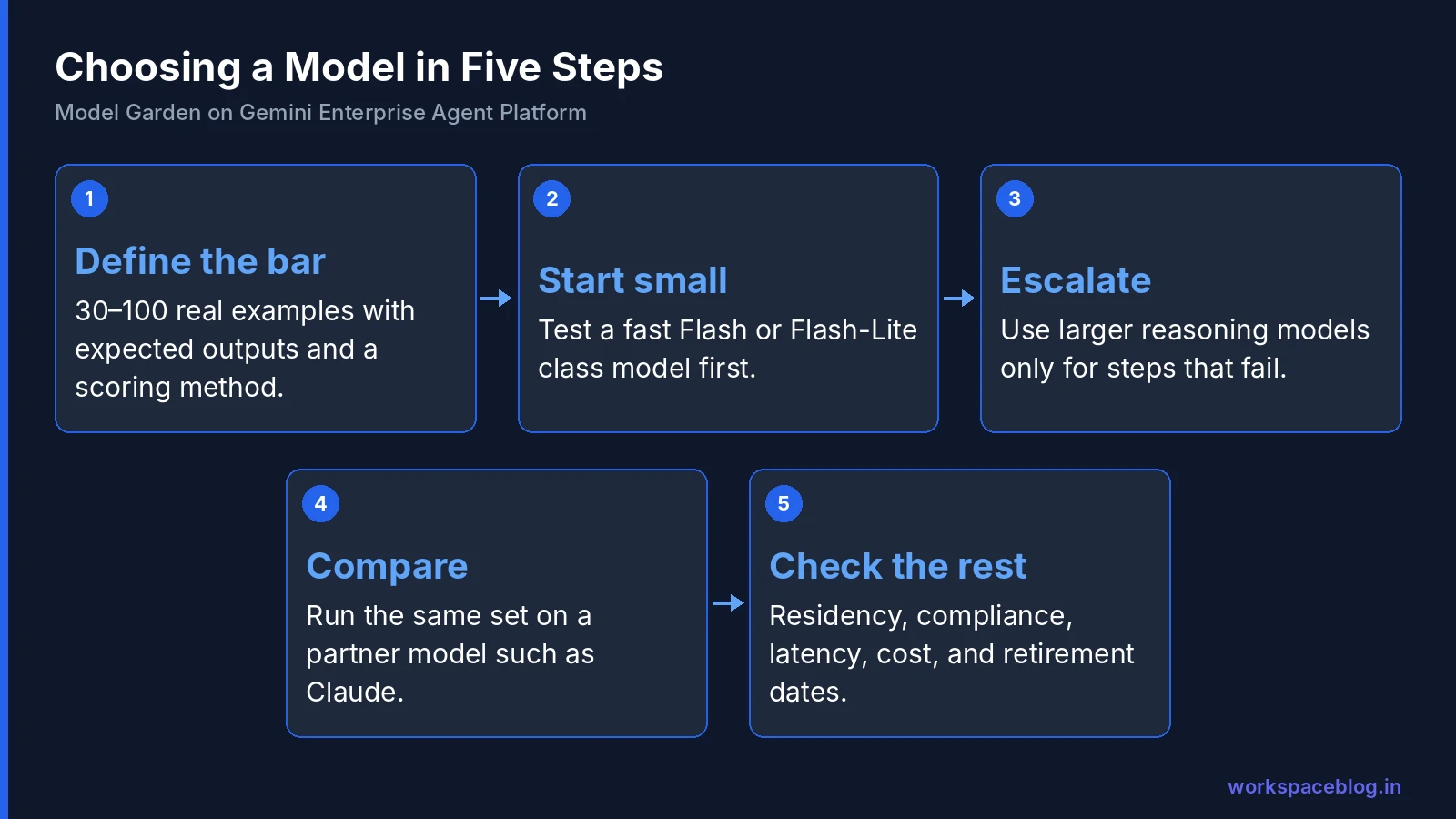
1. Define the task and the bar
Write 30–100 real examples with expected outputs, plus a scoring method (exact match, rubric, or an AI judge). Without an evaluation set, model choice is guesswork.
2. Start small and fast
Test the cheapest, fastest capable model first, usually a Flash or Flash-Lite class model. Many tasks (classification, extraction, routing, summarizing) don’t need more.
3. Escalate only where needed
Move to a larger reasoning model only for steps that fail with the smaller one. In agents, mix models: a fast model for routing and tool selection, a reasoning model for the hard step.
4. Compare a partner model
For coding, long documents, or specific reasoning styles, run your evaluation set on a Claude model too. Choose on results, not brand.
5. Check the non-functional requirements
| Requirement | Questions |
|---|---|
| Residency | Is the model available with DRZ and ML processing in your location? |
| Compliance | Do your certifications cover this model and region? |
| Latency | Does P95 latency meet the user experience target? |
| Cost | What’s the cost per task at expected volume? |
| Lifecycle | When is this version scheduled to retire? |
Typical choices by use case
| Use case | Starting point |
|---|---|
| Chat assistant for employees | Flash-class Gemini; Gemini Enterprise’s own routing |
| Document extraction and classification | Flash or Flash-Lite, with structured output |
| Complex analysis and planning | Pro- or Argon-class reasoning model |
| Coding agents | Compare Gemini and Claude on your codebase |
| Image generation | Nano Banana models |
| Video | Veo |
| On-device or edge | Gemma |
| Fine-tuned domain model | Gemma or another open model, self-deployed |
Worked Example: Choosing Models for a Support Agent
A company is building a customer-support agent that classifies incoming tickets, looks up account data, drafts replies, and escalates hard cases.
| Step | First try | Result | Final choice |
|---|---|---|---|
| Classify the ticket | Flash-Lite | 96% accuracy on 200 labeled tickets | Flash-Lite |
| Extract order number and product | Flash-Lite with structured output | Fails on messy emails 12% of the time | Flash |
| Look up account data | Tool call, no model needed | - | Tool |
| Draft the reply | Flash | Good tone, occasionally misses policy nuances | Flash, with policy documents grounded |
| Decide on refunds over a threshold | Pro-class reasoning model | Matches senior agent decisions 91% of the time | Reasoning model, with human approval |
The outcome: most traffic runs on small, cheap models; the expensive reasoning model handles a few percent of tickets; and a person approves anything with financial impact. Cost per ticket is a fraction of running everything on the largest model, and quality is higher, because each step uses the right tool.
Self-Deploying an Open Model: What You Take On
Self-deploying Gemma or another open model gives you control, but you also take on responsibilities that managed models handle for you:
- Capacity: choose machine types and accelerators, and scale endpoints yourself
- Cost while idle: you pay for the endpoint while it runs, not per request
- Licensing: each open model has its own license; check commercial-use terms
- Security: review the model’s source and keep serving images patched
- Evaluation and safety: run your evaluation set and apply Model Armor or your own filters
- Updates: track new versions and re-deploy deliberately
Choose self-deployment when you need custom fine-tuning, special hardware, offline or edge operation, or strict control over where the model runs.
Plan for Model Retirements
Models don’t last forever. In 2026 alone, Google discontinued Gemini 2.0 Flash and 2.0 Flash-Lite (June 1), retired several preview endpoints (July 9), deprecated open model endpoints with retirement on October 21, and removed Gemini 2.5 Pro from the Canada and Japan regions on October 20 for Gemini Enterprise. New GA versions sometimes include breaking parameter changes: Gemini 3.6 Flash changed sampling, penalty, and turn-structure parameters.
Protect yourself:
- Keep model IDs in configuration, not scattered through code
- Re-run your evaluation set before switching versions
- Track retirement dates in your release calendar
- Subscribe to Agent Platform release notes
Our Vertex AI to Agent Platform guide lists the 2026 changes in one place.
Governance for Admins
| Control | How |
|---|---|
| Allowed models | Use Google’s organization policy for Model Garden model access to allow only approved models at org, folder, or project level |
| Who can enable partner models | Restrict the permissions needed to accept partner terms and enable partner models |
| Separate projects | One project per team or product, so usage and budgets are clear |
| Budgets and spend caps | Cloud Billing budgets with alerts and caps per project |
| Safety | Model Armor floor settings for Gemini API traffic (see our Model Armor guide) |
| Residency | Approve models per region based on DRZ and ML processing support |
| Logging | Enable request logging where appropriate and restrict access to logs |
| Review | Quarterly review of models in use, costs, and upcoming retirements |
How the allowed-models policy works
The organization policy constraint is vertexai.allowedModels. Each value names a model and an action in the form publishers/PUBLISHER/models/MODEL_NAME:ACTION, where the action is predict (managed API and batch predictions), deploy (deployments without a managed API, such as one-click deploys) or tune.
- Default: with no policy set or inherited, all models and actions are allowed
- Allow list or deny list: a custom allow list blocks everything else; a custom deny list allows everything else
- Inheritance: set it at organization, folder or project level; an explicit deny beats an explicit allow
- Limits: at most 500 allowed and denied values, each model named individually (no “all partner models” group), and it covers Model Garden models only, not models in Model Registry
- A separate constraint,
vertexai.allowedPartnerModelFeatures, controls partner model features such as web search
A simple approval tiering works well:
- Tier 1 (pre-approved): Google Flash and Pro models in approved regions
- Tier 2 (approval needed): partner models such as Claude: legal review of terms
- Tier 3 (exception): self-deployed open models: security review of source, license, and hosting
Cost Tips
- Right-size first: the biggest savings come from using a smaller model where it’s good enough
- Cache and reuse: context caching and saved results avoid paying twice
- Use batch for anything that doesn’t need an immediate answer
- Provisioned Throughput only after usage is stable and predictable
- Watch output length: set sensible maximum output tokens
For Gemini Enterprise seat and overage billing, see our billing guide.
Conclusion
Model Garden turns model choice into a strategic advantage: Google’s Gemini family for most work, Claude and other partner models where they excel, Gemma and open models for edge and custom tuning. All under one platform, one bill, and one set of controls. Gemini Enterprise adds automatic routing so employees benefit without having to choose.
Make the choice with evidence: build an evaluation set, start with the smallest capable model, escalate only where needed, and check residency, compliance, and retirement dates. Then govern it with allowed-model policies, separate projects, and budgets: the same discipline you apply to apps across your Google Workspace and cloud estate.
Official Google documentation:
- Explore models in Model Garden
- Control access to Model Garden models
- Agent Platform release notes
- Gemini Enterprise release notes
Related reading:
- Vertex AI Is Now Gemini Enterprise Agent Platform: model retirements and name changes.
- Gemini Enterprise Data Residency, VPC-SC, and CMEK: which models support residency where.
- Google Agent Development Kit (ADK) Tutorial: set the model for each agent.
This guide contains referral or affiliate links. If you sign up through one, Workspace Blog may earn a commission at no extra cost to you. Read our referral and advertising disclosure.
Frequently Asked Questions
- What is Model Garden?
- Model Garden is the catalog in Gemini Enterprise Agent Platform (formerly Vertex AI) for discovering, customizing, and deploying models from Google and its partners. Google says it offers access to more than 200 models, including Google's Gemini, Imagen, Veo, Lyria, and Gemma models, partner models such as Anthropic's Claude, and open models such as Llama, DeepSeek, Qwen, and OpenAI's gpt-oss.
- Can I use Claude models on Google Cloud?
- Yes. Anthropic's Claude models are available in Model Garden as managed partner models. In 2026 Google added Claude Opus 4.8, Claude Fable 5, Claude Sonnet 5, Claude Opus 5, Claude Fable 5.1, Claude Opus 5.5, Claude Sonnet 5.5, Claude Haiku 5.5, and Claude Fable 5.2 to Model Garden. In Gemini Enterprise, Claude Opus 5.5 and Sonnet 5.5 were added to AI developer tools as off-by-default third-party models billed on consumption, and since October 15, 2026 admins can also turn them on for users of the Gemini Enterprise app, billed pay-as-you-go.
- What's the difference between managed models and self-deployed open models?
- Managed models (Model as a Service) are serverless: you call an API and pay per use, and Google runs the infrastructure. Self-deployed open models are deployed to your own endpoints on Agent Platform, which gives you control over hardware, scaling, and tuning, but you pay for the compute while the endpoint runs and manage capacity yourself.
- How can admins restrict which models teams use?
- Google documents an organization policy for controlling access to Model Garden models, so you can allow only approved models at the organization, folder, or project level. Combine it with IAM, separate projects per team, budgets, and Model Armor to govern model use.
- Which model should I choose for an AI agent?
- Start with the cheapest, fastest model that passes your evaluation set, usually a Flash-class model for routing, extraction, and classification. Use larger reasoning models only for steps that need deep reasoning, and consider partner models such as Claude where they perform better on your tasks. Re-evaluate whenever models are updated or retired.