Agent2Agent (A2A) Protocol Explained: How AI Agents Talk to Each Other and How to Use A2A in Gemini Enterprise
-
 Mohit
Mohit - 25 Oct, 2026
- Updated 27 Oct, 2026

As organizations build more agents, a new problem appears: the HR agent, the IT agent, the finance agent, and the vendor’s procurement agent all work, but they can’t work together. Each speaks its own framework’s language. The Agent2Agent (A2A) protocol fixes that by giving agents a common way to find each other, hand off tasks, and return results.
A2A started at Google, is now an open standard under the Linux Foundation, and is built into Gemini Enterprise and Gemini Enterprise Agent Platform. This guide explains how A2A works, how it differs from MCP, how to register A2A agents in Gemini Enterprise, and the security points architects need to get right.
For organizations on Google Workspace, A2A is also how partner and custom agents reach employees inside Gemini Enterprise.
Table of contents
Open Table of contents
What the A2A Protocol Is
The A2A project describes itself as “an open standard for seamless communication and collaboration between AI agents.” Key facts:
| Origin | Developed by Google, donated to the Linux Foundation |
| Governance | Technical Steering Committee with nine seats, held by AWS, Bloomberg, Cisco, Google, IBM, Microsoft, Salesforce, SAP, and ServiceNow |
| License | Apache 2.0 |
| SDKs | Python, JavaScript, Java, C#/.NET, Go, Rust, plus an A2A CLI |
| Interoperability | Works across frameworks such as LangGraph, CrewAI, Semantic Kernel, and Google’s ADK |
The design idea: opaque agents
A2A agents are opaque. They don’t have to share their memory, tools, or proprietary logic. A client agent asks a remote agent to do something and gets back status updates and results, the way you’d email a colleague in another department without needing access to their systems. That makes A2A suitable for collaboration across teams and across companies.
What A2A is not
The project is explicit that A2A is not an agent development kit, not a tool-calling protocol, not a replacement for MCP, and not a messaging app.
A2A vs. MCP
| MCP (Model Context Protocol) | A2A (Agent2Agent) | |
|---|---|---|
| Connects | Agent → tools and data | Agent → agent |
| The other side is | A tool server: deterministic functions and resources | Another agent that reasons, plans, and may run for a long time |
| Typical exchange | ”Run this query,” “create this ticket" | "Handle this onboarding request and tell me when it’s done” |
| Long-running work | Usually request/response | Tasks with lifecycle, streaming, and push notifications |
| Example | An agent calls the Jira MCP server | A sales agent delegates contract review to the legal team’s agent |
Most real systems use both. We’ll cover MCP in Gemini Enterprise in tomorrow’s post.
How A2A Works: The Core Concepts
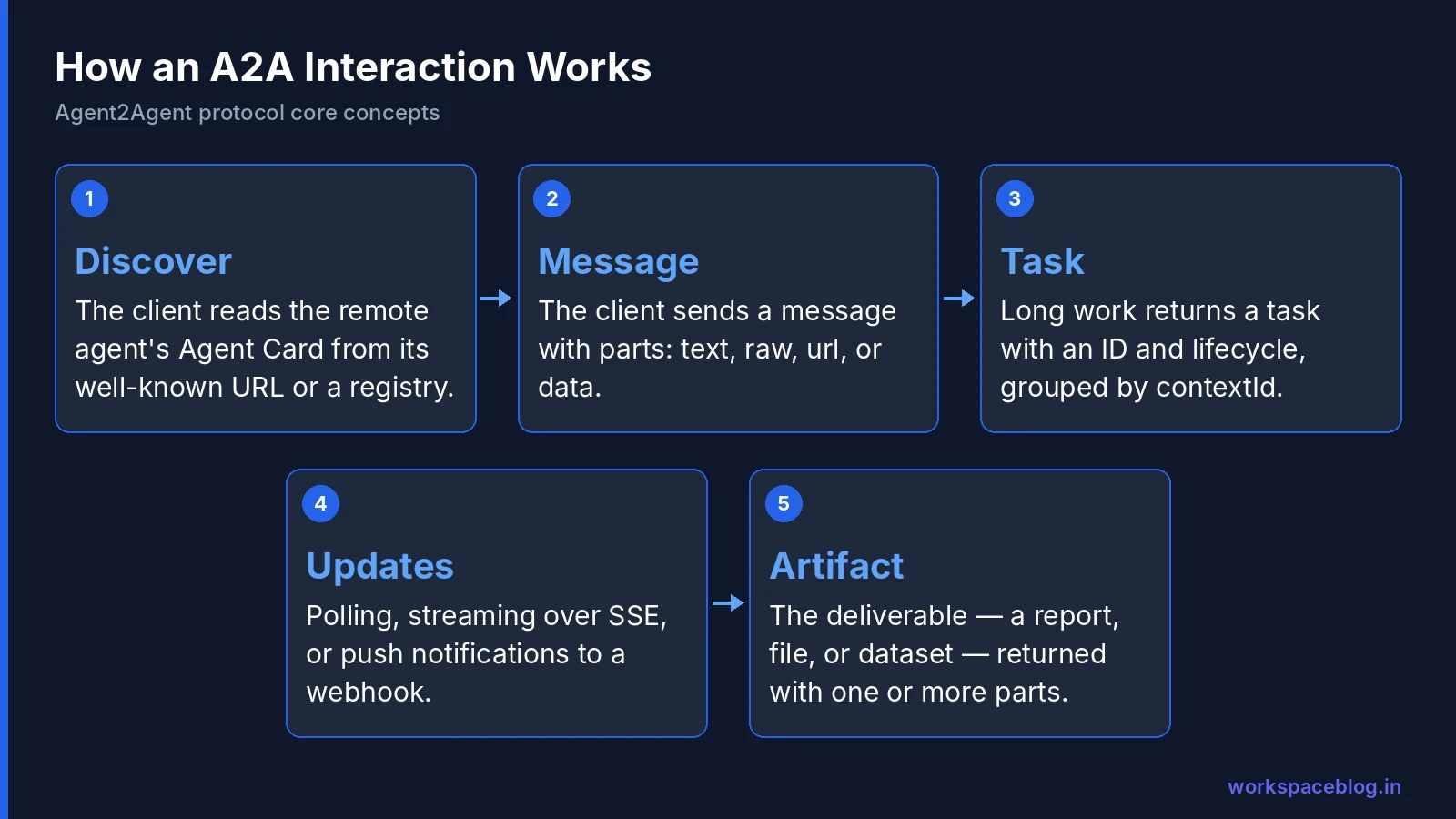
The actors
- User: a person or automated service with a goal
- A2A client (client agent): acts for the user and starts the conversation
- A2A server (remote agent): exposes an HTTP endpoint that implements A2A; opaque to the client
Agent Card: discovery
Every A2A server publishes an Agent Card: a JSON “digital business card” describing:
- Identity (name, description, version)
- Service endpoint URL
- Capabilities, such as streaming and push notifications
- Authentication requirements
- Skills: what the agent can do
- Optional custom extensions
Clients find cards three ways:
| Discovery method | How | Best for |
|---|---|---|
| Well-known URI | GET https://{agent-domain}/.well-known/agent-card.json | Public agents and domain-wide discovery |
| Curated registry | Search a central catalog by skill or tag | Enterprises, for example, Google’s Agent Registry |
| Direct configuration | Hard-coded URL or config file | Tightly coupled private systems |
The A2A specification doesn’t define a standard registry API, which is why products like Agent Registry exist.
Tasks, messages, parts, and artifacts
| Concept | What it is |
|---|---|
| Task | A stateful unit of work with a unique ID and lifecycle: used for long-running and multi-turn work |
| Message | One turn of communication, with a messageId and a role of user or agent |
| Part | The content inside messages and artifacts, exactly one of text, raw (inline binary), url (file reference), or data (structured JSON), plus optional mediaType, filename, and metadata |
| Artifact | A concrete deliverable (a report, a file, a dataset) with an artifactId, a name, and one or more parts; can be streamed |
Context (contextId) | Groups related tasks across interactions |
A remote agent answers either with a Message (an immediate reply) or a Task (for longer work).
Interaction patterns
| Pattern | How it works | Use when |
|---|---|---|
| Request/response with polling | Client sends a request and polls the task for updates | Simple integrations |
| Streaming (SSE) | Client keeps an HTTP stream open and receives incremental updates | Interactive experiences |
| Push notifications | Server calls a client-provided webhook on significant updates | Very long tasks or disconnected clients |
Communication runs over HTTP(S) with JSON-RPC 2.0 payloads. Authentication requirements are declared in the Agent Card, and credentials such as OAuth tokens travel in HTTP headers, separate from A2A messages.
A worked example
An employee asks the company’s assistant: “Onboard Priya, starting Monday, as a sales engineer.”
- The assistant (the client agent) finds the HR team’s onboarding agent in Agent Registry and reads its Agent Card. It has a skill called onboard employee and supports streaming.
- It sends a message with the request. The HR agent replies with a task ID, because onboarding takes time.
- Over the next hour, the HR agent streams status updates: account requested, laptop ordered, training booked.
- When finished, it returns an artifact: a welcome document with logins and the first-week schedule.
The client never sees how the HR agent works internally, only the card, the task, and the results.
A2A in Google’s Stack
A2A shows up in several places across Gemini Enterprise and Agent Platform:
| Where | What A2A does there |
|---|---|
| Agent Runtime | Deploy agents as A2A servers (“Deploy as A2A” in Agent Studio) |
| Agent Studio | Use agents from Agent Registry as remote sub-agents |
| Agent Registry | Central catalog of A2A agents, tools, and MCP servers |
| Gemini Enterprise | Register custom A2A agents so employees can use them in the web app |
| A2UI | Lets A2A agents define rich user interfaces that Gemini Enterprise renders |
See our Agent Runtime guide for deployment and our Agent Studio guide for the visual builder.
Registering an A2A Agent in Gemini Enterprise
Prerequisites
- The Gemini Enterprise Admin role
- The Discovery Engine API enabled
- An existing Gemini Enterprise app
- An agent that speaks A2A: Gemini Enterprise supports A2A v0.3 streaming; for agents on A2A v1.0.0 or later, use the SDK compatibility packages (for example
a2a.compat.v0_3in Python) - You host and maintain the agent yourself: on Agent Runtime, Cloud Run, behind Apigee or a load balancer, or elsewhere
The Agent Card Gemini Enterprise expects
Core fields: protocolVersion (for example "0.3"), name, description, url, version, capabilities (such as streaming and pushNotifications), skills, defaultInputModes, and defaultOutputModes. iconUrl is optional.
Console steps
- Open Gemini Enterprise in the Google Cloud console and select your app
- Go to Agents → Add Agents
- Under Choose an agent type, click Add for Custom agent via A2A
- Paste the agent card JSON → Preview agent details → Next
- Enter OAuth client details and scopes and click Finish, or Skip & Finish if you don’t need user OAuth
You can also register through the REST API by creating an agent under engines/APP_ID/assistants/default_assistant/agents with an a2aAgentDefinition.jsonAgentCard.
Authentication options
| Header | When it’s sent | What it carries |
|---|---|---|
X-Serverless-Authorization | Only for default Cloud Run .run.app URLs | A Google-signed OIDC token for the Discovery Engine service agent (grant it roles/run.invoker) |
Authorization | When you configure OAuth | The end user’s OAuth token, after consent |
For OAuth, create a Web application OAuth client with redirect URIs https://vertexaisearch.cloud.google.com/oauth-redirect and https://vertexaisearch.cloud.google.com/static/oauth/oauth.html. Agents on Agent Runtime need the cloud-platform scope.
Not supported: the agent card’s securitySchemes/security fields, apiKey schemes, and static API keys or custom headers.
Status and quotas
Google’s registration page still labels this feature Pre-GA, while the August 17, 2026 release notes announced A2UI and A2A agent registration as generally available. Check the current status for your project. Registration also draws on the daily agent creation quota: one per Standard user per day, ten per Plus user, none for Frontline. CI/CD pipelines that register agents across many apps can hit HTTP 429 RESOURCE_EXHAUSTED.
A2UI: Agents That Bring Their Own Interface
A2UI lets an A2A agent describe a custom interface (forms, cards, choices) that Gemini Enterprise renders with its own built-in styling. A2A handles communication; A2UI handles presentation. Gemini Enterprise supports A2UI v0.9 and v0.8, and the agent must be registered as an A2A agent on a publicly reachable endpoint such as Agent Runtime or Cloud Run.
Security: What Architects Must Get Right
Two lines in Google’s documentation deserve attention:
- Agents added through A2A registration bypass Agent Gateway, so gateway policies don’t apply to them.
- Model Armor settings in the console don’t protect A2A agents: developers must configure Model Armor through the REST API in the agent’s own code.
That makes the remote agent responsible for its own defenses. A practical checklist:
| Control | Recommendation |
|---|---|
| Authentication | Use user OAuth so the agent acts with the user’s permissions; avoid shared credentials |
| Network | Put the endpoint behind Apigee or a load balancer with authentication; don’t expose unauthenticated .run.app URLs |
| Prompt injection | Call Model Armor from the agent code; treat messages from other agents as untrusted input |
| Agent Card | Don’t embed secrets; use authenticated extended cards for sensitive details |
| Registry | Register approved agents in Agent Registry so teams reuse them instead of building copies |
| Logging | Log task IDs, callers, and outcomes for audit |
| Ownership | Every registered agent has an owner and an on-call contact |
When to Use A2A
Use A2A when:
- Different teams own different agents and need them to cooperate
- You’re integrating a vendor’s agent you can’t see inside
- A task runs long and needs status updates, streaming, or callbacks
- You want to swap one agent implementation for another without changing callers
Don’t use A2A when:
- You just need to call a deterministic API. That’s a tool (MCP or a function)
- Everything lives in one codebase. Use ADK sub-agents directly
Conclusion
A2A does for agents what HTTP and email did for people: a shared way to find each other, ask for help, and get results back, regardless of who built what. Agent Cards make agents discoverable, tasks and artifacts make long-running collaboration manageable, and the protocol keeps each agent’s internals private.
In Gemini Enterprise, A2A is how custom and partner agents reach employees, with Agent Registry as the catalog and A2UI for richer interfaces. Just remember that registered A2A agents sit outside Agent Gateway’s protection, so build authentication and Model Armor into the agents themselves before you put them in front of people across your Google Workspace organization.
Official documentation:
- A2A protocol
- A2A key concepts
- A2A agent discovery
- A2A project governance
- Register and manage A2A agents in Gemini Enterprise
- Register and manage A2UI agents
Related reading:
- Agent Runtime: Deploy and Scale AI Agents: host A2A agents on Google Cloud.
- Google Agent Development Kit (ADK) Tutorial: build agents that can speak A2A.
- Gemini Enterprise Connectors and Data Stores: the data side of agent integration.
This guide contains referral or affiliate links. If you sign up through one, Workspace Blog may earn a commission at no extra cost to you. Learn more.
Frequently Asked Questions
- What is the Agent2Agent (A2A) protocol?
- A2A is an open standard for communication and collaboration between AI agents, originally developed by Google and donated to the Linux Foundation. It lets agents built on different frameworks and by different vendors discover each other, delegate tasks, and exchange results without sharing their internal memory, tools, or logic. It's licensed under Apache 2.0, with official SDKs for Python, JavaScript, Java, C#/.NET, Go, and Rust.
- What is the difference between A2A and MCP?
- MCP (Model Context Protocol) connects an agent to tools and data: agent-to-tool. A2A connects an agent to other agents: agent-to-agent. They're complementary: an agent might use MCP to call a ticketing system and A2A to delegate a task to a specialist agent owned by another team or vendor.
- What is an A2A Agent Card?
- An Agent Card is a JSON document that works like a digital business card for an agent. It describes the agent's identity, service endpoint URL, A2A capabilities such as streaming and push notifications, authentication requirements, and skills. Public agents typically publish it at https://{agent-domain}/.well-known/agent-card.json.
- Which A2A version does Gemini Enterprise support?
- Google's registration documentation says Gemini Enterprise supports A2A v0.3 streaming. For agents built with A2A v1.0.0 or later, Google says to use the SDK compatibility packages, for example a2a.compat.v0_3 in Python.
- How do I add an A2A agent to Gemini Enterprise?
- With the Gemini Enterprise Admin role, open your app in the Gemini Enterprise page of the Google Cloud console, go to Agents > Add Agents, choose Custom agent via A2A, paste the agent card JSON, preview the details, and either configure OAuth or skip it. You can also register agents through the REST API. You host and maintain the agent yourself, for example on Agent Runtime or Cloud Run.