Google Agent Development Kit (ADK) Tutorial: Build, Test, and Deploy Your First AI Agent
-
 Mohit
Mohit - 19 Oct, 2026

The Agent Development Kit (ADK) is the code-first way to build agents on Google’s stack. It’s open source, it’s what Google uses for many of its own agents, and it’s the framework behind most agents running on Gemini Enterprise Agent Platform (formerly Vertex AI). Google says more than six trillion tokens a month flow through Gemini models via ADK.
This tutorial goes from an empty folder to a deployed agent: install ADK, write an agent with a tool, run it locally, add a second agent, and deploy to Agent Runtime. Along the way it covers the concepts you need to design real agents, and what IT and security teams should check before an ADK agent goes live.
If you’d rather build without code, Agent Studio offers a visual builder whose logic can be exported to ADK. Code-first teams start here.
Finished agents can be published to employees through Gemini Enterprise, next to the Gemini features already in Google Workspace.
Table of contents
Open Table of contents
- What the Agent Development Kit Is (and When to Use It)
- Step 1: Install ADK
- Step 2: Choose How the Agent Reaches Gemini
- Step 3: Write Your First Agent
- Step 4: Run It Locally
- Step 5: Go Multi-Agent
- Step 6: Add Real Tools
- Step 7: Deploy to Agent Runtime
- Step 8: Evaluate Before You Ship
- Security Checklist for ADK Agents
- Common First-Time Errors
- Publishing to Employees
- Conclusion
What the Agent Development Kit Is (and When to Use It)
ADK is a framework for building agents: programs where a model decides which steps to take and which tools to call to reach a goal. Google describes it as a way to build, debug, evaluate, and deploy agents “from simple assistants to multi-agent business workflows.”
| Capability | What it gives you |
|---|---|
| Languages | Python, TypeScript, Go, Java, and Kotlin |
| Orchestration | Predictable workflow agents (sequential, parallel, loop) or model-driven routing |
| Multi-agent | Teams of specialized agents that delegate to each other |
| Tools | Function tools, MCP tools, OpenAPI tools, built-in tools such as Google Search grounding |
| Context | Sessions, state, memory, events, context compression, and caching |
| Evaluation | Criteria, user and environment simulation, custom metrics |
| Deployment | Local, Agent Runtime, Cloud Run, or GKE |
ADK 2.0 adds graph-based workflows that combine model reasoning with deterministic code: useful when a compliance step must always run in a fixed order.
ADK vs. Agent Studio vs. Workflow Builder
| Tool | Who it’s for | Style |
|---|---|---|
| ADK | Developers | Code-first, full control, version-controlled |
| Agent Studio (Agent Platform) | Developers and technical makers | Low-code visual canvas; exports to ADK |
| Workflow Builder (Gemini Enterprise) | Business users | No-code agents and workflows inside the Gemini Enterprise app |
Choose ADK when the agent needs custom tools, tests in CI, code review, or complex multi-agent logic.
Step 1: Install ADK
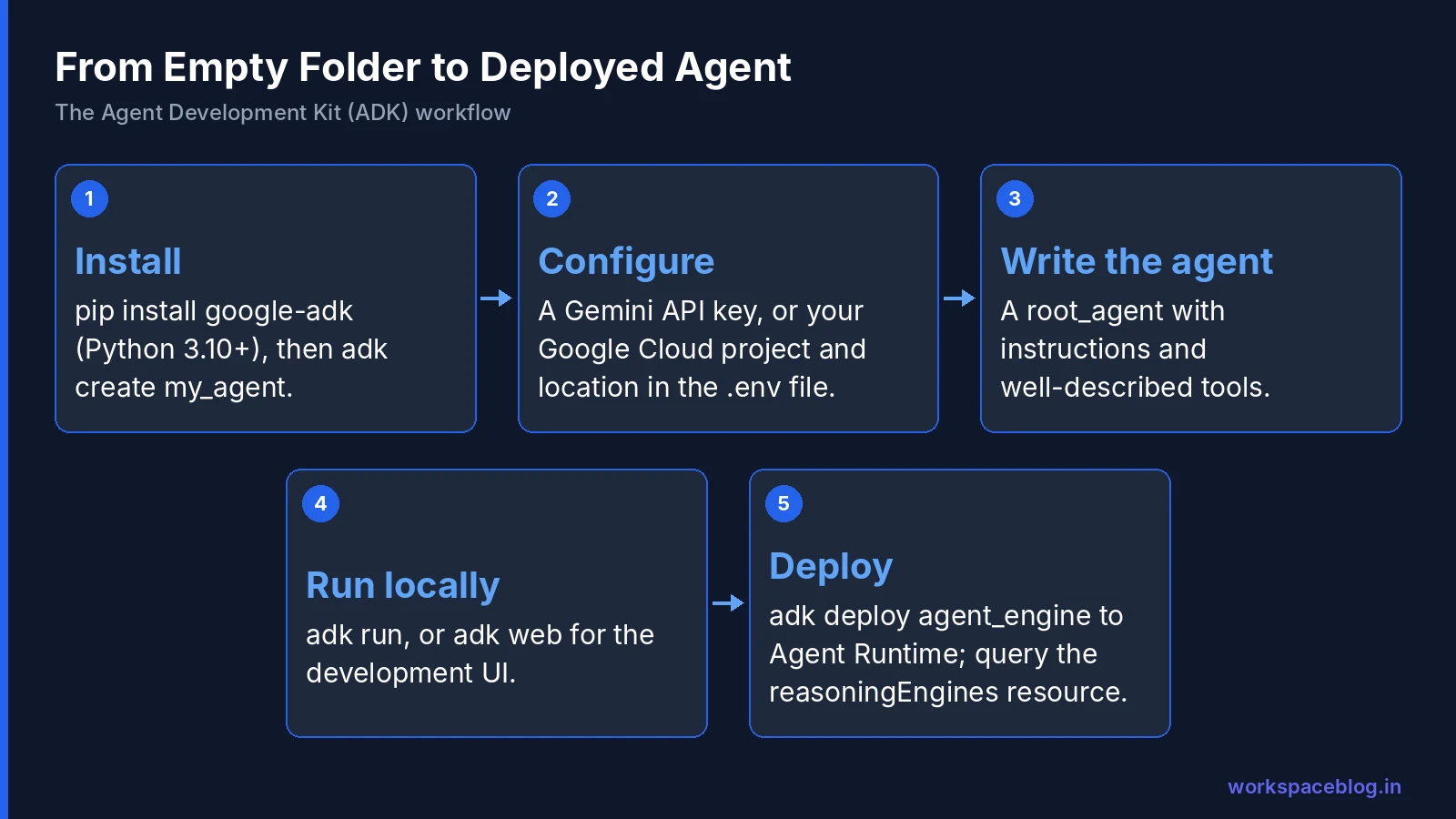
You need Python 3.10 or later.
python3 -m venv .venv
source .venv/bin/activate        # Windows: .venv\Scripts\activate
pip install google-adk
Then scaffold a project:
adk create my_agentThis creates:
my_agent/
├── agent.py      # your agent code
├── .env          # API key or project settings
└── __init__.py
Step 2: Choose How the Agent Reaches Gemini
ADK can call Gemini two ways. Put the settings in my_agent/.env.
Option A: Gemini API key (quickest for learning):
GOOGLE_API_KEY="YOUR_API_KEY"Create the key in Google AI Studio.
Option B: Google Cloud Agent Platform (for company work):
GOOGLE_CLOUD_PROJECT=your-project-id
GOOGLE_CLOUD_LOCATION=us-central1
GOOGLE_GENAI_USE_ENTERPRISE=True
Then authenticate:
gcloud auth application-default loginOlder tutorials use GOOGLE_GENAI_USE_VERTEXAI=TRUE; current ADK docs use GOOGLE_GENAI_USE_ENTERPRISE. For anything touching company data, use Option B so usage runs under your Google Cloud project’s IAM, logging, and billing.
Step 3: Write Your First Agent
Replace agent.py with an agent that has one tool. This follows the structure of Google’s quickstart:
from google.adk.agents.llm_agent import Agent


def get_current_time(city: str) -> dict:
    """Returns the current time in a specified city."""
    # Replace with a real lookup in production.
    return {"status": "success", "city": city, "time": "10:30 AM"}


root_agent = Agent(
    model="gemini-flash-latest",
    name="root_agent",
    description="Tells the current time in a specified city.",
    instruction="You are a helpful assistant that tells the current time in cities. "
                "Use the 'get_current_time' tool for this purpose.",
    tools=[get_current_time],
)
Four things to notice:
root_agentis required. ADK looks for this name as the entry point.- Tools are plain Python functions. ADK reads the function name, type hints, and docstring to tell the model what the tool does, so write clear docstrings.
instructionis the agent’s job description. Be specific about when to use each tool.descriptionmatters in multi-agent setups. Other agents use it to decide whether to delegate to this one.
Step 4: Run It Locally
From the command line:
adk run my_agentOr with the development web UI (run from the folder that contains my_agent/):
adk web --port 8000Open http://localhost:8000, choose your agent in the upper left, and chat with it. The web UI shows each step (model calls, tool calls, and results) which makes debugging much easier. Google is clear that ADK Web is for development only, not production.
Step 5: Go Multi-Agent
Real tasks are easier when split between specialists. ADK gives you two patterns.
Model-driven delegation
Give a coordinator agent a list of sub_agents. The model reads each sub-agent’s description and hands work to the right one:
from google.adk.agents.llm_agent import Agent

billing_agent = Agent(
    model="gemini-flash-latest",
    name="billing_agent",
    description="Answers questions about invoices and payment status.",
    instruction="Answer billing questions using the billing tools.",
    tools=[],  # add billing tools here
)

support_agent = Agent(
    model="gemini-flash-latest",
    name="support_agent",
    description="Troubleshoots product issues.",
    instruction="Help users troubleshoot product problems step by step.",
)

root_agent = Agent(
    model="gemini-flash-latest",
    name="root_agent",
    description="Front-door assistant that routes requests.",
    instruction="Route billing questions to billing_agent and product problems "
                "to support_agent. Ask a clarifying question if unsure.",
    sub_agents=[billing_agent, support_agent],
)
Workflow agents for fixed steps
When steps must always happen in order (extract, validate, then write) use ADK’s workflow agents (sequential, parallel, and loop) or, in ADK 2.0, a graph workflow. The model still does the thinking inside each step, but the order is guaranteed by code. That predictability matters for finance, HR, and compliance processes.
Step 6: Add Real Tools
| Tool type | Use it for |
|---|---|
| Function tools | Your own Python functions: lookups, calculations, API calls |
| MCP tools | Connecting to any Model Context Protocol server, such as an internal ticketing or database server |
| OpenAPI tools | Generating tools from an OpenAPI spec for an existing REST API |
| Built-in tools | Google Search grounding and other pre-built integrations |
Keep tools narrow and well described. A tool called get_invoice_status(invoice_id) is safer and more reliable than a generic run_sql(query).
Step 7: Deploy to Agent Runtime
Agent Runtime (formerly Vertex AI Agent Engine) is Google’s managed runtime for agents: fast cold starts, long-running agents that can run for up to seven days, and built-in sessions and memory.
Prerequisites
- A Google Cloud project. Use the Project ID, not the project number
- Enable the Agent Platform API (
aiplatform.googleapis.com) and Cloud Resource Manager API (cloudresourcemanager.googleapis.com) - Install the gcloud CLI and authenticate:
gcloud auth login
gcloud auth application-default login
gcloud config set project MY-PROJECT-ID
Deploy
PROJECT_ID=my-project-id
LOCATION_ID=us-central1

adk deploy agent_engine \
  --project=$PROJECT_ID \
  --region=$LOCATION_ID \
  --display_name="My First Agent" \
  my_agent
Note the subcommand is still agent_engine, even though the product is now called Agent Runtime: product names changed faster than command names.
The output ends with a resource name like:
projects/.../locations/us-central1/reasoningEngines/751619551677906944Save the numeric resource ID. You query the deployed agent at:
https://LOCATION-aiplatform.googleapis.com/v1/projects/PROJECT_ID/locations/LOCATION/reasoningEngines/RESOURCE_ID:queryusing the Agent Platform SDK, Python requests, or any REST client. Monitor deployments in the Agent Runtime page of the Google Cloud console.
For Python, the deployment uploads your code and declared dependencies but not the ADK web UI: Agent Runtime provides the API server. For teams that want CI/CD and infrastructure-as-code from the start, Google also offers an accelerated Agents CLI deployment path.
Agent Runtime is a paid service beyond its no-cost tier; check the pricing page before load testing.
Step 8: Evaluate Before You Ship
An agent that works in three test chats can still fail on the fourth. Before production:
- Write an evaluation set: 20 to 50 realistic requests with expected outcomes, including edge cases and requests it should refuse
- Check trajectories, not just answers: did it call the right tools, in the right order, with the right arguments?
- Simulate users: ADK’s evaluation supports user and environment simulation
- Re-run the set on every change: prompts, tools, and model versions all change behavior
On Agent Platform, Agent evaluation adds multi-turn autoraters and online monitors that score live traffic for drift.
Security Checklist for ADK Agents
Before an ADK agent touches company data, check:
| Area | Check |
|---|---|
| Identity | Run as a dedicated identity (use Agent Identity on Agent Platform), not a developer’s personal credentials |
| Least privilege | Grant only the IAM roles the agent’s tools need |
| Secrets | Keep API keys in Secret Manager, never in .env files committed to Git |
| Tool scope | No generic “run any query” or “send any email” tools |
| Prompt injection | Treat retrieved documents and web pages as untrusted; route traffic through Agent Gateway with Model Armor |
| Logging | Send traces to Cloud Logging and review them during the pilot |
| Human approval | Require confirmation for irreversible actions such as payments, deletions, or external emails |
| Cost | Separate project with a budget and spend cap |
Common First-Time Errors
| Symptom | Likely cause | Fix |
|---|---|---|
adk web doesn’t list your agent | Command run from inside the agent folder | Run it from the parent folder |
| ”No root_agent found” | Variable renamed or missing | Define root_agent in agent.py |
| Authentication errors with Option B | Application Default Credentials not set | Run gcloud auth application-default login |
| Permission denied on deploy | API not enabled or missing IAM role | Enable aiplatform.googleapis.com and check your project role |
| Agent never calls the tool | Vague docstring or instruction | Describe exactly when to use the tool |
| 429 errors | Model quota exceeded | Retry with backoff, or request more quota |
Publishing to Employees
Agents built with ADK and deployed to Agent Runtime can be made available to employees through the Gemini Enterprise app, so people use them alongside enterprise search and the Gemini agent. Edition matters: using your own full-code agents requires Gemini Enterprise Standard, Plus, Pay-as-you-go, or Frontline (provisioned agents only), Business doesn’t include it. See our billing guide for how usage is charged.
Conclusion
ADK gives developers a straightforward path from idea to production agent: pip install google-adk, write a root_agent with well-described tools, test with adk web, and deploy with adk deploy agent_engine. Multi-agent delegation and workflow agents cover most real business processes, and Agent Runtime handles scaling, sessions, and memory.
The hard part isn’t the code. It’s tool design, evaluation, and governance. Get those right, and your agents can safely work with the same data your people use every day in Google Workspace, Gemini Enterprise, and the rest of your stack.
Official Google documentation:
- Agent Development Kit
- ADK Python quickstart
- Deploy ADK agents to Agent Runtime
- ADK on Gemini Enterprise Agent Platform
- Gemini models and authentication in ADK
Related reading:
- Vertex AI Is Now Gemini Enterprise Agent Platform: the name changes behind Agent Runtime and Agent Studio.
- Google’s New Gemini Agent: Gemini at Work 2026: where custom agents meet employees.
- Gemini Enterprise Pay-as-you-go and Overages: how agent usage is billed.
This guide contains referral or affiliate links. If you sign up through one, Workspace Blog may earn a commission at no extra cost to you. Learn more.
Frequently Asked Questions
- What is the Google Agent Development Kit (ADK)?
- ADK is Google's open-source framework for building, debugging, evaluating, and deploying AI agents, from simple assistants to multi-agent workflows. It supports Python, TypeScript, Go, Java, and Kotlin, works with Gemini and other models, and deploys locally or to Agent Runtime, Cloud Run, or Google Kubernetes Engine.
- How do I install ADK?
- With Python 3.10 or later, create a virtual environment and run pip install google-adk. Then run adk create my_agent to scaffold a project containing agent.py, .env, and init.py.
- How do I run an ADK agent locally?
- Use
adk run my_agentfor a command-line chat, or runadk web --port 8000from the parent folder and openhttp://localhost:8000to use the development web UI. Google notes ADK Web is for development and debugging only, not production. - How do I deploy an ADK agent to Agent Runtime?
- Enable the Agent Platform API (aiplatform.googleapis.com) and Cloud Resource Manager API, authenticate with gcloud auth login and gcloud auth application-default login, then run adk deploy agent_engine with --project, --region, and --display_name flags followed by your agent folder. The command prints a reasoningEngines resource name you use to query the agent.
- Do I need Google Cloud to use ADK?
- No. For local development you can use a Gemini API key from Google AI Studio by setting GOOGLE_API_KEY in the .env file. To use Gemini through Google Cloud, set GOOGLE_CLOUD_PROJECT, GOOGLE_CLOUD_LOCATION, and GOOGLE_GENAI_USE_ENTERPRISE=True, and authenticate with gcloud.