Gemini Enterprise Agent Platform Architecture: How Build, Scale, Govern and Optimize Fit Together
-
 Mohit
Mohit - 22 Oct, 2026
- Updated 27 Oct, 2026

Gemini Enterprise Agent Platform is a large product with a long list of components, and the names alone do not show how they connect. This guide draws the architecture as Google describes it: four pillars (Build, Scale, Govern and Optimize), the components in each, and the path a request takes from an employee to an agent, its tools and its model.
It is written for architects and IT teams planning their first production agents. If you need the background first, our introduction to Gemini Enterprise Agent Platform covers editions and integrations, and the Vertex AI rename guide maps the old names to the new ones.
Key Takeaways
- Agent Platform has four pillars: Build, Scale, Govern and Optimize.
- Agents are built with ADK or Agent Studio, run on Agent Runtime with Sessions and Memory Bank, and reach employees through the Gemini Enterprise app.
- Agent Gateway is the enforcement point: every connection is checked against the agent’s identity, Agent Registry and IAM policies.
- Model Armor and semantic governance policies attach to the gateway to filter content and control tool use.
- Google recommends a setup order for governance, with audit modes to test policies before they block anything.
Table of contents
Open Table of contents
The Architecture at a Glance
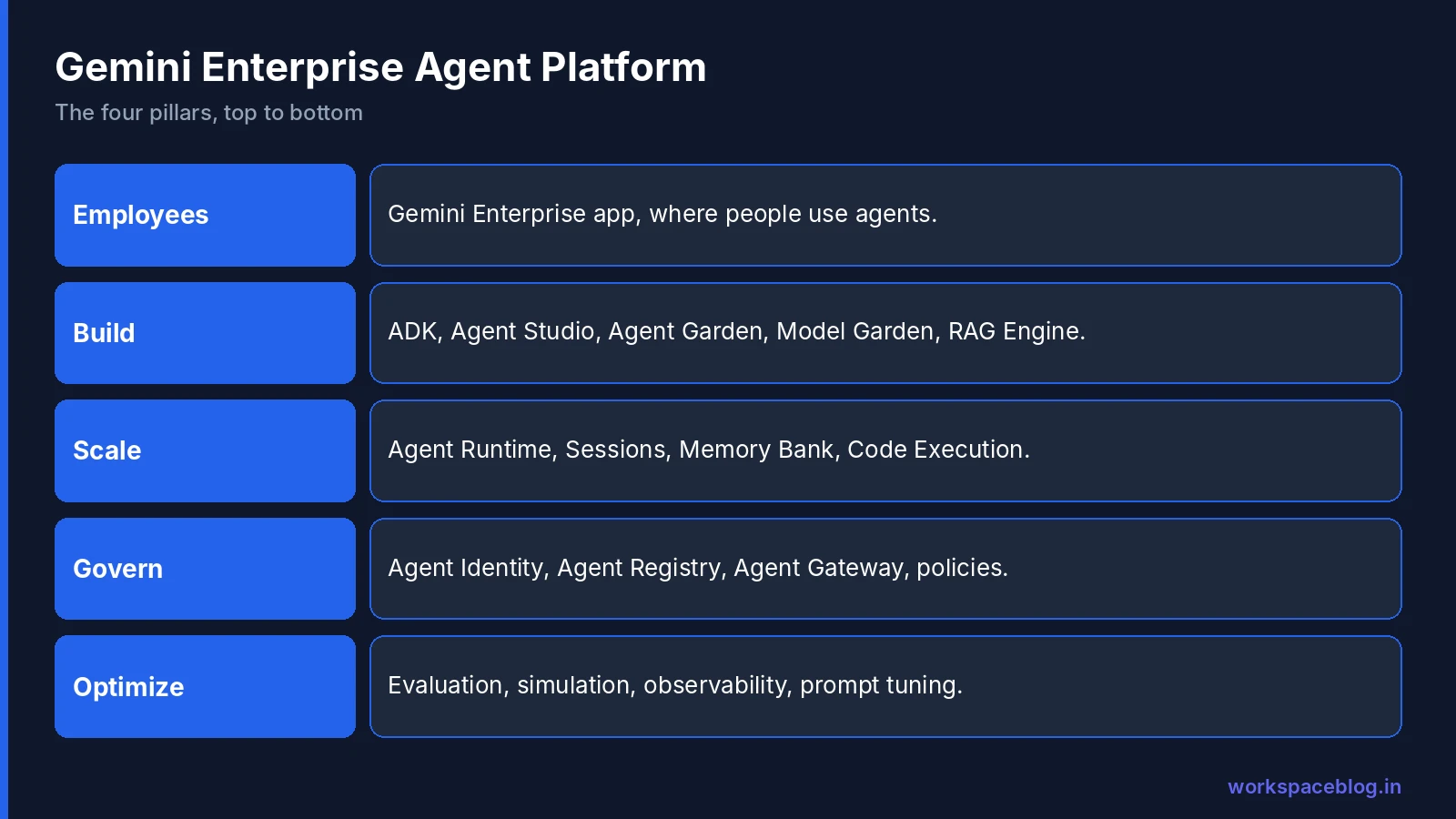
Google introduced Agent Platform on April 22, 2026 as the evolution of Vertex AI, “to build, scale, govern, and optimize agents”. Think of it as layers:
| Layer | What it does | Main components |
|---|---|---|
| Employees | Where people use agents | Gemini Enterprise app |
| Build | Design and develop agents | Agent Development Kit (ADK), Agent Studio, Agent Garden, Model Garden, RAG Engine, Vector Search, Managed Agents API, CodeMender |
| Scale | Run agents in production | Agent Runtime, Agent Platform Sessions, Agent Platform Memory Bank, Code Execution |
| Govern | Secure and control agents | Agent Identity, Agent Registry, Agent Gateway, governance policies, threat and vulnerability scanning, AI Content Detection API |
| Optimize | Measure and improve agents | Agent evaluation, simulation, observability, prompt optimisation |
Build: Where Agents Are Made
The Build pillar holds everything a team needs before an agent goes live.
| Component | Role in the architecture |
|---|---|
| Agent Development Kit (ADK) | Code-first, model-agnostic framework for building agents and multi-agent systems |
| Agent Studio | Low-code visual canvas for designing agent logic and workflows, which can be exported to ADK code |
| Agent Garden | Library of prebuilt agents and templates to start from |
| Model Garden | Access to Google’s models (including Gemini 4 Argon), third-party models and open models |
| RAG Engine and Vector Search | Ground agents in company data and search large collections of embeddings |
| Managed Agents API | REST-first, configuration-driven API for agents that run in a managed sandbox |
| CodeMender | An agent that finds, verifies and fixes security flaws in code |
Most teams pick one build path per agent: ADK for developers who want full control and version control, Agent Studio for faster visual design. Our ADK tutorial and Agent Studio guide cover each path step by step. Business users who want no-code agents inside the Gemini Enterprise app use Workflow Builder instead.
Scale: Where Agents Run
Once built, agents are deployed to the Scale pillar:
- Agent Runtime is the managed runtime for deploying and running agents, with fast startup and support for long-running work.
- Agent Platform Sessions keeps state and context within one conversation.
- Agent Platform Memory Bank gives agents long-term memory that carries across sessions.
- Code Execution lets agents run Python in a secure sandbox for calculations and analysis.
The split between Sessions and Memory Bank matters for privacy reviews: Sessions holds the current conversation, while Memory Bank stores what the agent should remember about a user over time. Decide early what an agent may keep, and for how long.
Govern: How Agents Are Controlled
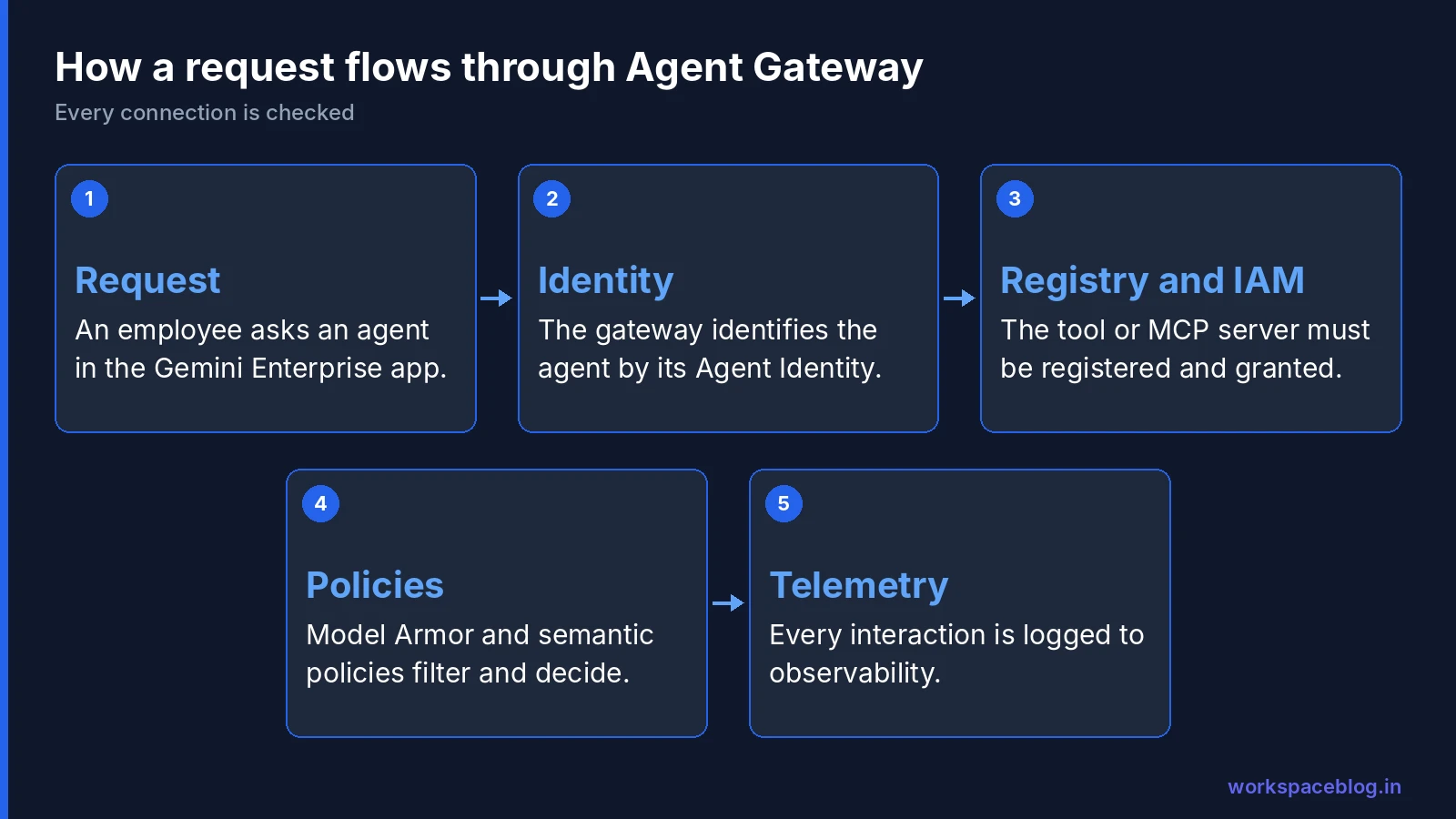
Governance is where Agent Platform differs most from running models through a plain API. Google’s documentation frames it as four questions:
| Question | Component | What it does |
|---|---|---|
| Who made the request? | Agent Identity | Gives each agent a unique, managed identity (a SPIFFE ID) used for authentication, access control and auditing |
| What destinations are approved? | Agent Registry | Central directory of approved agents, tools, MCP servers and endpoints |
| What actions are permitted? | Policies | IAM policies linking identities to approved registry entries, Model Armor content filters, semantic governance policies in plain language, and optional custom authorisation engines |
| Where are policies enforced? | Agent Gateway | The entry and exit point for agent traffic, in the path for client-to-agent and agent-to-anywhere connections |
How a request flows
- An employee asks an agent for something, for example in the Gemini Enterprise app.
- The request reaches Agent Gateway, which identifies the calling agent by its Agent Identity.
- When the agent wants to call a tool, an MCP server or another agent, the gateway checks that the destination is in Agent Registry and that an IAM policy grants this identity access. Without an explicit grant, the connection is blocked.
- Model Armor filters content passing through the gateway, and semantic governance policies decide whether the requested tool use is allowed.
- The gateway handles mTLS and protocol translation, then sends telemetry for every interaction to Agent Observability.
Data an agent reaches through connectors still follows the source system’s permissions. Our guide to Gemini Enterprise connectors and data stores explains how federated and ingested data keep access rules.
Optimize: How Agents Improve
The fourth pillar keeps agents reliable after launch:
- Agent evaluation measures quality, including multi-turn raters and online evaluation of live traffic.
- Simulation generates synthetic scenarios and multi-turn users with configurable personas, so you can test before real users arrive.
- Observability brings monitoring, logging and tracing together, including the Unified Trace Viewer for following an agent’s reasoning.
- Prompt optimisation refines system instructions and tool descriptions based on observed failures.
Run evaluation and simulation before every major change, the same way you would run tests before a software release.
Recommended Setup Order
Google’s governance documentation suggests building controls in this order:
| Step | Set up | Why first |
|---|---|---|
| 1 | Agent identities | Every later policy refers to an identity |
| 2 | Agent Registry | Lists what agents are allowed to reach |
| 3 | IAM policies | Links identities to approved destinations |
| 4 | Model Armor templates | Content filtering on the gateway |
| 5 | Semantic governance policies | Plain-language rules for tool use |
| 6 | Agent Gateway and traffic monitoring | Enforces everything above |
Each policy type has an audit mode (DRY_RUN or INSPECT_ONLY) that logs decisions without blocking. Run new policies in audit mode first, review the logs, then switch to enforcement.
Architecture Checklist for Your First Agent
- Choose the build path: ADK or Agent Studio
- Pick the model in Model Garden and note its pricing and data location
- Decide what goes in Sessions and what, if anything, goes in Memory Bank
- Give the agent its own Agent Identity; never share credentials between agents
- Register every tool and MCP server in Agent Registry
- Grant access with IAM policies, starting from nothing
- Attach Model Armor and semantic policies in audit mode, then enforce
- Set up evaluation and observability before go-live
- Put the project behind a budget and spend cap; see how Gemini Enterprise usage is billed
Conclusion
Agent Platform makes more sense once you see it as four layers around one enforcement point. Teams build with ADK or Agent Studio, run agents on Agent Runtime with Sessions and Memory Bank, govern every connection through Agent Gateway using identities, the registry and policies, and optimize with evaluation and observability. Employees meet the result in the Gemini Enterprise app, alongside the Gemini features in Google Workspace.
Start small: one agent, its own identity, a short registry, audit-mode policies and good tracing. Then add agents on the same foundation, so every new one inherits the controls that already work, across your Google Cloud projects and Google Workspace data.
Official Google documentation:
- Agent Platform overview
- Govern your agents
- Agent Gateway overview
- Agent Registry
- Agent Runtime
- Introducing Gemini Enterprise Agent Platform
Related reading:
- Gemini Enterprise Agent Platform: Introduction: editions and integrations.
- Vertex AI Is Now Gemini Enterprise Agent Platform: old and new names.
- Google Agent Development Kit (ADK) Tutorial: build and deploy your first agent.
- Gemini 4 Argon Benchmarks Explained: choosing a model for your agents.
This guide contains referral or affiliate links. If you sign up through one, Workspace Blog may earn a commission at no extra cost to you. Learn more.
Frequently Asked Questions
- What are the main parts of Gemini Enterprise Agent Platform?
- Google organises Agent Platform into four pillars. Build covers Agent Development Kit, Agent Studio, Agent Garden, Model Garden, RAG Engine and Vector Search. Scale covers Agent Runtime, Sessions, Memory Bank and Code Execution. Govern covers Agent Identity, Agent Registry, Agent Gateway and governance policies. Optimize covers agent evaluation, simulation, observability and prompt optimisation.
- How does Agent Gateway work?
- Agent Gateway sits in the traffic path for client-to-agent and agent-to-anywhere traffic. It checks each connection against Agent Registry and IAM policies tied to the agent's identity, applies Model Armor and semantic governance policies, handles mTLS and protocol translation, and sends telemetry to Agent Observability.
- What is the difference between Agent Platform and the Gemini Enterprise app?
- Agent Platform is the Google Cloud environment where developers build, run, govern and improve agents. The Gemini Enterprise app is where employees use them. Google describes agents built on Agent Platform being delivered to employees through the Gemini Enterprise app.
- Is Agent Platform the same as Vertex AI?
- Agent Platform is the evolution of Vertex AI. Google announced it on April 22, 2026 and said all Vertex AI services and roadmap updates will be delivered through Agent Platform rather than as a standalone service.
- In what order should we set up agent governance?
- Google's governance documentation recommends this order: agent identities, then Agent Registry, then IAM policies, then Model Armor templates, then semantic governance policies, and finally Agent Gateway deployment and traffic monitoring. Each policy type has an audit mode (DRY_RUN or INSPECT_ONLY) for testing without blocking.