Google's New Gemini Agent: What It Means for Your Organization
-
 Mohit
Mohit - 15 Oct, 2026
- Updated 27 Oct, 2026

On October 8, 2026, at Gemini at Work 2026, Google Cloud CEO Thomas Kurian introduced the Gemini agent: what Google calls “a single, universal agent for work.” Instead of separate tools for chat, research, automation, and coding, Google is putting all of it behind one prompt box and one API inside Gemini Enterprise.
For IT leaders, this is more than a new feature. It changes how AI reaches employees (in the apps they already use, including Google Workspace and Microsoft 365), how long AI tasks can run (hours or days), and what you have to govern (agents with their own identities, permissions, and budgets).
This guide covers what Google announced, what is available now versus later, how the Gemini agent works, and what admins should do to prepare.
Table of contents
Open Table of contents
- What Google Announced at Gemini at Work
- The Five Design Principles Behind the Gemini Agent
- How the Gemini Agent Remembers: Four Types of Memory
- Tools and Skills: How the Agent Gets Things Done
- Gemini in Google Workspace and Coworker Agents
- Governance: Who the Agent Is, What It Can Do, and What It Did
- Cost Controls: Spend Caps, Smart Routing, and Chargebacks
- Data and Analytics Announcements
- Industry Specializations
- What’s Available Now vs. Later
- What Admins Should Do Now
- Conclusion
What Google Announced at Gemini at Work
The headline is a single agent that handles four kinds of work that used to need different tools:
| Type of work | Examples |
|---|---|
| Questions and answers | Find a policy, summarize a customer account, explain a metric |
| Knowledge work | Research a market, draft a proposal, build a financial model in Sheets |
| Media creation | Generate images and other media for a campaign |
| Code | Write and run code, build data pipelines, fix a broken job |
Users give the agent objectives rather than step-by-step instructions. They can chat with it, assign it work, schedule it, or have it react to events.
Google also shared adoption figures: nearly 90% of the Fortune 100 use Gemini Enterprise, nearly 80% of Google Cloud customers use its AI products, and nearly 500 customers have each processed more than one trillion tokens.
The Five Design Principles Behind the Gemini Agent
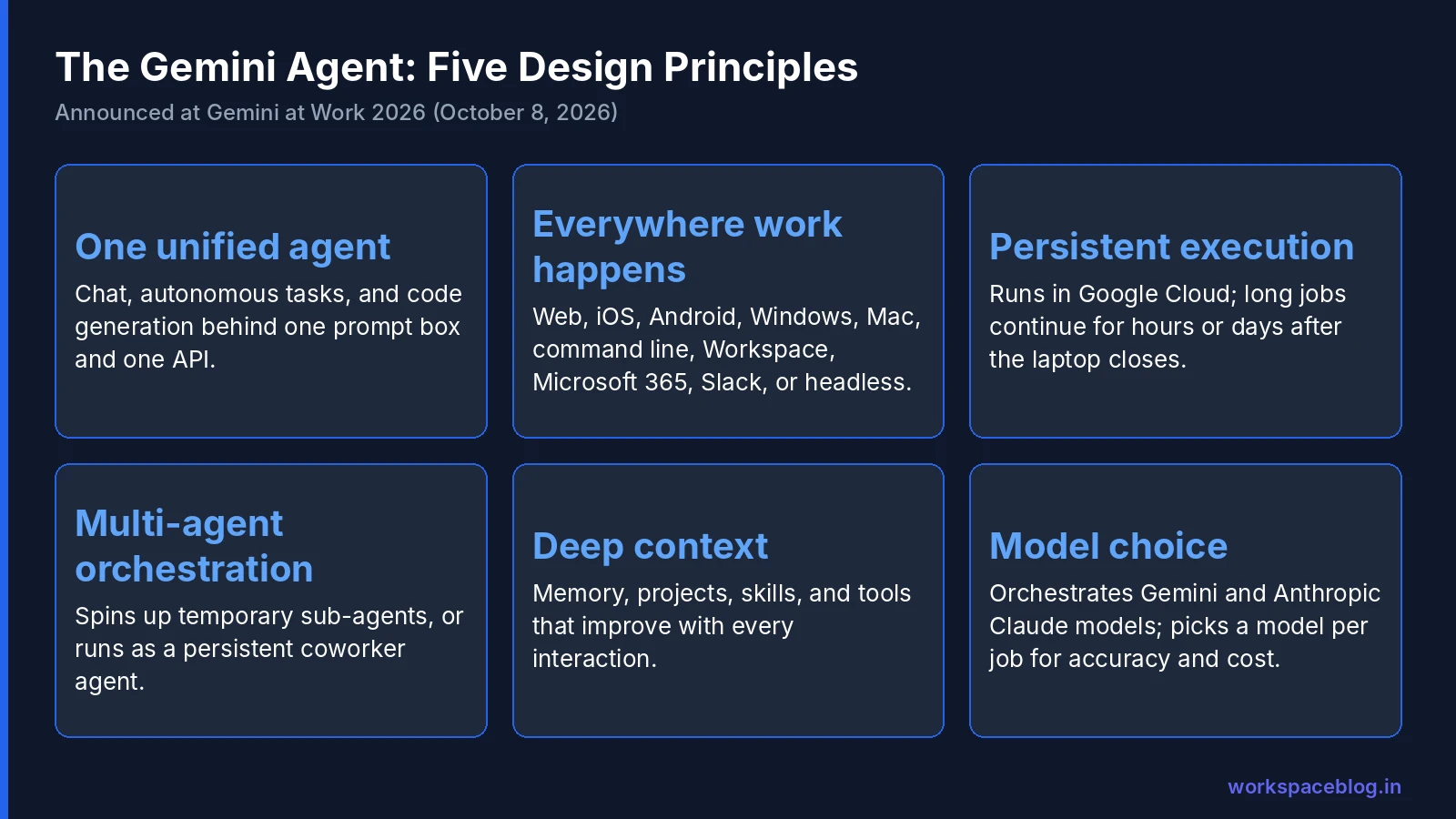
Google framed the Gemini agent around five principles. Each one has a practical consequence for IT.
1. One unified agent
Chat, autonomous task completion, and code generation live in one interface. For users, that means one place to start any request. For IT, it means one product to license, secure, and support instead of several point tools.
2. Available everywhere work happens
The Gemini agent runs on the web, iOS, Android, Windows, and Mac, from the command line, and inside Google Workspace, Microsoft 365, and Slack. It can also be embedded in third-party apps or run headless with no user interface at all.
Practical consequence: your AI policy can no longer assume AI lives in one app. Plan controls at the identity and data layer, not per app.
3. Persistent execution in the cloud
The agent runs on a secure machine in Google Cloud with one set of memories and context across devices. Long-running work (hours or even days) keeps going after the user closes their laptop.
That is a big shift from chat assistants that stop when the browser tab closes. It also means agents can spend money and touch data while nobody is watching, which is why Google paired it with spend caps and audit trails (covered below).
4. Multi-agent orchestration
For complex jobs, the Gemini agent creates temporary sub-agents, each with its own identity, and coordinates steps in parallel or in sequence. It can also run as a coworker agent: a persistent agent with a defined role that works across days and sessions, with its own Workspace account.
5. Deep context and model choice
The agent learns from interactions, and teams can create projects to give it dedicated context, skills, and tools. It orchestrates across Gemini models and Anthropic’s Claude models today, with other private and open models planned, and chooses a model per job to balance accuracy and cost.
How the Gemini Agent Remembers: Four Types of Memory
Google says the Gemini agent shares a memory and personalization graph across devices and channels, with four memory types:
| Memory type | What it stores | Example |
|---|---|---|
| Session | Context for the current task, even across days | A week-long vendor evaluation |
| Semantic | A structured knowledge base | Your product catalog and terminology |
| Procedural | How jobs get done, including skills the agent writes itself | Your month-end reporting steps |
| Episodic | A history of past actions | What it did on the last renewal |
Memory is what turns a chat assistant into something closer to a colleague. It is also new data you need to account for in retention and privacy reviews.
Tools and Skills: How the Agent Gets Things Done
Tools registry
The Gemini agent connects to enterprise systems through tools, including Confluence, Microsoft Office, Teams, Slack, Google Workspace, Git, Jira, Salesforce, ServiceNow, BigQuery, Databricks, Postgres, Snowflake, local desktop files, and any MCP server. An enterprise tools registry lets teams publish approved tools for the agent to use.
Skills registry
Skills are reusable instructions and workflows. Gemini ships with a global library, teams can publish custom skills, and users can build personal ones. Google says the agent learns from each run, improving consistency and saving tokens. A saved reporting skill, for example, can be re-run on demand.
Gemini in Google Workspace and Coworker Agents
Inside Workspace, the Gemini agent works inline in Gmail, Drive, Docs, Slides, Sheets, Chat, and Calendar, using the same memory, skills, and controls as everywhere else. Google’s examples:
- Scheduling a meeting with “the regional team” without typing names or emails, using calendar and directory context
- Chaining a task from research to a Sheets financial model to a slide deck
- Workspace Intelligence suggesting tasks you could delegate (for example, offering to “pass to Gemini” when a manager asks for a deck) and prioritizing your inbox with explanations
Coworker agents go further. Users describe a role and Gemini creates an agent with its own Workspace account: an email address at an agents subdomain (Google’s example is @agents.company.com), a calendar, Drive storage, and a place in the company directory. You can add it to Chat spaces, @mention it, or tag it in document comments, and its edits appear under its own name in version history. Coworker agents act under their own identity, not the user’s, and only see the context they’re given. Our coworker agents admin guide sets out a policy for governing them.
For how this compares with the AI features most Workspace users already have, see our Gemini for Google Workspace guide.
Governance: Who the Agent Is, What It Can Do, and What It Did
Google organized the Gemini agent’s security around four questions: who is the agent, what may it do, what did it do, and what must it never touch.
| Control | What it does |
|---|---|
| Agent identity | Every agent gets a cryptographically attested identity, governed like an employee with least-privilege access. The identity appears in logs and in any VM the agent starts. |
| Authorization | Fine-grained, role-based permissions approved by security admins. Access to external systems uses identity mapping and standards such as OAuth, so the agent never sees more than the user could. |
| Audit trail | Every action is written to an audit trail attributed to the agent and can be monitored in real time. |
| Agent Sandbox | Tasks run in an isolated sandbox with its own network boundary. |
| Agent Gateway | An “AI network firewall” that all agent traffic passes through, enforcing policies company-wide, for example, “agents may not open documents classified Need to Know.” |
These controls build on the governance features of Gemini Enterprise Agent Platform, Google’s platform (formerly Vertex AI) for building and running agents.
Cost Controls: Spend Caps, Smart Routing, and Chargebacks
Agents that run for days can run up bills. Google announced three cost controls:
- Multi-model orchestration: combine models in one project to balance quality and cost
- Smart Routing: automatically send each workload to the model with the best performance at the lowest cost
- Real-time spend caps: set a hard limit on a project’s AI spend in the Cloud Billing console. When the cap is hit, the project’s agent pauses and can be resumed with one click. Spend is tracked per project, so you can charge costs back to departments.
Google also noted that per-token prices have fallen 98% since 2024. For seat-based licensing, see our Gemini Enterprise add-on pricing guide.
Data and Analytics Announcements
Several announcements target data teams and business users who need numbers they can trust:
- Knowledge Catalog maps business definitions (such as “net margin”) across Databricks, dbt, LookML, and SAP, so the agent uses your official metric definitions.
- Reporting skills integrated with BigQuery and Knowledge Catalog let users save queries and re-run them on demand without incurring token costs.
- Smart Storage enriches unstructured files (PDFs, images, scans, audio) in place and inherits their existing security.
- Borderless Lakehouse queries Amazon S3 and Azure Data Lake with no variable egress fees, reads Salesforce Data 360, SAP, and Workday without copying data, and federates Apache Iceberg tables across Databricks Unity, Snowflake Horizon, and AWS Glue.
Industry Specializations
Google is packaging industry-specific skills and data on top of the Gemini agent:
| Specialization | Status | Highlights |
|---|---|---|
| Gemini for Financial Services | Preview | 50+ foundational skills; data from FactSet, LSEG, S&P Global, and SEC filings; confidence scores, methodology, data lineage, and citations |
| Gemini for Legal | Preview | Inherits matter-level permissions and ethical walls from NetDocuments and iManage; partners include Harvey and Onit |
| Government, Healthcare, Retail | Coming soon | - |
What’s Available Now vs. Later
Google did not publish general availability dates for most Gemini at Work announcements. Here’s what we know:
| Item | Status |
|---|---|
| Gemini Enterprise app, agents, connectors, and Gemini Notebook Enterprise | Available today, by edition |
| Gemini Enterprise Plus 30-day trial | Available from Google’s product page |
| Delegating multi-step background tasks | Early access, not yet available to all customers |
| Gemini on mobile and desktop (agent experience) | Early access |
| Third-party model choice | Listed as early access on Google’s product page, but Claude Opus 5.5 and Sonnet 5.5 became generally available in the Gemini Enterprise app on October 15, 2026 (off until an admin turns them on, billed pay-as-you-go), after reaching AI developer tools on October 8 |
| Financial Services and Legal specializations | Preview |
| Coworker agents in Workspace | Announced; Google has not published pricing or an availability date |
On pricing, Google has not yet published full licensing details for every part of the announcement, especially persistent coworker agents. Confirm with Google or your reseller how each feature is licensed for your edition before planning a rollout.
Treat the rest of the announcements as a roadmap and check Google’s release notes before planning a rollout around a specific feature.
What Admins Should Do Now
1. Map who will use what
List the teams most likely to benefit first (usually sales, support, finance, and engineering) and which data sources each one needs (Drive, SharePoint, Jira, Salesforce, BigQuery).
2. Fix permissions before connecting data
The Gemini agent respects existing permissions. That is good news, and also a warning: if a sensitive folder is shared with “anyone in the organization,” the agent can surface it to anyone who asks. Review over-shared Drive and SharePoint content first; our DLP guide covers the Workspace side.
3. Decide your agent identity policy
Coworker agents get real accounts. Decide now who may create them, which OU they live in, how they’re named, and who owns each one when its creator leaves.
4. Set budgets before pilots
Create a separate Google Cloud project per pilot team and set a spend cap on each. That keeps experiments contained and gives you clean per-team cost data.
5. Turn on audit logging and review it
Make sure agent actions land in your logging and SIEM pipeline, and assign someone to review them weekly during the pilot. Our audit logs guide covers Workspace log sources.
6. Start with the 30-day trial
Google offers Gemini Enterprise Plus at no cost for 30 days as a trial. Use it with a small, well-scoped pilot group rather than the whole company.
Conclusion
The Gemini agent is Google’s answer to a simple question: why should employees juggle five AI tools when one agent could do all of it, in the apps they already use? The vision (one agent, available everywhere, running for days, with memory and its own identity) is ambitious, and several pieces are still in early access.
For IT, the work starts now regardless of dates: clean up permissions, define who can create agents, set budgets per project, and make sure every agent action is logged. Organizations that already run Google Workspace are best placed to benefit, because the agent can use Gmail, Drive, Calendar, and Chat context from day one.
Official Google documentation:
- Welcome to Gemini at Work 2026
- Gemini Enterprise product page
- Compare editions of Gemini Enterprise
- Gemini Enterprise release notes
Related reading:
- Gemini Enterprise Agent Platform: Introduction and Integration: the platform behind Gemini Enterprise agents.
- Gemini Enterprise Workspace Add-On: Pricing and Features: licensing Gemini Enterprise for Workspace users.
- Gemini for Google Workspace: Admin Guide: the Gemini features already built into Gmail, Docs, and Meet.
This guide contains referral or affiliate links. If you sign up through one, Workspace Blog may earn a commission at no extra cost to you. Learn more.
Frequently Asked Questions
- What is the Gemini agent announced at Gemini at Work?
- The Gemini agent is what Google calls a single, universal agent for work. From one prompt box and one API it answers questions, does knowledge work, creates images and media, and writes and runs code. Users can give it objectives instead of step-by-step instructions, schedule it, or have it respond to events. It was announced by Google Cloud CEO Thomas Kurian on October 8, 2026.
- Is the Gemini agent part of Gemini Enterprise?
- Yes. The Gemini agent is the experience Google is building into Gemini Enterprise, its AI platform for businesses. It works across the Gemini Enterprise web app, mobile and desktop apps, the command line, Google Workspace, Microsoft 365, and Slack, and can run headless inside third-party applications.
- Is the Gemini agent generally available?
- Not all of it. Google did not publish general availability dates for most Gemini at Work announcements. Google's product page lists delegating multi-step background tasks, Gemini on mobile and desktop, and third-party model choice as early access features not yet available to all customers. The industry specializations for financial services and legal are in preview. Claude Opus 5.5 and Sonnet 5.5 have been generally available in the Gemini Enterprise app since October 15, 2026, once an admin turns them on.
- Which AI models does the Gemini agent use?
- Google says the Gemini agent orchestrates across Google's Gemini models and Anthropic's Claude models today, with other private and open models planned. It picks a model for each job to balance accuracy and cost, and Smart Routing can assign workloads to the best-value model automatically.
- How do admins control what the Gemini agent can do?
- Google describes four layers: a cryptographically attested identity for each agent, fine-grained role-based permissions approved by security admins, an audit trail of every action attributed to the agent, and runtime controls such as Agent Sandbox and Agent Gateway. Admins can also set real-time spend caps per project in the Cloud Billing console that pause the agent when reached.