Gemini Enterprise Security and Compliance: Data Residency, VPC Service Controls, CMEK, and Certifications
Gemini Enterprise data residency and compliance: global, US, EU, and in-country regions, ML processing, VPC Service Controls, CMEK, and certifications.

Checked against Google's official documentation, last updated 15 Nov, 2026. See what changed

For many organizations, the first question about AI isn’t “what can it do?”. It’s “where does our data go, and can we prove it?” Gemini Enterprise has answers, but they’re more detailed than a single checkbox: data residency depends on the location you choose and the features you turn on, CMEK has specific key requirements, and VPC Service Controls must be in place before you create data stores.
This guide walks through locations and machine-learning processing, the features that break residency, VPC Service Controls, CMEK, certifications, and a compliance checklist you can hand to your security and legal teams.
Google also states on the Gemini Enterprise product page that customer data isn’t used to train Google’s models or models for other customers, and isn’t sold or used for advertising.
If you already manage data regions and encryption for Google Workspace, many of the same questions apply, with AI-specific twists.
Table of contents
Open Table of contents
Gemini Enterprise Data Residency: Global, Multi-Region, or In-Country
| Location | Code | Notes |
|---|---|---|
| Global | global | Google’s recommendation unless you have regulatory reasons: better response times, newest models and features |
| United States | us | Multi-region |
| European Union | eu | Multi-region |
| Canada | ca | In-country, GA with allowlist |
| India | in | In-country, GA with allowlist |
| Japan | asia-northeast1 | In-country, GA with allowlist |
| Singapore | sg | In-country, GA with allowlist |
| United Kingdom | europe-west2 | In-country, GA with allowlist |
In-country regions require contacting your Google account team. Google added India and Singapore (June 30, 2026) and Japan and the UK (July 6, 2026) during the year.
At rest vs. machine-learning processing
Two separate commitments matter:
- At-rest data residency (DRZ): where your stored data (indexes, sessions, notebooks) lives
- Machine-learning processing (MLP): where prompts are processed by models
For base functionality, Google lists both at-rest DRZ and MLP in us, eu, and in-country regions. Feature by feature, it varies, which is where most compliance surprises come from.
Features That Change the Residency Picture
From Google’s locations page and release notes (as of November 2026):
| Feature | Residency support |
|---|---|
| Gemini 3.8 Flash | DRZ and MLP in us, eu, sg, UK (europe-west2) and, since November 12, 2026, Canada and Japan (on by default there); not in IN |
| Gemini 4 Argon | DRZ and MLP in us and eu; not offered in CA, IN, JP, SG, UK (its toggle defaults to on from October 27, 2026) |
| Gemini 4 Carbon, Gemini 4 Hydrogen | DRZ and MLP in us and eu, also offered in global; not offered in-country; off by default in the web and mobile apps (Carbon from November 10, Hydrogen from November 12, 2026) |
| Gemini 3.1 Pro (limited availability) | DRZ and MLP in us only; not in eu or in-country regions |
| Claude Opus 5.5, Sonnet 5.5 | DRZ and MLP in us and eu (also offered in global); not offered in CA, IN, JP, SG, UK; off until an admin enables third-party models |
| Gemini 3.7 Flash, 3.6 Flash | DRZ and MLP in us and eu; global only for in-country regions |
| Gemini 3.1 Flash image, Gemini 2.5 Flash image | DRZ and MLP in us and eu; not in-country |
| Gemini 3 Pro image, video generation, dynamic facets | Global only |
| Gemini 3.5 Flash | DRZ and MLP in us, eu, and in-country |
| Gemini 2.5 Pro | DRZ and MLP in us and eu; not offered in CA, IN, JP, SG, UK (Canada and Japan ended October 20, 2026) |
| Grounding with Google Search | Global only: and DRZ, VPC-SC, and Access Transparency don’t apply when it’s on |
| Web Grounding for Enterprise | DRZ and MLP in us and eu; not in-country |
| AI developer tools (Antigravity, Android Studio) | In us and eu, follow the selected model’s commitments; not in-country |
| Model Armor | DRZ and MLP in us, eu, in-country; not global |
| CMEK | Not in global |
| Gemini Notebook for business (formerly Gemini Notebook Enterprise): Content Studio (audio and video overviews, slide decks, infographics) | At-rest DRZ in us and eu, no MLP commitment; not available in-country |
| Gemini Notebook for business: Discover Sources | No DRZ or MLP in any location |
| Agent Runtime, Memory Bank, Sessions | At-rest DRZ in us, eu, in-country |
| Agent Runtime code execution | At-rest DRZ in us only |
Since November 6, 2026, the console also enforces your resource locations organization policy. If a project’s policy doesn’t allow global, admins can’t turn on Gemini models that aren’t supported in the app’s location and route to the global endpoint; their toggles are unavailable, and a warning appears under any such model that is already on so you can turn it off.
Practical consequences:
- In some in-country regions, using certain newer models requires confirming a warning that sends traffic to the global endpoint. Train admins not to click through it casually.
- Grounding with Google Search temporarily logs certain customer data. If you need strict residency, use Web Grounding for Enterprise in
usoreu, or turn web grounding off. - Model Armor templates created in CA, IN, JP, SG, or UK before a regional change continue to call out of region: recreate them.
Google’s locations page notes some inconsistencies (for example, between CMEK and Notebook tables and their notes), so validate the exact features you plan to use with your account team.
VPC Service Controls
What a perimeter does
Adding your Gemini Enterprise project to a VPC Service Controls perimeter, with the Discovery Engine API (discoveryengine.googleapis.com) as a restricted service, means:
- The API can’t be reached from the public internet
- The Gemini Enterprise UI is blocked except where ingress rules allow it
- New data stores are blocked until an admin adds allowed data sources and egress domains in managed organization policy constraints
- Existing data stores keep working
Organization policy constraints for connectors
| Constraint | Use |
|---|---|
| Restrict allowed data sources for data connectors | Choose which connector types may be created; well-known domains (such as graph.microsoft.com) are allowed automatically |
| Restrict egress domains for data connectors | Add organization-specific domains (your Atlassian site, internal hosts) |
For custom MCP servers, add custom_mcp to allowed data sources and allow the server’s domains (see our MCP guide).
Access levels
With Access Context Manager, you can gate access by IP address, user identity, or device type (device checks need a Chrome Enterprise Premium license).
The ordering rule
Enforcing a perimeter on a project that already has data stores isn’t supported. The workaround is deleting and recreating them. The same applies to individual connectors: Microsoft Teams and Outlook data stores can’t have VPC-SC applied retroactively. Set up the perimeter first, then create data stores. Test in dry-run mode before enforcing.
Also note: since September 9, 2026, website URL ingestion in Gemini Notebook for business is blocked under VPC Service Controls.
Customer-Managed Encryption Keys (CMEK)
Key requirements
| Requirement | Detail |
|---|---|
| Key type | Cloud KMS symmetric key |
| Main key location | Multi-region us or europe |
| Rotation setting | ”Never (Manual rotation)”; key rotation is supported (GA since September 14, 2026) and rotated data is re-encrypted automatically |
| Third-party connectors | Also need three single-region keys: us-east1, us-central1, us-west1 (US) or europe-west1, europe-west4, europe-north1 (EU) |
| EKM / HSM | Supported (EKM/HSM is GA with allowlist); needs at least 1,000 QPM of encrypt/decrypt headroom; EKM must be reachable more than 90% of any 30+ second window |
If billing problems, persistent quota exhaustion, or key unreachability last more than 12 hours, the service automatically turns down the CMEK configuration: monitor your key health.
Setup
- Create the key(s) and grant
roles/cloudkms.cryptoKeyEncrypterDecrypterto the Discovery Engine service agent and the Cloud Storage service agent (without the latter, CMEK imports fail) - Register: Gemini Enterprise → Settings → CMEK → Add key (or
UpdateCmekConfigwithset_default=true). You need Gemini Enterprise Admin (roles/discoveryengine.agentspaceAdmin) - Register the three single-region keys for third-party connectors
- Confirm
"state": "ACTIVE"and"isDefault": true - Only then create apps and data stores, and verify each has a
cmekConfig
Terraform users can manage this with the google_discovery_engine_cmek_config resource.
CMEK limitations
- Not supported in
global - Resources created before registration aren’t protected
- One key per project by default (more needs a quota increase)
- All connectors in a multi-connector app must use the same CMEK configuration
- First-party connectors aren’t CMEK-compliant, except import-once and periodic BigQuery and Cloud Storage connectors
- Keys can’t be changed once applied (key versions can be rotated); the console can’t remove them (use
DeleteCmekConfig, a long-running operation that can take a couple of days)
Certifications
For Gemini Enterprise Standard and Plus and Gemini Notebook for business, Google says the products have many of the following certifications:
| Category | Certifications |
|---|---|
| Healthcare | HIPAA |
| US government | FedRAMP |
| ISO | 27001, 27017, 27018, 27701 |
| SOC | SOC 1, SOC 2, SOC 3 |
| Payments | PCI DSS |
| Germany / EU | BSI C5:2020 |
Federated data stores became supported in FedRAMP High Assured Workloads in August 2026. Always confirm the specific product and feature on Google’s compliance pages before relying on a certification.
Documented exclusions
| Product | Not covered |
|---|---|
| AlphaEvolve | ITAR, FedRAMP Moderate/High, IL4, IL5 |
| Antigravity | Access Transparency, FedRAMP Moderate/High, IL4/IL5, ISO (including 27001 and 42001), ITAR, SOC 1/2/3 |
If you’re regulated, keep AlphaEvolve and AI developer tools out of in-scope projects, or document the exception.
Other security controls
| Control | Standard / Plus | Notebook Enterprise |
|---|---|---|
| Data residency | Supported, with product limitations | Supported, with notebook limitations |
| CMEK | US and EU multi-region only | US and EU multi-region only |
| VPC Service Controls | Supported | Supported |
| Access Transparency | Supported (not in global) | Supported |
Usage audit logs
Gemini Enterprise writes usage audit logs to Cloud Logging: who did what, when and from where, across search, assistant, agent, data connector and file upload operations. Metadata such as resource names, timestamps and IAM changes is always logged. Prompt and response text is logged only if you turn on “Enable logging of prompt inputs and response outputs” in the observability settings; otherwise those fields show <elided>.
- Turning on audit logging needs Gemini Enterprise Admin (
roles/discoveryengine.agentspaceAdmin); reading the logs needs Logs Viewer (roles/logging.viewer) - Find them in Logs Explorer under the
gemini_enterprise_user_activityandgen_ailog names - Logs go to the
_Defaultbucket. If you log prompts, restrict access with log views, IAM conditions or a sink to a separate project, because those logs then hold sensitive data
Questions Auditors Will Ask and Where the Answers Are
| Question | Where to find the evidence |
|---|---|
| ”Where is our data stored?” | The location chosen for each app and data store, plus Google’s locations page |
| ”Where are prompts processed?” | Feature-by-feature MLP commitments for the models and features you enabled |
| ”Who can reach the service?” | VPC Service Controls perimeter, ingress rules, and Access Context Manager levels |
| ”Is the data encrypted with our keys?” | Each app’s and data store’s cmekConfig, and Cloud KMS key access logs |
| ”Can Google staff access our data?” | Access Transparency logs (not available in global) |
| “Which external services receive our data?” | Allowed data sources and egress domains in organization policy; federated connectors; web grounding setting |
| ”Is customer data used to train models?” | Google’s product terms and data-use commitments |
| ”What did the AI do with sensitive data?” | Model Armor detections and Cloud Audit Logs |
Collect this evidence once, during setup, and refresh it whenever you add a connector or enable a new feature.
A Compliance Checklist
| # | Decision or task | Owner |
|---|---|---|
| 1 | Choose location (global, us, eu, or in-country) per regulatory need | Security + legal |
| 2 | List the features you’ll use and check each against the locations table | Platform team |
| 3 | Decide on web grounding (off, Web Grounding for Enterprise, or Google Search) | Security |
| 4 | Create the VPC-SC perimeter in dry run, then enforce | Cloud security |
| 5 | Configure connector org policy constraints (data sources, egress domains) | Cloud security |
| 6 | Create and register CMEK keys (plus single-region keys for third-party connectors) | Cloud security |
| 7 | Only then create apps and data stores; verify cmekConfig | Platform team |
| 8 | Enable Model Armor in-region and Cloud Logging | Security |
| 9 | Exclude non-compliant tools (AlphaEvolve, Antigravity) from regulated projects | Platform team |
| 10 | Document residency, processing, and subprocessors in your records | Privacy / legal |
| 11 | Monitor key health and VPC-SC violations | SOC |
For identity and admin hardening on the Workspace side, see our security hardening guide.
Conclusion
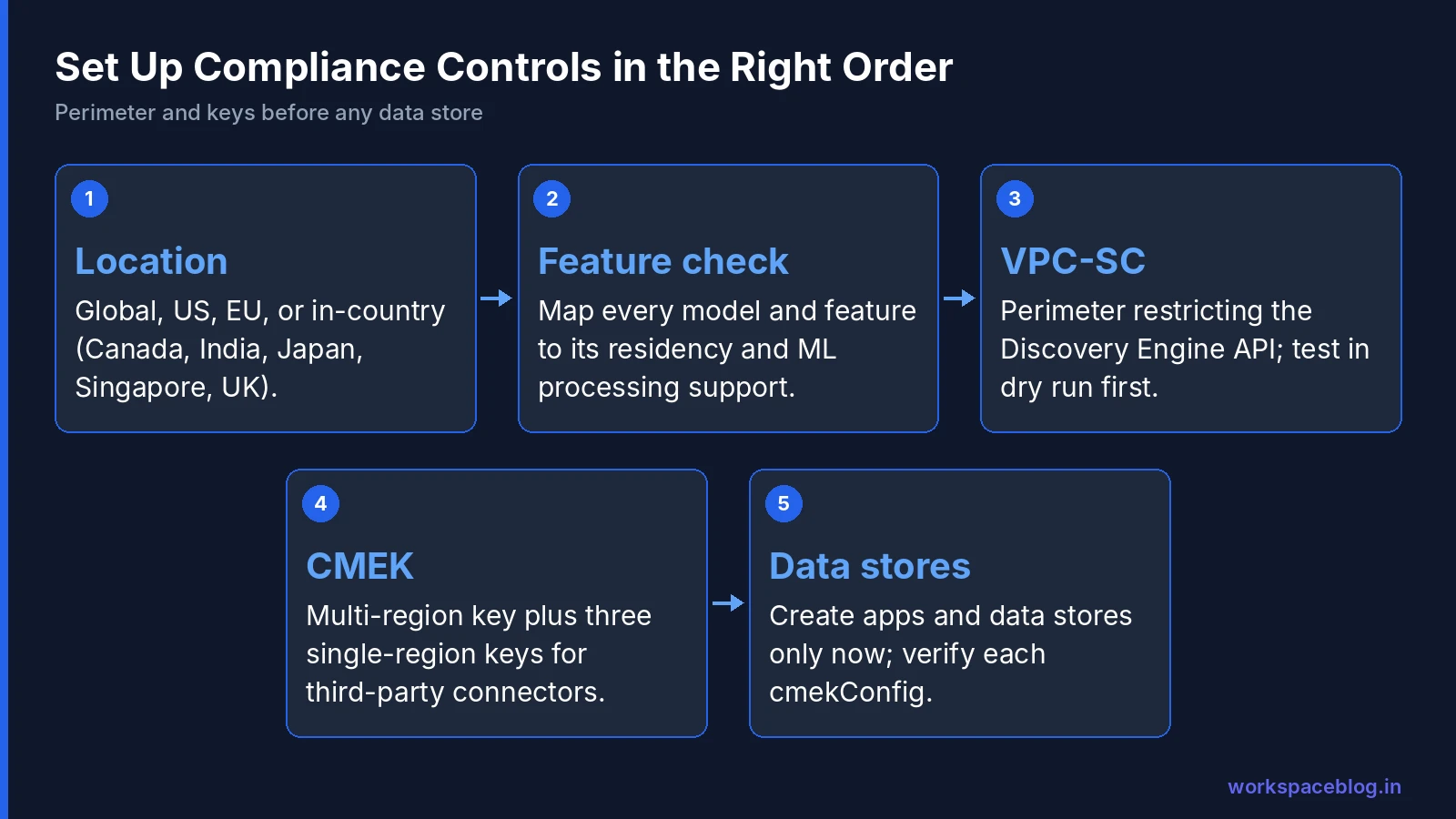
Gemini Enterprise can meet demanding compliance requirements: US and EU multi-regions, in-country regions for Canada, India, Japan, Singapore, and the UK, VPC Service Controls, CMEK with EKM or HSM keys, and a broad certification list. But residency is feature-dependent, and the order of setup matters: perimeter and keys first, data stores second.
Choose your location, map every feature you intend to use against Google’s locations table, decide on web grounding, and build the perimeter and keys before you connect a single data source. Do that, and your security team can approve Gemini Enterprise for the same sensitive data your users already handle in Google Workspace every day.
Official Google documentation:
- Data residency and ML processing locations
- Secure your app with VPC Service Controls
- Customer-managed encryption keys
- Compliance and security controls
- Access Gemini Enterprise usage audit logs with Cloud Logging
- Gemini Enterprise release notes
Related reading:
- Model Armor Guide: screening prompts and responses in-region.
- Securing AI Agents: Agent Identity, Registry, and Gateway: identity and policy controls for agents.
- Gemini Enterprise Connectors and Data Stores: how connectors interact with residency and CMEK.
This guide contains referral or affiliate links. If you sign up through one, Workspace Blog may earn a commission at no extra cost to you. Read our referral and advertising disclosure.
Frequently Asked Questions
- Where can Gemini Enterprise store data?
- Gemini Enterprise offers a global location, the us and eu multi-regions, and in-country regions for Canada (ca), India (in), Japan (asia-northeast1), Singapore (sg), and the United Kingdom (europe-west2). The in-country regions are generally available with an allowlist through your Google account team. Google recommends global unless you have security or regulatory reasons to keep data in a specific area, because global gets the latest models and features first.
- Does data residency cover AI processing as well as storage?
- For base functionality, Google commits to at-rest data residency and machine learning processing in the us and eu multi-regions and in-country regions, subject to listed limitations. Some features are global only (for example certain newer models in in-country regions, video generation, and Grounding with Google Search) and data residency, VPC Service Controls, and Access Transparency don't apply when Grounding with Google Search is enabled.
- What are the CMEK requirements for Gemini Enterprise?
- Use a Cloud KMS symmetric key in the us or europe multi-region with the rotation period set to Never (manual rotation), and register it before creating apps and data stores. Third-party connectors also need three single-region keys in the same geography. Grant roles/cloudkms.cryptoKeyEncrypterDecrypter to the Discovery Engine and Cloud Storage service agents. CMEK isn't supported in the global location, and each project is limited to one key by default.
- How do VPC Service Controls work with Gemini Enterprise?
- Add the project to a perimeter and restrict the Discovery Engine API (discoveryengine.googleapis.com). The API then can't be reached from the public internet, the UI is blocked except where ingress rules allow it, and new data stores need allowed data sources and egress domains in managed organization policy constraints. Enforcing a perimeter on a project that already has data stores isn't supported. You must recreate them.
- Which compliance certifications does Gemini Enterprise have?
- Google says Gemini Enterprise Standard and Plus editions and Gemini Notebook for business have many of these certifications: HIPAA, FedRAMP, ISO 27001, 27017, 27018, and 27701, SOC 1, 2, and 3, PCI DSS, and BSI C5:2020, and directs customers to Google's security pages to confirm specific products. AlphaEvolve and Antigravity have documented exclusions.