Gemini Enterprise Workspace Add-On: Features, Pricing, and IT Admin Deployment Guide
-
 Mohit
Mohit - 22 Sep, 2026
- Updated 26 Oct, 2026

If your organization runs Google Workspace Enterprise and you’re evaluating whether to add the Gemini Enterprise add-on, this guide gives you the complete picture: what you actually get beyond the Business tier, what compliance controls IT admins need to configure, and how to make the business case for the investment.
Note: Google no longer sells the old Gemini Business and Gemini Enterprise add-ons for Workspace. Gemini is now included in Workspace Business and Enterprise plans, and Gemini Enterprise is a separately licensed product; its Business edition can be bought through Google sales or a Google Cloud partner and managed in the Workspace Admin console. This guide covers the AI features and admin controls around Gemini in Workspace. For information on the Gemini Enterprise Agent Platform (Agentspace, search agents, third-party connectors), see our separate deep-dive on the Agent Platform.
Gemini Tiers: Where Does “Enterprise” Fit?
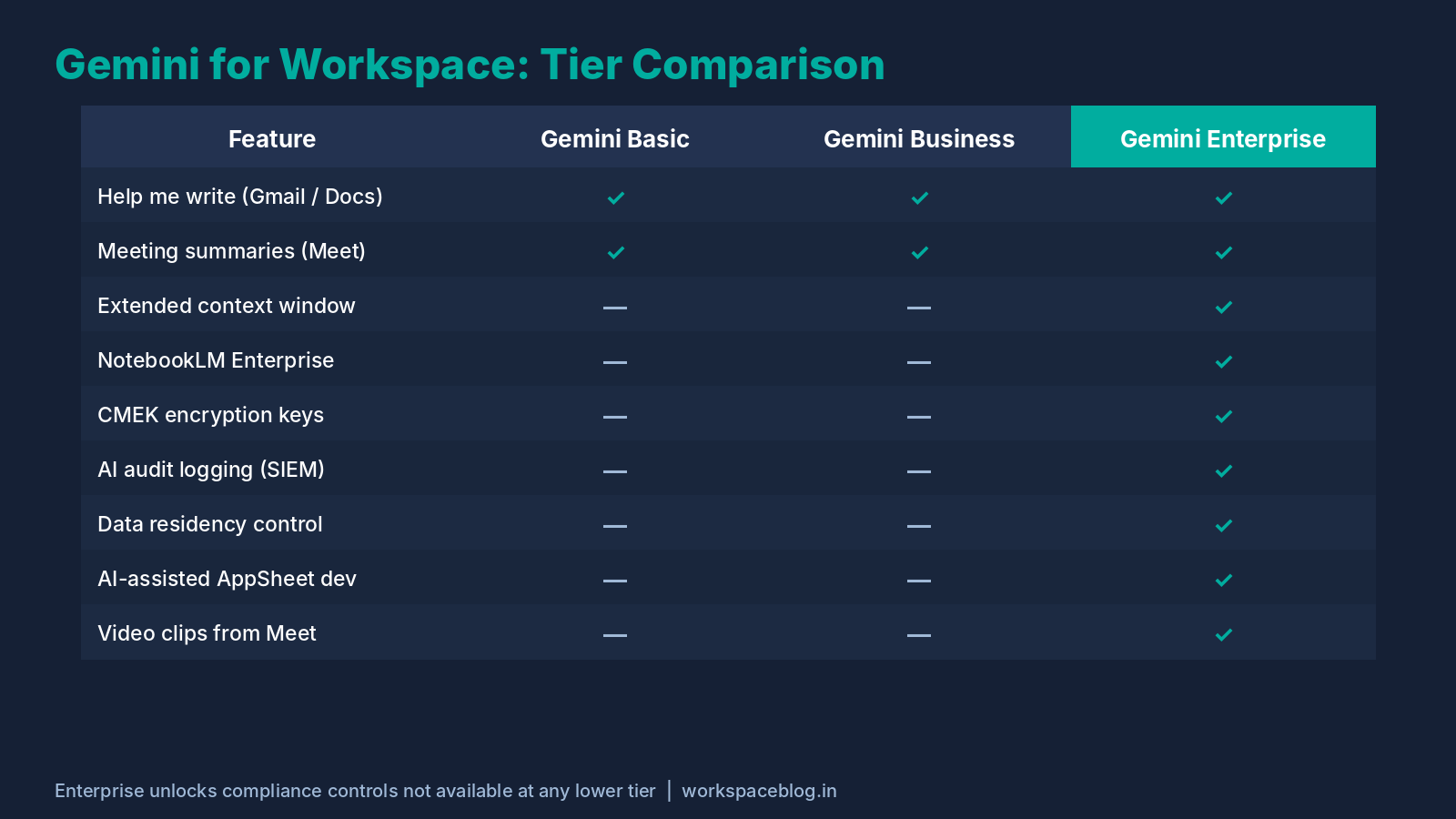
Google’s AI offer for Workspace now looks like this:
| Tier | Included With | Key AI Capabilities |
|---|---|---|
| Basic access to Gemini | Business Starter | Gemini app, Gemini in Gmail and Vids, with usage limits |
| Expanded access to Gemini | Business Standard/Plus, Enterprise Standard/Plus | Gemini in Gmail, Docs, Sheets, Slides, Drive, Meet, and Chat |
| Gemini Enterprise | Separate licence (Business, Standard, Plus and Frontline editions) | Agents, enterprise search, connectors, and the features below |
Gemini Enterprise is specifically designed for organizations with higher requirements around AI capability, compliance, and governance. It’s more than “more AI”: it adds features and controls that don’t exist in the Business tier.
What Gemini Enterprise Adds Over Gemini Business
1. Latest Gemini Models with Extended Context Window
Gemini Enterprise gives admins direct control over Google’s newest models, such as Gemini 4 Argon, which has a 1,048,576-token context window and became generally available in the Gemini Enterprise web app, mobile app and AI developer tools on October 13, 2026. Admins decide which models users see, and can turn on third-party models such as Claude Opus 5.5 and Sonnet 5.5, which are billed pay-as-you-go.
What this means practically:
- Analyze a full-length technical specification or legal contract in a single pass
- Process entire project email threads spanning months without summarizing first
- Feed in multi-department reports for consolidated analysis
- Review extensive meeting transcripts for cross-cutting action items
For knowledge-intensive work (legal review, technical documentation, compliance reporting) this changes what’s possible.
2. Gemini Notebook Enterprise (formerly NotebookLM Enterprise)
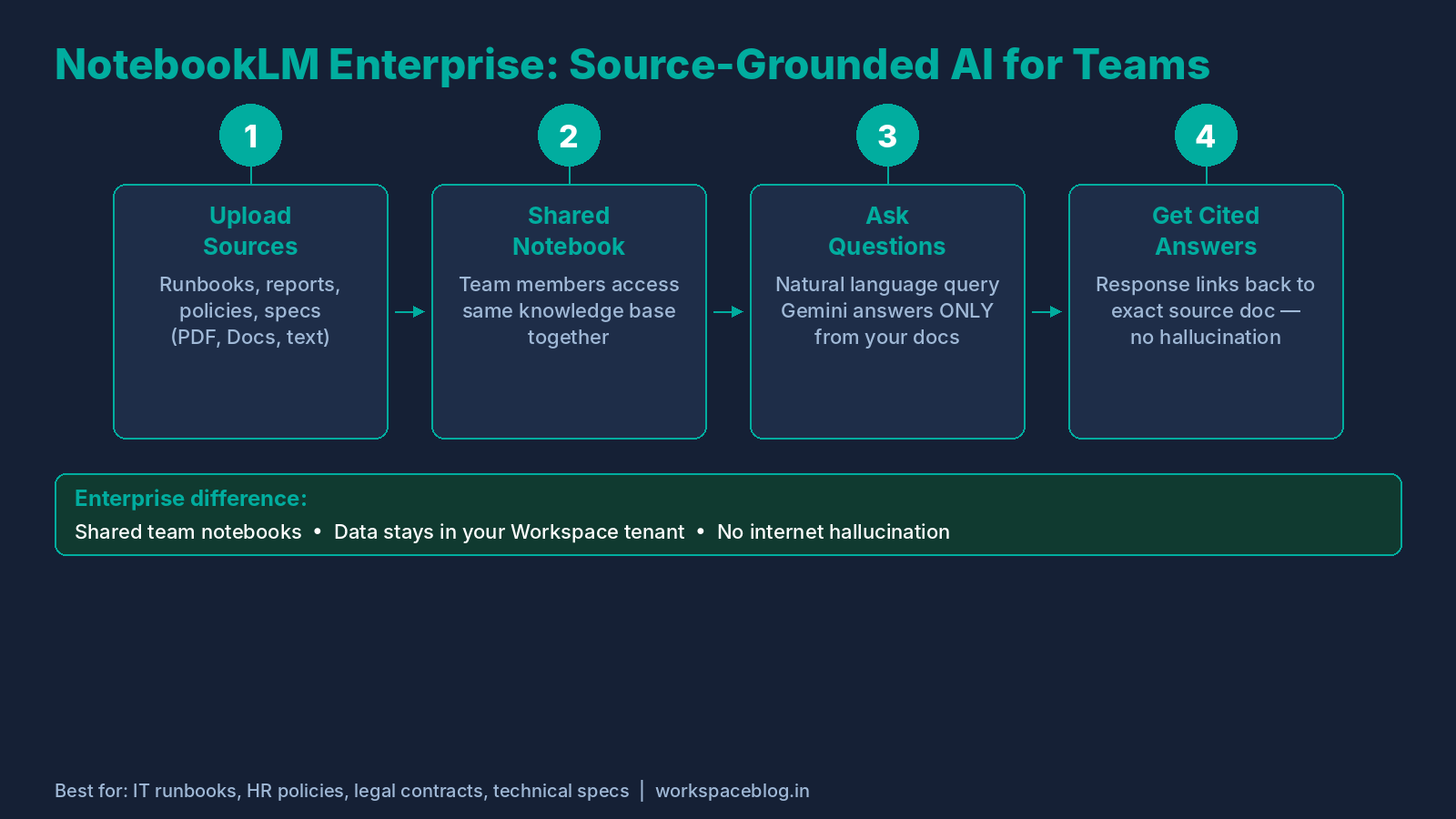
Gemini Notebook (renamed from NotebookLM in July 2026), Google’s AI research and knowledge management tool, has an enterprise version, Gemini Notebook Enterprise, which runs in your Google Cloud project:
- Shared notebooks: Teams can create shared AI-powered knowledge bases grounded in your organization’s own documents
- Source grounding: Gemini answers questions only from documents YOU upload, minimizing hallucination by keeping the model grounded in your specific corpus
- Audio Overview: Generate a podcast-style discussion of any uploaded source document
- Enterprise data controls: Notebooks run in your Google Cloud project, with data residency available in the
usandeumulti-regions
IT use case: Your team uploads all internal runbooks, incident reports, and architecture docs to a shared Gemini Notebook notebook. New engineers query the notebook with questions rather than searching scattered docs. The AI answers with citations to the exact source document.
3. Agents, Connectors and Actions
Google’s edition guide describes the core of Gemini Enterprise as answers that combine your files and work apps with web search, actions taken without leaving the current context, and prebuilt and no-code agents. Connectors respect the permissions users already have in third-party apps, so an agent cannot show someone a file they could not open themselves.
IT use case: connect your ticketing system, wiki and shared drives, then give the service desk an agent that answers “how do I” questions with links to the source articles.
4. Choosing an Edition
| Edition | Google’s description | Admin notes |
|---|---|---|
| Business | Small and medium-sized businesses and small teams in large enterprises | Set up at business.gemini.google without a Google Cloud project; can be included with an existing Workspace plan; no Gemini Enterprise mobile app |
| Standard | Employees in large organizations with complex environments | Managed in the Google Cloud console |
| Plus | Employees who need the most comprehensive AI tools and agent building | Managed in the Google Cloud console |
| Frontline | Frontline workers who need a cost-effective option | Managed in the Google Cloud console |
Google states you cannot upgrade from the Business edition to the other editions, because there is no data migration path. Choose carefully before a large rollout.
Security and Compliance: The Enterprise-Grade Controls
This is often the deciding factor for regulated industries.
Data Residency Guarantees
Gemini Enterprise Standard and Plus customers get data residency by choosing the us or eu multi-region when they create the app in the Google Cloud console. In-country locations for Canada, India, Japan, Singapore and the United Kingdom are generally available with an allowlist through your Google account team. Data residency does not apply when Grounding with Google Search is turned on. For organizations subject to GDPR or data localization laws, decide the location before you create the app.
This is separate from Workspace data regions (Admin Console → Data → Compliance → Data regions), which cover Workspace data. Google’s data residency documentation covers the Standard and Plus editions; for the Business edition, check the Business edition Help Center.
Audit Logging for AI Interactions
Gemini use in Workspace apps is recorded in Gemini for Workspace log events, which you can search and export to Sheets or CSV. The attributes Google lists describe usage, not the text of prompts and responses:
What gets logged:
- Which user invoked Gemini
- Which application (Gmail, Docs, Meet, etc.)
- The timestamp and session context
This creates a complete audit trail for compliance reviews, insider threat investigations, or regulatory audits.
Setup: Admin Console → Reporting → Audit and investigation → Gemini for Workspace log events
Customer-Managed Encryption Keys (CMEK)
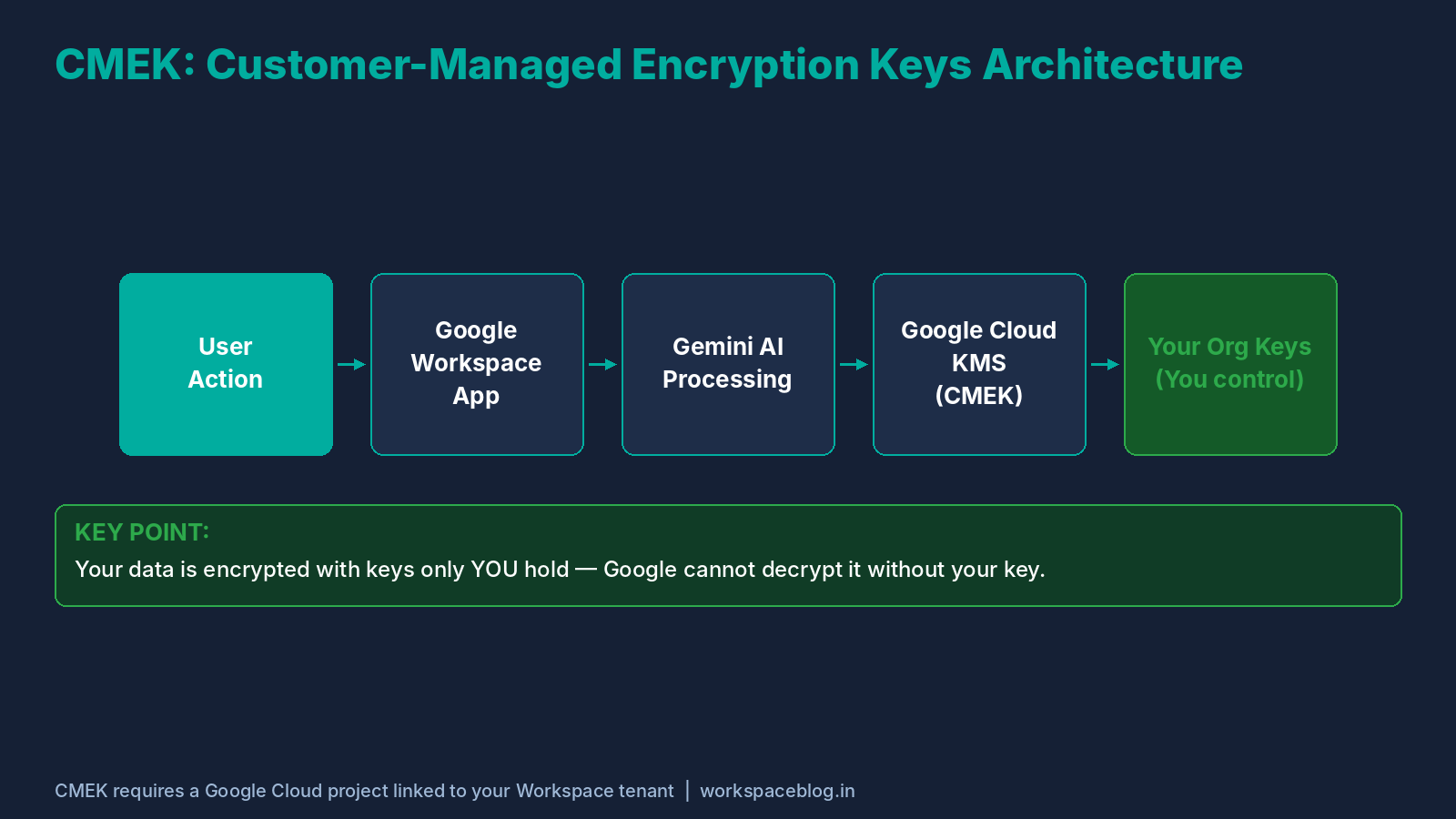
For organizations requiring control over their encryption keys (healthcare, finance, government), Gemini Enterprise Standard and Plus support CMEK through Cloud Key Management Service for the US and EU multi-region APIs only. CMEK and Access Transparency are not supported in the global location. Using an external key manager or HSM with CMEK is generally available with an allowlist.
For Workspace content itself, the equivalent control is Google Workspace client-side encryption, which is a separate feature with its own edition requirements.
Granular Feature Controls Per OU
Admins get fine-grained controls over:
- Which Gemini features in Workspace services are enabled for which organizational units or configuration groups (Generative AI > Gemini for Workspace > Feature access)
- Gemini access for specific apps only (e.g., enable for Gmail/Docs, disable for Sheets)
- Per-user quota limits and quota multipliers in Gemini Enterprise Standard, Plus and Standard Emerging Market editions (Usage & Spending > Usage, generally available since October 22, 2026)
- Which models, including third-party models, users can select in the Gemini Enterprise app
Pricing: What Does Gemini Enterprise Cost?
Gemini features in Workspace apps are included in Workspace Business and Enterprise plans, so there is no separate Gemini add-on to buy. Gemini Enterprise is licensed separately, and Google does not publish one list price for it through Workspace; get a quote from Google sales or a Google Cloud partner, as rates vary by edition, region, and commitment terms.
Budget planning considerations:
License selectively. You don’t need to license every user. Start with power users (managers, analysts, HR, legal, sales) who will see the most ROI. Licensing 20–30% of your org at Enterprise tier often delivers the majority of productivity value.
Calculate time savings. A conservatively estimated 1 hour/week saved per knowledge worker × 52 weeks × fully-loaded hourly rate often exceeds the per-user license cost. Document this for CFO approval.
Ask about terms. Seat count and commitment length can affect your quote, so ask your Google account team or partner to price the options you are considering. Google does not publish standard discount rates.
IT Admin Deployment Guide
Pre-Deployment Checklist
Before enabling Gemini Enterprise org-wide:
- Choose the Gemini Enterprise edition (Business can be included with an existing Workspace plan; Standard, Plus and Frontline are managed in Google Cloud)
- If you bought Gemini Enterprise, verify its licences are assigned in the Admin Console
- Review and accept the Cloud Data Processing Addendum (CDPA)
- Choose the app location (
usoreu) if you need data residency - Draft and approve AI Acceptable Use Policy with legal/compliance
- Prepare training materials for end users
- Identify 10–15 champion users for pilot program
Enabling Features by Organizational Unit
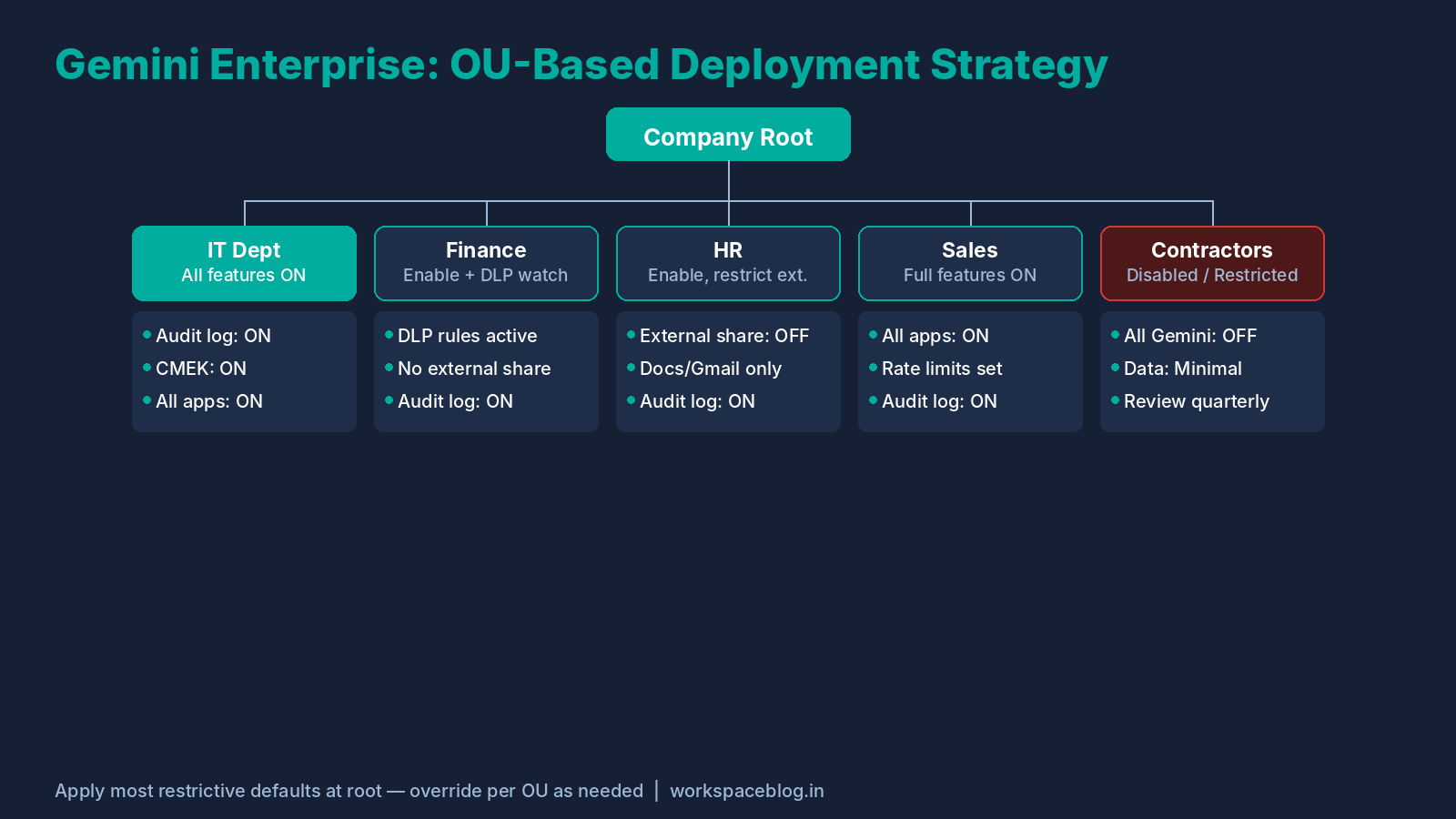
Structure your OU rollout to match your risk and governance requirements:
Company Root
├── IT_Department         → Enable all features
├── Finance               → Enable with DLP monitoring
├── HR                    → Enable, restrict external sharing
├── Sales                 → Enable full features
└── Contractors           → Disable or restrict to read-only
Training Your Organization
End-user training does more for Gemini adoption than anything else you can do.
30-minute all-hands demo (week 1):
- Show 3 real use cases relevant to each department
- Live demo of Help me write in Gmail
- Demo of meeting summary in Meet
- Open Q&A
Department-specific workshops (weeks 2–4):
- HR: Job descriptions, policy drafts, onboarding documentation
- Finance: Spreadsheet analysis, report summarization
- IT: Runbook queries via Gemini Notebook, incident summary drafting
- Sales: Email drafting, CRM note consolidation
Self-service resources:
- Internal Google Site with Gemini tips and prompt guides
- Short recorded clips of key features
- Link to Google’s official Gemini for Workspace Learning Center
Monitoring Adoption and ROI
Admin Console → Generative AI → Gemini reports → Org-level usage
Key metrics to monitor:
- Monthly active users (MAU) per Gemini feature
- Low adoption features → indicate need for more training
- High adoption features → quantify time savings
- Gemini-assisted content creation as a share of total
Build a quarterly report for leadership showing adoption trends and estimated productivity impact. This also justifies continued or expanded AI investment.
Common Enterprise Concerns, Answered
“Will Gemini use our proprietary data to train Google’s models?”
No. For Google Workspace Enterprise customers, your data is processed to generate AI responses but is not used to train or improve Google’s foundation models. This is covered in the Cloud Data Processing Addendum (CDPA, previously the Data Processing Amendment). Verify at Admin Console → Account → Account settings → Legal and compliance.
“Can employees leak sensitive information via Gemini prompts?”
Gemini for Workspace log events show who used Gemini, where, and when, which supports accountability, although they don’t record prompt text. Your AI Acceptable Use Policy should explicitly cover what data should never be entered into AI prompts (customer PII, trade secrets, unreleased financial data).
“What happens if Gemini generates incorrect information?”
Gemini can hallucinate, especially for factual or numerical claims. Recommended mitigations:
- Train users to verify AI-generated facts before using them externally
- Use Gemini Notebook Enterprise for high-stakes research (source-grounded, not open-ended)
- Build human review steps into workflows where AI-generated content goes to customers or regulators
“How does Gemini interact with our existing security tools?”
Google lists data residency, CMEK, VPC Service Controls and Access Transparency as supported for Gemini Enterprise Standard and Plus, with the exception that data residency, CMEK, VPC Service Controls and Access Transparency don’t apply when Grounding with Google Search is turned on. Check the compliance and security controls page for the current list before you sign off.
Is Gemini Enterprise Right for Your Organization?
Strong yes if:
- You have 200+ knowledge workers doing high-volume document, email, or data work
- You operate in a regulated industry (financial services, healthcare, legal)
- You have data residency or encryption key management requirements
- You want agents that work across your Workspace and third-party apps
- You need source-grounded AI for internal knowledge management (Gemini Notebook Enterprise)
Consider starting with the Gemini features already in your Workspace plan if:
- You’re under 100 seats and still validating AI adoption
- Your compliance requirements are not stringent
- You want to establish baseline ROI before committing to Enterprise pricing
Conclusion
The Gemini Enterprise Google Workspace add-on delivers features and governance controls (agents, Gemini Notebook Enterprise, CMEK, data residency, model controls) that aren’t part of the Gemini features included in Workspace plans. For IT administrators at organizations with compliance obligations, the governance controls alone often justify the investment.
The organizations seeing the greatest return combine solid technical deployment with intentional change management, because the barrier to value isn’t the technology, it’s adoption. Start with a 30-seat pilot in your highest-value department, measure time savings rigorously, and use that data to build the business case for broader rollout.
Official Google documentation:
- Gemini Enterprise – Business Edition through Google Workspace subscriptions
- Gemini AI features now included in Google Workspace subscriptions
- Manage your Gemini Enterprise - Business edition subscription
- Gemini for Workspace log events
- Choose a geographic location for your data
- Choose your Gemini Enterprise edition
- Gemini Enterprise compliance and security controls
- Gemini Enterprise data residency
- Streamlining admin controls for Gemini Enterprise in the Google Workspace Admin console
Related reading:
- Gemini for Google Workspace: Complete Admin Guide: covers the core Gemini features in Gmail, Docs, Meet, and Sheets before you evaluate the Enterprise tier upgrade.
- Gemini Enterprise Agent Platform: Introduction & Integration: the companion platform for enterprise-wide AI search and agents, separate from the Workspace add-on.
- Google Workspace Admin Security: 10-Point Hardening Guide: the security controls that should be in place before deploying any AI features at scale.
- Google Workspace Business Plans Comparison: if you’re still choosing which Workspace edition qualifies for the Enterprise add-on.
This guide reflects Gemini Enterprise Workspace add-on features and pricing as of September 2026. Google updates tier features and pricing regularly. Always verify at workspace.google.com/pricing or with your Google reseller before making licensing decisions.
This guide contains referral or affiliate links. If you sign up through one, Workspace Blog may earn a commission at no extra cost to you. Learn more.