Google Cloud Agent Marketplace and Gemini Enterprise: How to Find, Buy, Govern, and Publish Partner AI Agents
How the Google Cloud AI Agent Marketplace works with Gemini Enterprise: finding, buying, registering, governing, and publishing partner agents.

Checked against Google's official documentation.

No organization will build every agent it needs. Many of the most useful agents will come from the software vendors you already use: your CRM, your document platform, your data providers. The Google Cloud AI Agent Marketplace is how those partner agents reach Gemini Enterprise: find a validated agent, buy it with your Google Cloud account, register it, and make it available to employees in the Agent Gallery.
This guide covers how discovery, procurement, and registration work, how to govern third-party agents, what to check before buying, and how software vendors publish their own agents.
If you already govern Marketplace apps in Google Workspace, many of the same habits apply, with a few important differences covered below.
Key Takeaways
- Partner agents are A2A agents sold through Google Cloud Marketplace with consolidated billing.
- A Billing Administrator buys; a Gemini Enterprise admin registers with order-ID validation.
- Employees find registered agents in the Agent Gallery.
- Console Model Armor settings don’t automatically protect Marketplace agents: vet each partner’s security.
- Agent Marketplace access requires Standard, Plus, Pay-as-you-go, or Frontline.
Table of contents
Open Table of contents
- Where Google Cloud Agent Marketplace Partner Agents Come From
- How It Works: From Discovery to Use
- Edition Requirements
- How Partner Agents Connect: A2A Under the Hood
- Governance: Treat Agents Like SaaS Apps (Because They Are)
- Buy, Build, or Customize?
- For Software Vendors: Publishing an Agent
- Worked Example: Adding a Partner Agent for Sales
- Partner Agents vs. Workspace Marketplace Apps
- Rollout Tips
- Budgeting for Partner Agents
- Conclusion
Where Google Cloud Agent Marketplace Partner Agents Come From
| Source | What it offers |
|---|---|
| Google Cloud Marketplace: AI agents | Partner agents validated to integrate with Gemini Enterprise, purchased with your Google Cloud account |
| AI agent finder / AI Solution Finder | Natural-language search to discover validated agents and solutions |
| Agent Gallery (inside Gemini Enterprise) | Where employees find agents their organization has registered, and request access |
| Agent Garden (Agent Platform) | Google’s prebuilt agent templates for developers to customize |
| Industry solutions | Packaged partner agents, such as D&B, FlowX, Obin, and S&P Global for financial services (industry guide) |
Partners named in Google’s marketplace announcement (October 2025) included Amplitude, Avalara, Box, CARTO, Cotality, Dun & Bradstreet, Dynatrace, Elastic, Fullstory, HCLTech, HubSpot, Invideo, Manhattan Associates, Optimizely, Orion by Gravity, Pegasystems, Quantiphi, Quantum Metric, S&P Global, Supermetrics, Trase Systems, and UiPath. A later example is Atlassian Rovo, which Atlassian documents connecting to Gemini through Google Cloud Marketplace. Google added semantic search for Marketplace agents in Preview in September 2026.
How It Works: From Discovery to Use
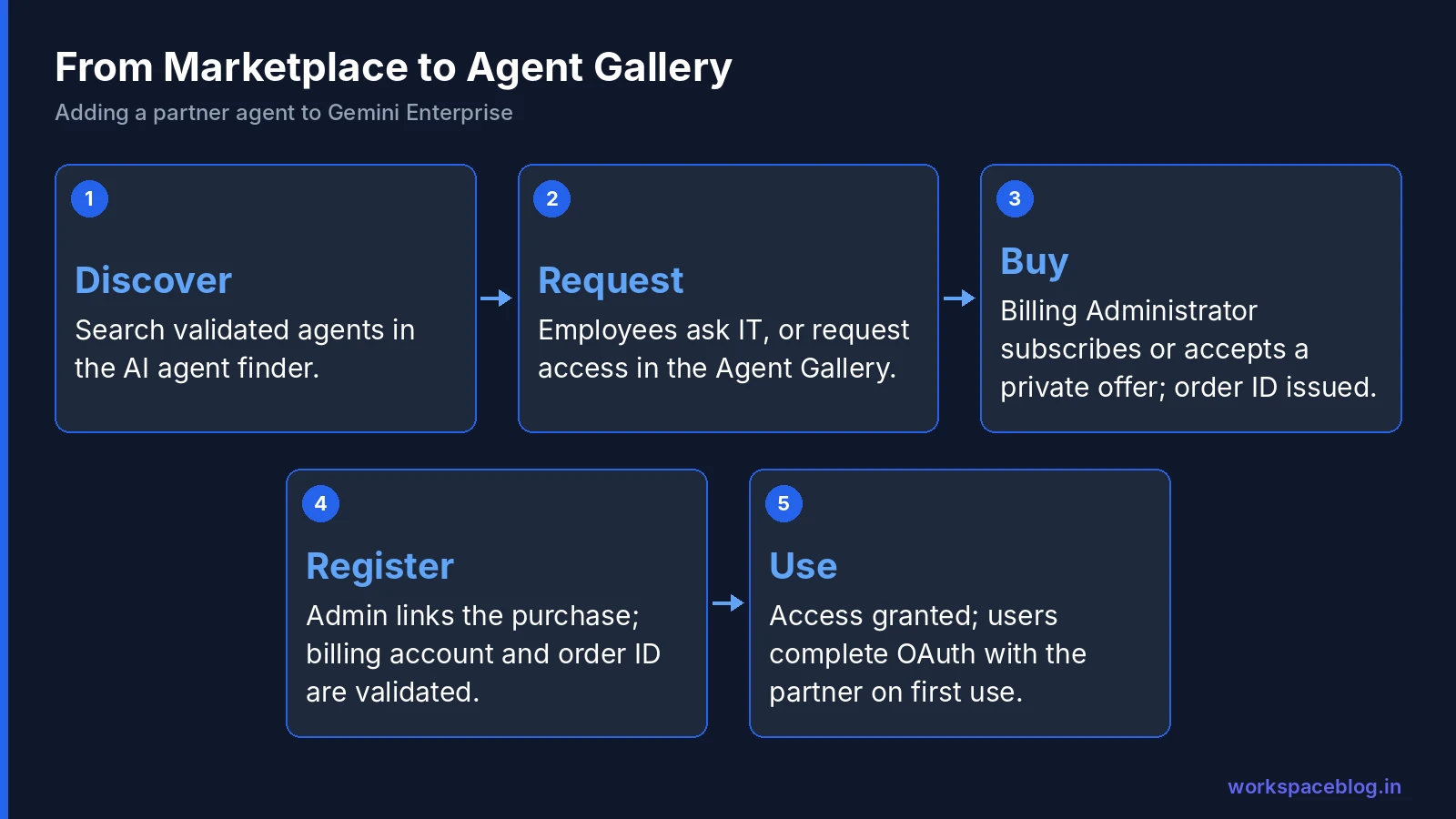
1. Discover
Teams search for agents in the AI agent finder using natural language (“an agent that reconciles invoices against purchase orders”) and filter for agents validated for A2A and Gemini Enterprise. Google’s “Google Cloud Ready – Gemini Enterprise” designation marks agents meeting its highest performance and quality bar.
2. Request
Employees follow your normal process to ask IT to procure an agent. In Gemini Enterprise, users can also find registered agents in the Agent Gallery and request access.
3. Buy
A Billing Administrator subscribes through Marketplace or accepts a private offer. The partner’s procurement system approves the entitlement, and the purchase gets a unique order ID. Billing is consolidated on your Google Cloud invoice.
Partners can price agents several ways:
| Pricing model | Example |
|---|---|
| Subscription | A monthly fee per user or per organization |
| Usage-based | Per request or per document processed |
| Private offer | Custom negotiated terms |
| SaaS extension | Added to an existing subscription with that vendor |
| Outcome-based | Per anomaly detected, report generated, or ticket resolved |
4. Register
A Gemini Enterprise administrator (Gemini Enterprise Admin role, plus Consumer Procurement Entitlement Viewer, with the Discovery Engine API enabled) clicks Integrate & grant access for the procured agent and enters its authentication details. Registration uses dynamic client registration: the partner checks the order ID in Google’s signed request against its records before issuing credentials. Google lists adding Marketplace agents to Gemini Enterprise as Preview.
5. Grant access
Admins grant access directly or use Review share request to approve requests; agents still waiting for purchase or integration appear under Procurements & integration requests. Admins also choose what the Agent Gallery shows: only accessible agents, only integrated agents, only procured agents (the default), or all. On first use, a user may need to complete OAuth authorization with the partner’s system.
Edition Requirements
From Google’s edition comparison, access to the Agent Marketplace is included in:
| Edition | Agent Marketplace |
|---|---|
| Business | - |
| Standard | ✓ |
| Plus | ✓ |
| Pay-as-you-go | ✓ |
| Frontline | ✓ |
If you’re on Business and want partner agents, plan an edition change (billing guide).
How Partner Agents Connect: A2A Under the Hood
Marketplace agents are A2A agents. Each partner publishes an Agent Card (a JSON file describing its skills, authentication methods, and endpoints) and hosts the agent in its own environment. Gemini Enterprise talks to it over the A2A protocol (A2A guide).
Authentication must be one of:
- OAuth 2.0 authorization code flow: the agent acts with the user’s authorization in the partner system (required for anything touching user data)
- Public access: only for agents that don’t handle user data or sensitive resources
Governance: Treat Agents Like SaaS Apps (Because They Are)
A partner agent is a third-party application with access to your users and possibly your data. Apply the same discipline you use for SaaS and Marketplace apps in Workspace (Marketplace apps guide).
Controls Google provides
- Admin control over which agents can be deployed and accessed in Gemini Enterprise
- IAM and Private Marketplace to manage which offerings employees can see and buy
- Google’s review of functionality, security, and pricing before an agent is published
What to add yourself
Google’s Marketplace agent documentation says Model Armor settings in the Gemini Enterprise console don’t automatically protect Marketplace agents; Model Armor has to be configured in the agent’s own code. For partner agents, that means you depend on the partner’s own security, so vet it (agent security guide).
Partner agent review checklist
| Area | Questions |
|---|---|
| Data | What data does the agent receive? Where does the partner store and process it? Is it used for training? |
| Access | Which OAuth scopes does it request in the partner system? Can it be limited to read-only? |
| Actions | Can it change records, send messages, or make payments? Are actions confirmed by the user? |
| Security | SOC 2 / ISO 27001 reports; prompt-injection defenses; incident notification terms |
| Compliance | Data residency, retention, subprocessors, DPA |
| Pricing | Model, usage caps, overage terms, outcome definitions |
| Support | SLAs, escalation path, status page |
| Exit | How to remove access and delete data if you stop using it |
| Ownership | Internal business owner and renewal date |
Buy, Build, or Customize?
| Option | Choose when |
|---|---|
| Buy a partner agent | The task lives inside a vendor’s system (CRM, document platform, data provider) and they’ve already built the agent |
| Customize a template | Agent Garden or Workflow Builder templates cover 80% of the need |
| Build your own | The process is unique to you, or the data is too sensitive to send to a third party (ADK tutorial) |
A practical rule: buy agents that work inside a partner’s product; build agents that work across your own systems.
For Software Vendors: Publishing an Agent
If you build software, the marketplace is a distribution channel into Gemini Enterprise customers.
- Enroll: join the Google Cloud Partner Network, accept the Marketplace Vendor Agreement, and nominate your agent through your Google Cloud contact
- Build an A2A agent with an Agent Card describing skills, authentication, and endpoints; support OAuth 2.0 authorization code flow for user data
- In the Producer Portal, create an “AI Agent as a Service” product and upload the Agent Card from Cloud Storage
- Choose a self-service (public pricing) or private offer only listing and a pricing model
- Integrate procurement with the Cloud Commerce Partner Procurement API and Pub/Sub notifications for automatic provisioning
- Support dynamic client registration and verify order IDs before issuing credentials
- Pass Google’s review of functionality, security, and pricing; consider the Google Cloud Ready – Gemini Enterprise designation
Partners host the agent and procurement logic in their own projects.
Worked Example: Adding a Partner Agent for Sales
A sales operations team wants an agent from its CRM vendor that summarizes account health and drafts renewal plans inside Gemini Enterprise.
- Discover. The team finds the vendor’s agent in the AI agent finder, validated for A2A and Gemini Enterprise.
- Review. IT and security run the partner checklist: the agent requests read-only CRM scopes plus an optional “create task” action; data is processed in the vendor’s US region; the vendor provides a SOC 2 report and a data processing agreement.
- Buy. Procurement accepts a private offer for 200 users; the Billing Administrator subscribes and receives an order ID.
- Register. The Gemini Enterprise admin uses Integrate & grant access in the production app, and the vendor verifies the order ID during registration.
- Pilot. Access is granted to the sales ops group. On first use, each user authorizes the agent in the CRM with OAuth, so it only sees accounts that user can see.
- Decide on actions. After two weeks of read-only use, the team enables “create task” with user confirmation.
- Operate. The sales ops lead is the business owner; renewal and usage are reviewed each quarter.
Total time from request to pilot: usually a few weeks. Most of it in security review, which is exactly where it should be spent.
Partner Agents vs. Workspace Marketplace Apps
| Workspace Marketplace app | Gemini Enterprise partner agent | |
|---|---|---|
| Runs | Inside Gmail, Drive, Docs, and other Workspace apps | In Gemini Enterprise, over A2A |
| Access model | OAuth scopes to Workspace data | OAuth to the partner’s system; A2A with Gemini Enterprise |
| Governed in | Workspace Admin console allowlist and API controls | Gemini Enterprise admin, IAM, Private Marketplace |
| Bought through | Vendor or Workspace Marketplace | Google Cloud Marketplace |
| Main risk | Broad access to Workspace data | Data shared with the partner’s systems; actions taken by the agent |
Many vendors offer both. Review them separately: approving one doesn’t approve the other.
Rollout Tips
- Publish an approved-agents list so employees know what’s available and what’s being evaluated
- Use Private Marketplace to show only vetted offerings
- Start with read-only agents from vendors you already trust
- Assign a business owner for each partner agent and track renewals
- Review usage quarterly: remove agents nobody uses
Budgeting for Partner Agents
Partner agents add a new line to your AI budget alongside Gemini Enterprise licenses and Agent Platform usage. Track each agent’s cost against the business owner’s department, set renewal reminders well before term dates, and compare outcome-based and usage-based offers carefully: a low per-request price can still add up quickly at enterprise volume.
Conclusion
The Google Cloud AI Agent Marketplace turns partner agents into something you can buy and govern like any other cloud product: discover validated agents, purchase with consolidated billing, register them in Gemini Enterprise with order-ID checks, and let employees find them in the Agent Gallery. For vendors, it’s a standard A2A-based path to reach Gemini Enterprise customers.
Because console Model Armor settings don’t cover Marketplace agents, vet each partner’s security, scopes, and data handling as carefully as any SaaS app. Combine bought, customized, and custom-built agents, and your teams across Google Workspace and Gemini Enterprise get the best of each without losing control.
Official Google sources:
- Google Cloud AI Agent Marketplace announcement
- Gemini Enterprise agents
- Compare editions of Gemini Enterprise
- Register and manage Marketplace agents
- Register and manage A2A agents
Related reading:
- Agent2Agent (A2A) Protocol Explained: how partner agents connect.
- Securing AI Agents: Agent Identity, Registry, and Gateway: governance for agents of every kind.
- Google Workspace Marketplace: Best Apps: app governance lessons that apply to agents.
This guide contains referral or affiliate links. If you sign up through one, Workspace Blog may earn a commission at no extra cost to you. Read our referral and advertising disclosure.
Frequently Asked Questions
- What is the Google Cloud AI Agent Marketplace?
- It's the AI agent category of Google Cloud Marketplace, where partners list agents validated to integrate with Gemini Enterprise. Customers buy them with their existing Google Cloud account and consolidated billing, and admins register them in Gemini Enterprise so employees can find them in the Agent Gallery. Partners named in Google's October 2025 announcement included Box, Dun & Bradstreet, HubSpot, S&P Global, UiPath, and many others.
- How do I add a partner agent to Gemini Enterprise?
- A Billing Administrator subscribes through Google Cloud Marketplace or accepts a private offer, which creates an order ID once the partner approves the entitlement. Then a Gemini Enterprise administrator (with the Consumer Procurement Entitlement Viewer role too) uses Integrate & grant access to add the agent; during registration the partner verifies the order ID before issuing credentials. Google lists this flow as Preview.
- Which Gemini Enterprise editions can use the Agent Marketplace?
- Google's edition comparison lists access to the Agent Marketplace for Standard, Plus, Pay-as-you-go, and Frontline editions, but not the Business edition.
- How are partner agents secured?
- Marketplace agents are built on the A2A protocol and must support either OAuth 2.0 authorization code flow or public access, which is only appropriate for agents that don't handle user data or sensitive resources. Google reviews agents' functionality, security, and pricing before publication. Admins control which agents can be deployed and who can access them, and can manage access and cost through IAM and Private Marketplace.
- How do partners publish an agent?
- Partners join the Google Cloud Partner Network, accept the Marketplace Vendor Agreement, nominate the agent through their Google Cloud contact, create an AI Agent as a Service product in the Producer Portal, upload an A2A Agent Card from Cloud Storage, choose public or private offers and a pricing model, and integrate with the Cloud Commerce Partner Procurement API and Pub/Sub notifications. Google reviews the agent before it appears in the marketplace.