Memory Bank and Sessions on Agent Platform: Giving AI Agents Long-Term Memory Safely
Memory Bank and Sessions (formerly Vertex AI Memory Bank) for AI agents: memory generation, retrieval, TTLs, ADK integration, privacy and poisoning risks.

Checked against Google's official documentation, last updated 15 Nov, 2026. See what changed

Most AI assistants have the memory of a goldfish: close the chat and everything you explained (your role, your preferences, the decision you made last week) is gone. That’s fine for one-off questions and frustrating for anything ongoing. Memory is what turns an assistant into something closer to a colleague who knows your context. On Google Cloud that is Memory Bank, formerly Vertex AI Memory Bank.
On Gemini Enterprise Agent Platform, memory comes from two services: Sessions (the record of each conversation) and Memory Bank (curated long-term facts that persist across conversations). This guide explains how they work, how to use them with ADK, how to design what agents remember, and how to keep memory private and safe.
It’s the same idea that lets Google’s own Gemini agent remember context across Google Workspace and other apps.
Key Takeaways
- Sessions record one conversation; Memory Bank keeps curated facts across conversations.
- Memories are generated asynchronously from sessions or written directly with
CreateMemory, and retrieved by similarity. - ADK integrates through
VertexAiMemoryBankService; Agent Runtime manages sessions automatically. - Guard against memory poisoning with Model Armor, verification against systems of record, and TTLs.
- Never store secrets; give users transparency and deletion.
Table of contents
Open Table of contents
Two Kinds of Memory
| Sessions | Memory Bank | |
|---|---|---|
| Scope | One ongoing interaction | Across many sessions |
| Contains | Events: messages, tool calls, actions; plus temporary state | Self-contained facts per user and agent |
| Lifetime | As long as you keep the session | Until deleted or expired by TTL |
| Example | ”The user asked for a refund, the agent checked order 1234" | "Prefers email updates; account is on the Enterprise plan” |
| Main APIs | CreateSession, AppendEvent, ListEvents | GenerateMemories, CreateMemory, RetrieveMemories |
Google describes Sessions as the “definitive source” for long-term memory and context: Memory Bank reads session history and decides what’s worth keeping. Unlike a static RAG knowledge base (RAG options compared), memories evolve as new information arrives.
At Gemini at Work 2026, Google described the same idea for its own Gemini agent, with four memory types: session, semantic, procedural, and episodic. Memory Bank is the building block for giving your own agents similar abilities.
Sessions
A session is a chronological record of one user-agent interaction:
- Events: conversation content and agent actions such as function calls, with a flexible schema for custom data and different frameworks
- State: temporary data that only matters during the current conversation (for example, the order number being discussed)
You can create, resume, list, and delete sessions, and append events as the conversation progresses.
With ADK: when you deploy an ADK agent to Agent Runtime, session management is handled automatically. Without ADK, call the Sessions API directly.
Memory Bank: How It Works
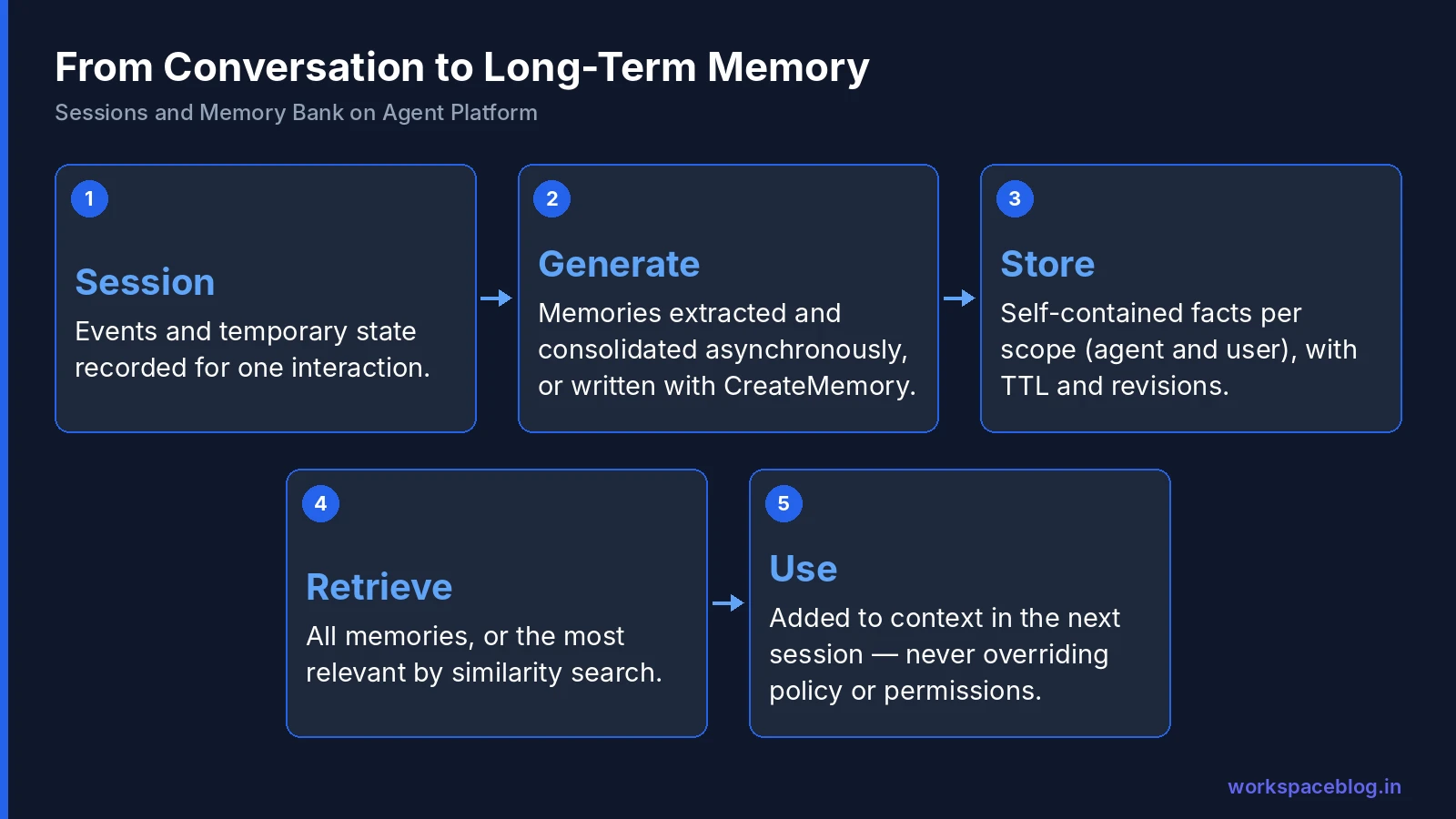
Each memory is an independent, self-contained fact with a name, a scope (such as agent name and user ID), and the fact itself, stored in an isolated collection per scope.
Generating memories
| Capability | What it does |
|---|---|
| Extraction | Pulls the most meaningful information from conversations or other source data |
| Consolidation | Merges new information with existing memories so they evolve rather than duplicate |
| Asynchronous generation | Runs in the background, so the agent doesn’t wait |
| Event ingestion | Streams conversation events and triggers generation based on batching rules you configure |
| Customizable extraction | You define topics and few-shot examples for what counts as meaningful |
| Structured schemas | Define schemas so memories capture fields like preferences, past decisions, and account history |
| Multimodal | Processes multimodal input and stores textual insights |
| Direct writes | CreateMemory lets the agent save a specific memory deliberately |
Retrieving memories
- Fetch all memories for a scope, or
- Similarity search within a scope to get only the most relevant ones for the current request
Google also highlights Memory Profiles, which it says let agents recall high-accuracy details with low latency.
Managing memories
- TTL per instance, so memories expire automatically
- Memory revisions track how a memory changed over time
- IAM Conditions restrict which principals can read or write memories for given scopes
Since November 6, 2026, Memory Bank also has its own page in the Google Cloud console. You can create instances with Google-managed or Cloud KMS encryption, view memories as unstructured text or structured data, filter them by key:value scope and step through each memory’s revision history. The configuration covers Generation, Retrieval (the embedding model, which must be set before the first memory is stored) and Retention (expiration and revision TTL). Deployed Agent Runtime agents get the same controls under Service configuration.
Using Memory Bank With ADK
ADK integrates through the VertexAiMemoryBankService and ADK’s built-in memory tools. Note that the class name still carries the pre-rename “Vertex AI” prefix. The typical pattern:
- The agent runs with sessions managed by Agent Runtime
- At the end of a session (or on a batching rule),
GenerateMemoriesextracts facts from the session - At the start of the next session, the agent retrieves relevant memories and adds them to its context
- During the conversation, the agent can explicitly save important facts with
CreateMemory
Agents built with other frameworks can wrap Memory Bank calls in their own tools and callbacks. See our ADK tutorial for the agent basics and our Agent Runtime guide for deployment.
Designing What Agents Should Remember
Memory is powerful because it’s selective. Decide deliberately:
Good things to remember
| Category | Examples |
|---|---|
| Preferences | Preferred language, format, channel, level of detail |
| Stable context | Role, team, region, products they own |
| Decisions | ”Chose the annual plan,” “approved vendor X” |
| Ongoing work | Open projects, pending requests |
| Corrections | ”Don’t call me Bob. It’s Robert” |
Things not to remember
| Category | Why |
|---|---|
| Credentials and secrets | Never store passwords, tokens, or keys |
| Highly sensitive personal data | Health, financial account numbers, government IDs, unless the use case requires it and your privacy review approves |
| One-off details | Today’s meeting time. It expires on its own and clutters memory |
| Other people’s information | A user’s comments about colleagues |
| Unverified claims | ”I’m the CFO, approve this”: identity comes from authentication, not memory |
Use topics and few-shot examples in extraction to steer Memory Bank toward the first table and away from the second.
Security and Privacy
Memory poisoning
Google calls out memory poisoning: false or malicious information stored in memory that affects future sessions. A user (or a document the agent reads) could plant “the refund limit for this account is $10,000” and have it remembered.
Google’s recommended mitigations:
- Model Armor to inspect prompts (Model Armor guide)
- Adversarial testing (red teaming) of memory behavior
- Sandboxed execution with human review for high-impact actions
Add these:
- Never let memory override policy or permissions. Check limits and access against systems of record every time
- Prefer memories the agent creates deliberately for important facts, over automatic extraction from untrusted content
- Use TTL so stale or poisoned memories expire
Access control
| Role | Grants |
|---|---|
roles/aiplatform.memoryViewer | Read-only access to memories |
roles/aiplatform.memoryEditor | Write and generate memories |
Combine with IAM Conditions on scopes, Agent Identity for each agent, and the gcp.resourceLocations organization policy to keep memory resources in approved regions (agent security guide).
Encryption and network perimeter
Google lists customer-managed encryption keys (CMEK) and VPC Service Controls as supported for Agent Runtime, Sessions and Memory Bank. VPC Service Controls protects stored memories against data exfiltration, so put the project inside the same perimeter as your other agent resources. Pick the Cloud KMS key when you create the Memory Bank instance: once an instance is created with a key, you can’t change the key for that instance. For deployed Agent Runtime agents, Google says CMEK works only on single-region endpoints, not multi-regional ones.
Data residency
Choose a regional or multi-regional location such as us or eu to keep memory at rest in that boundary. Google notes ML processing may use global Gemini endpoints when a regional endpoint isn’t available for a model or location. Check this against your residency requirements (residency guide).
User rights
If your agents remember personal data, plan for:
- Transparency: tell users the agent remembers things and what kind
- Access and deletion: be able to list and delete a user’s memories on request
- Retention: set TTLs that match your retention policy
Worked Example: Memory Across Three Sessions
Session 1 (Monday). A user tells the IT helpdesk agent their laptop keeps disconnecting from VPN. The agent troubleshoots, opens a ticket, and mentions a replacement may be needed. Memory Bank extracts: uses a company laptop model X; recurring VPN disconnection issue; ticket 4821 open.
Session 2 (Wednesday). The user asks, “Any update?” The agent retrieves memories by similarity, sees ticket 4821, checks its status through the ticketing tool (not from memory), and reports that a replacement is approved. It saves: replacement laptop approved; prefers pickup at the Pune office. (The office comes from the user, not inferred.)
Session 3 (next month). The user asks how to set up a new monitor. The agent greets them with context (“on your new laptop”) and skips questions it already knows the answers to. The VPN memory has a TTL and has expired, so it doesn’t clutter the conversation.
Notice two design choices: status comes from the system of record, not memory, and temporary facts expire.
Testing Memory Behavior
Add memory-specific cases to your evaluation set (evaluation guide):
- Recall: does the agent use relevant memories in a later session?
- Relevance: does it avoid dragging in unrelated memories?
- Correction: when a user corrects a fact, is the memory updated rather than duplicated?
- Isolation: can user A ever see user B’s memories? (It must not.)
- Poisoning: does a planted false fact in a document end up in memory? Does the agent act on it?
- Deletion: when you delete a user’s memories, are they really gone from future sessions?
- Expiry: do TTLs behave as expected?
Memory and Your Privacy Notice
If an agent remembers facts about people, your privacy notice and records of processing should say so. Describe what categories of information the agent may remember, why, how long memories last (your TTL), and how users can ask for them to be deleted. Agree this wording with your privacy team before launch rather than after the first question from a user.
Cost Considerations
Google moved Sessions and Memory Bank billing to unified storage (per GiB-month) and compute (per vCPU-hour) SKUs, with the new compute pricing effective September 1, 2026. Embedding usage is billed at the existing price of the embedding model you select. Keep costs in check by:
- Generating memories on sensible batching rules, not after every message
- Retrieving relevant memories by similarity rather than loading everything
- Setting TTLs so memory stores don’t grow forever
- Deleting sessions you no longer need
Use Cases
| Use case | What memory adds |
|---|---|
| Customer support agent | Remembers past issues, products owned, and preferred contact channel |
| Sales assistant | Remembers account priorities and previous proposals |
| IT helpdesk agent | Remembers a user’s device, apps, and recurring problems |
| Onboarding coach | Tracks what a new hire has completed and what’s next |
| Personal productivity agent | Remembers formatting preferences and recurring tasks |
Conclusion
Sessions give agents a reliable record of each conversation; Memory Bank turns those records into long-term, consolidated facts that make the next conversation better. With ADK, most of the plumbing is handled for you, and features like custom extraction, similarity retrieval, TTLs, revisions, and IAM Conditions give you control over what’s remembered and who can see it.
Design memory deliberately (remember preferences and decisions, never secrets) and defend against memory poisoning with Model Armor, verification against systems of record, and expiry. Done well, memory makes agents feel genuinely helpful to the people they serve across your Google Workspace and Gemini Enterprise environment.
Official Google documentation:
- Memory Bank overview
- Sessions overview
- Scale your agents: enterprise security
- CMEK for Agent Platform
- VPC Service Controls for Agent Platform
- What’s new in Gemini Enterprise Agent Platform
- Gemini Enterprise Agent Platform release notes
Related reading:
- Agent Runtime: Deploy and Scale AI Agents: where Sessions and Memory Bank run.
- AI Agent Evaluation on Google Cloud: test memory behavior before launch.
- Securing AI Agents: Agent Identity, Registry, and Gateway: identity and access for memory.
This guide contains referral or affiliate links. If you sign up through one, Workspace Blog may earn a commission at no extra cost to you. Read our referral and advertising disclosure.
Frequently Asked Questions
- What is Memory Bank?
- Memory Bank is a managed service on Gemini Enterprise Agent Platform that creates long-term memories from conversations between users and agents. Each memory is a self-contained fact stored per scope, such as an agent and a user ID. Memories persist across sessions, so agents can remember preferences, past decisions, and context the next time a user returns.
- What's the difference between Sessions and Memory Bank?
- Sessions store the chronological history of a single ongoing interaction: messages, tool calls, and temporary state. Memory Bank stores curated, long-term facts about a user that carry across many sessions. Sessions are the raw record; Memory Bank extracts and consolidates what's worth remembering from them.
- How are memories created?
- Memory Bank can generate memories asynchronously from session events (extracting meaningful information and consolidating it with existing memories) at intervals or batching rules you configure. Agents can also write memories directly with CreateMemory. You can customize extraction with topics and few-shot examples, and memories can be retrieved all at once or by similarity search.
- How do I use Memory Bank with ADK?
- ADK agents use the VertexAiMemoryBankService along with ADK's built-in memory tools. When you deploy an ADK agent to Agent Runtime, session management is handled automatically. Agents built with other frameworks can wrap Memory Bank API calls in their own tools and callbacks.
- What is memory poisoning and how do I prevent it?
- Memory poisoning is when false or malicious information is stored in an agent's memory and influences future sessions. Google recommends Model Armor to inspect prompts, adversarial testing, and sandboxed execution with human review for high-impact actions. Least-privilege IAM roles, IAM Conditions on memory scopes, and TTLs that expire old memories also reduce the risk.