Gemini Coworker Agents: An Admin's Guide to AI Agents With Their Own Workspace Accounts
-
 Mohit
Mohit - 16 Oct, 2026

Most AI assistants borrow your identity. When Gemini drafts an email in Gmail, it works as you, with your access, and the result is yours. Coworker agents are different. Announced at Gemini at Work 2026, a coworker agent is a persistent AI team member with its own Workspace account. Its own email address, calendar, Drive, and entry in the company directory.
That is a genuinely new kind of account for Google Workspace admins to manage. It is not a person, not a service account, and not a shared mailbox, but it has some properties of all three.
This guide explains what Google has said about coworker agents, how they fit with the rest of the Gemini agent, what is still unknown, and a practical policy you can put in place before they arrive in your tenant.
Table of contents
Open Table of contents
- What Coworker Agents Are
- What a Coworker Agent Might Look Like in Practice
- How Coworker Agents Are Governed
- What Google Hasn’t Said Yet
- A Coworker Agent Policy You Can Adopt Now
- How Coworker Agents Compare With Other Account Types
- Questions to Ask Google or Your Reseller
- Running a Coworker Agent Pilot
- Conclusion
What Coworker Agents Are
Google describes the Gemini agent as a single, universal agent for work. It can handle a task on the spot, spin up short-lived sub-agents for a big job, or take on a persistent role that lasts across days and sessions. That persistent form is the coworker agent.
According to Google:
- A user describes a role, and Gemini creates the agent.
- In Workspace, the agent receives its own Workspace account with an email address (Google’s example format is
@agents.company.com), a calendar, Drive storage, and a presence in the company directory. - Colleagues can add it to Chat spaces, @mention it, or tag it in document comments.
- When it suggests edits, they appear under its own name in version history.
- It acts under its own identity, not the user’s, and follows existing sharing and membership rules.
- It can only access the context the user or team gives it.
Three ways the Gemini agent works
| Mode | Lifetime | Identity | Typical use |
|---|---|---|---|
| Assistant (in Gmail, Docs, the Gemini Enterprise app) | One conversation or task | Acts with the user’s access | Draft, summarize, research |
| Sub-agent | One job, then discarded | Temporary identity per job | Parallel steps of a big task |
| Coworker agent | Persistent, across days and sessions | Its own Workspace account | An ongoing role for a team |
What a Coworker Agent Might Look Like in Practice
Google hasn’t published a catalog of coworker roles, but its description suggests roles like these:
| Role | What it does | What it needs access to |
|---|---|---|
| Sales deal-desk agent | Prepares quote summaries and flags non-standard terms | A shared drive of pricing rules; the deals Chat space |
| IT onboarding agent | Tracks new-hire checklists and reminds owners | An onboarding tracker Sheet; the IT Chat space |
| Marketing research agent | Compiles weekly competitor updates into a Doc | Web research; a team shared drive |
| Finance close agent | Runs saved reporting skills at month end and posts results | BigQuery reports through approved tools |
The common thread: each role has a clear scope, a small set of data, and a team that owns it. Those three things are also what your policy should require.
How Coworker Agents Are Governed
Coworker agents use the same governance model as the rest of the Gemini agent. Google frames it as four questions.
Who is the agent?
Each agent has a cryptographically attested identity, governed “like an employee, with least-privilege permissions.” The identity appears in logs and in any VM the agent starts, so you can always tell which agent did something.
What may it do?
Permissions are fine-grained and role-based, approved by security administrators. When the agent reaches external systems, Google uses identity mapping and standards such as OAuth. A coworker agent only sees what colleagues share with it: the same way a new employee only sees the files and spaces they’re added to.
What did it do?
Every action is written to an audit trail attributed to the agent, not to the person who created it, and can be monitored in real time.
What must it never touch?
Agents run in an Agent Sandbox with its own network boundary, and their traffic passes through Agent Gateway, an “AI network firewall” where you write a policy once and it applies company-wide.
What does it cost?
Spend is controlled per Google Cloud project with real-time spend caps set in the Cloud Billing console. When a cap is reached, the project’s agent pauses until an admin resumes it with one click.
What Google Hasn’t Said Yet
As of mid-October 2026, several details that matter to admins aren’t public:
| Open question | Why it matters |
|---|---|
| Licensing: does an agent account consume a Workspace license? | Google hasn’t published licensing for coworker agents yet. Get the answer confirmed in writing for your contract. |
| General availability | Google hasn’t published a date; plan pilots, not rollouts. |
| Provisioning controls | Whether admins can restrict who creates agents, or which OU agent accounts land in. |
| Ownership and sponsorship | What happens to an agent when the person who created it leaves. |
| Mail and calendar behavior | How a paused agent handles incoming email and meeting invites. |
| Retention | How Vault, retention rules, and eDiscovery apply to agent mailboxes and Drive. |
Until these are answered, the safest approach is to write your own rules and apply them as soon as the controls exist.
A Coworker Agent Policy You Can Adopt Now
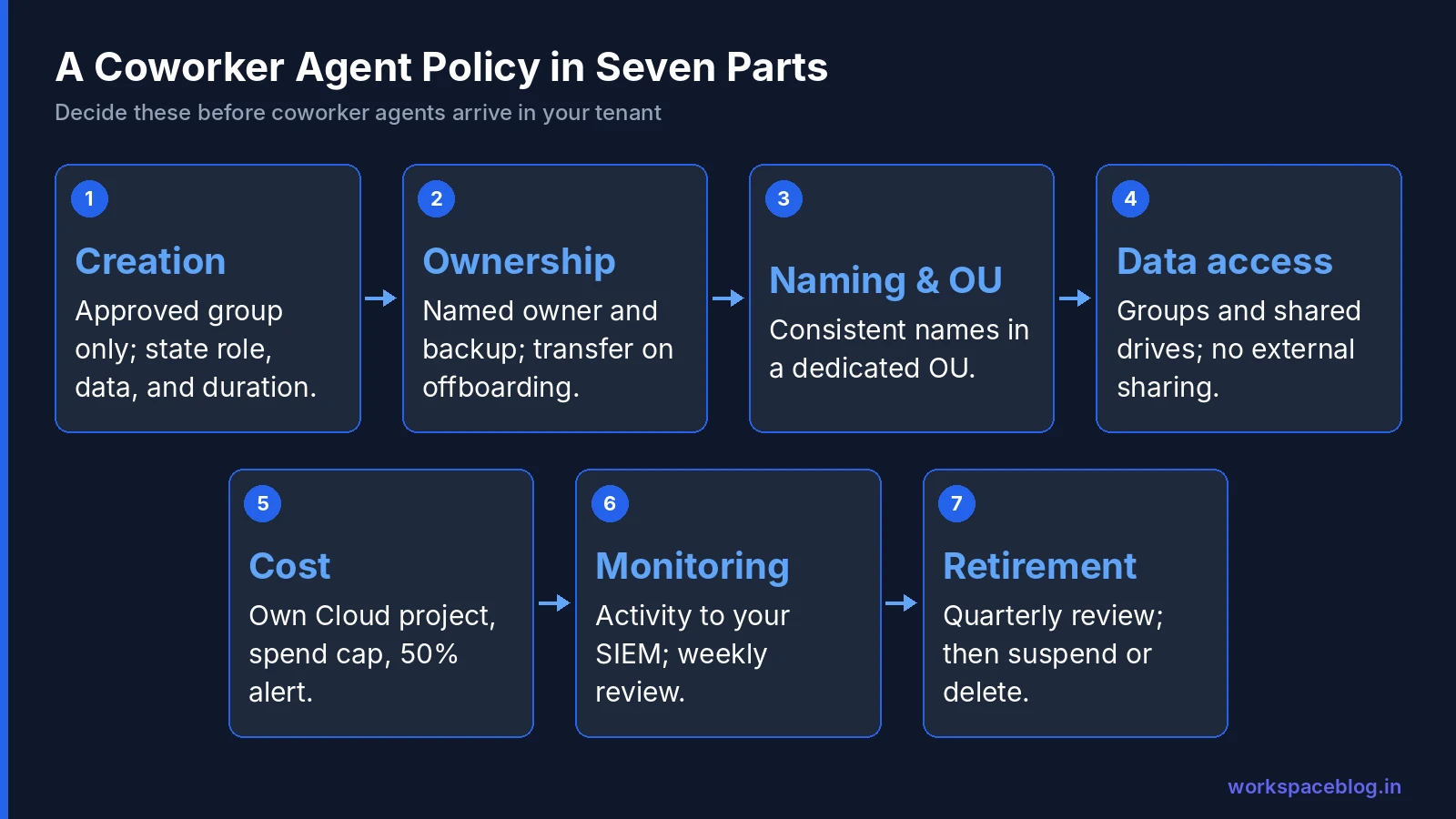
You don’t need to wait for general availability to decide how your organization will handle agents. Here’s a starting policy.
1. Creation
- Only members of an approved group (for example,
agent-creators@) may create coworker agents. - Every agent request states its role, team, data sources, and expected duration.
- Agents that touch personal, financial, or customer data need a security review first.
2. Ownership
- Every agent has a named human owner and a backup owner.
- When an owner leaves or changes role, ownership transfers as part of your offboarding checklist. Add a line to your user lifecycle process.
- Agents with no owner are suspended within 7 days.
3. Naming and placement
- Use a consistent naming pattern, such as
agent-sales-dealdesk, so agents are obvious in the directory and in version history. - Put agent accounts in a dedicated organizational unit (for example,
/Agents) so you can apply different settings from people. Our organizational units guide covers OU design.
4. Data access
- Share data with agents through groups and shared drives, not individual files. That makes access easy to review and revoke.
- Never add agents to groups that grant broad access, such as “all staff” groups with access to HR or finance drives.
- Keep agents out of external sharing: they shouldn’t be able to share files outside your domain.
5. Cost
- Give each agent (or each team’s agents) its own Google Cloud project with a spend cap and a budget alert at 50% to the owner.
- Review spend monthly and retire agents nobody uses.
6. Monitoring
- Send agent activity to your SIEM along with Workspace audit logs. See our audit logs guide.
- Review a sample of each agent’s actions weekly during the pilot.
7. Retirement
- Agents are reviewed every quarter: still needed, still owned, still within scope?
- When retired, transfer any Drive files to the team’s shared drive, then delete or suspend the account according to your retention policy.
How Coworker Agents Compare With Other Account Types
| Human user | Service account | Shared mailbox / group | Coworker agent | |
|---|---|---|---|---|
| Has an email address | Yes | No (Google Cloud identity) | Yes | Yes |
| Appears in the directory | Yes | No | Yes | Yes |
| Acts on its own | Yes | Through code only | No | Yes |
| Uses AI to decide actions | No | No | No | Yes |
| Shows up in version history | Yes | Sometimes | No | Yes, under its own name |
| Needs a human owner | - | Should | Should | Must (your policy) |
That last row is the key point. Coworker agents can act on their own, so accountability has to come from a person.
Questions to Ask Google or Your Reseller
Before you sign anything that includes coworker agents, get written answers to these:
- Licensing: Does each coworker agent consume a Workspace license, a Gemini Enterprise license, or neither? Are agent accounts counted toward edition user caps?
- Billing: Is agent usage billed per seat, per project through Google Cloud, or both? Which spend caps apply?
- Provisioning: Can admins restrict agent creation to a group, require approval, and choose the organizational unit for agent accounts?
- Lifecycle: What happens to an agent when its creator is suspended or deleted? Can ownership be transferred in the Admin console?
- Retention: Do Vault retention rules, holds, and eDiscovery cover agent mailboxes, Chat messages, and Drive files?
- Security: Do agent accounts appear in Admin console audit logs and the security center like other users? Can they be excluded from external sharing and Context-Aware Access exceptions?
- Models: If a task is routed to a third-party model such as Claude, which terms apply to that data?
The answers will shape your policy more than any feature list.
Running a Coworker Agent Pilot
When coworker agents reach your tenant, a careful pilot looks like this:
- Pick one team and one role with low-risk data, for example, an IT onboarding agent.
- Create a dedicated OU, group, and shared drive for the agent, and a Google Cloud project with a spend cap.
- Write the role description carefully: scope, tone, what it must never do, and when to escalate to a person.
- Run for four weeks with the owner reviewing every action in the first week, then a weekly sample.
- Measure time saved, error rate, and cost per task.
- Decide whether to expand, change the role, or retire it.
Conclusion
Coworker agents turn AI from a tool people use into a colleague people work with: one with an email address, a calendar, and its own name in version history. Google has built the governance pieces (identity, least-privilege access, audit trails, sandboxing, and spend caps), but licensing, provisioning controls, and retention behavior are still to be confirmed.
Use that gap well. Decide now who can create agents, require a human owner for every one, give agents their own OU and Cloud project, and plan how they leave your organization. When coworker agents arrive in your Google Workspace tenant, you’ll be ready to pilot them safely instead of cleaning up afterwards.
Official Google documentation:
- Welcome to Gemini at Work 2026 (Google Cloud blog)
- Gemini Enterprise product page
- Gemini Enterprise release notes
Related reading:
- Google’s New Gemini Agent: Gemini at Work 2026: the universal agent that coworker agents are built on.
- Google Workspace Organizational Units Guide: how to give agent accounts their own settings.
- Google Workspace User Lifecycle: Onboarding and Offboarding: add agent ownership transfer to your offboarding.
- SPF, DKIM, and DMARC for Google Workspace: keep mail sent by agent accounts deliverable and trusted.
- Google Workspace Backup and Data Recovery: recover files and mail that agent accounts change or delete.
- Google Calendar Admin: Resource Booking: set up the rooms and calendars agents will schedule against.
This guide contains referral or affiliate links. If you sign up through one, Workspace Blog may earn a commission at no extra cost to you. Learn more.
Frequently Asked Questions
- What is a Gemini coworker agent?
- A coworker agent is a persistent Gemini agent with a defined role that works across days and sessions. In Google Workspace it gets its own account, including an email address on an agents subdomain, a calendar, Drive storage, and a place in the company directory. Colleagues can add it to Chat spaces, @mention it, or tag it in document comments.
- Do coworker agents act as the user who created them?
- No. Google says coworker agents act under their own identity, not the user's, and follow existing sharing and membership rules. They can only access the context a user or team gives them, and their actions are written to an audit trail attributed to the agent.
- Do coworker agents need a Google Workspace license?
- Google hasn't published licensing details for coworker agents yet. Confirm with Google or your reseller how agent accounts are licensed before planning a large deployment.
- How is a coworker agent different from the Gemini assistant in Gmail or Docs?
- The Gemini assistant in Gmail or Docs works on your behalf, using your access, inside one conversation. A coworker agent is a separate team member with its own account and identity that keeps a role over time, can be shared with a team, and shows up in version history and audit logs under its own name.
- What should admins do before allowing coworker agents?
- Decide who can create agents, give each agent a named human owner, put agent accounts in a dedicated organizational unit, set naming and data-access rules, define what happens when the owner leaves, put each agent's work in its own Google Cloud project with a spend cap, and make sure agent actions reach your audit and SIEM review.