Googlebook and Google Meet Hardware on Android: What Google's ChromeOS-to-Android Shift Means for Workspace Admins
-
 Mohit
Mohit - 14 Oct, 2026
- Updated 26 Oct, 2026

Two announcements in September 2026 point in the same direction. On September 1, Google said it is moving its Google Meet room hardware from ChromeOS to Android (the Android Open Source Project, or AOSP). Three weeks later, Googlebook (Google’s new Android-based laptop line and the successor to the Chromebook) opened for pre-order, and it reached stores on October 4.
For Google Workspace admins, both changes land in the same place: the Devices section of the Admin console. Your ChromeOS laptops, your meeting room hardware, and your licensing plans for the next few years are all affected.
This guide explains what Google has confirmed, what is still unknown, the dates that matter, and what to do now.
Table of contents
Open Table of contents
The Big Picture: Google Is Consolidating on Android
Google first said publicly in July 2025 that it would combine ChromeOS and Android into a single platform. In 2026 that plan became products:
- Laptops: Googlebooks run Googlebook OS (developed under the codename Aluminium OS), built on the Android technology stack with ChromeOS desktop foundations.
- Meeting rooms: new Google Meet hardware is certified on Android (AOSP). Google says no new ChromeOS devices are being certified for Meet.
Neither change switches anything off. ChromeOS devices keep working and keep getting updates for years. But every new purchase from 2027 onward will be on the Android side, so your planning should start now.
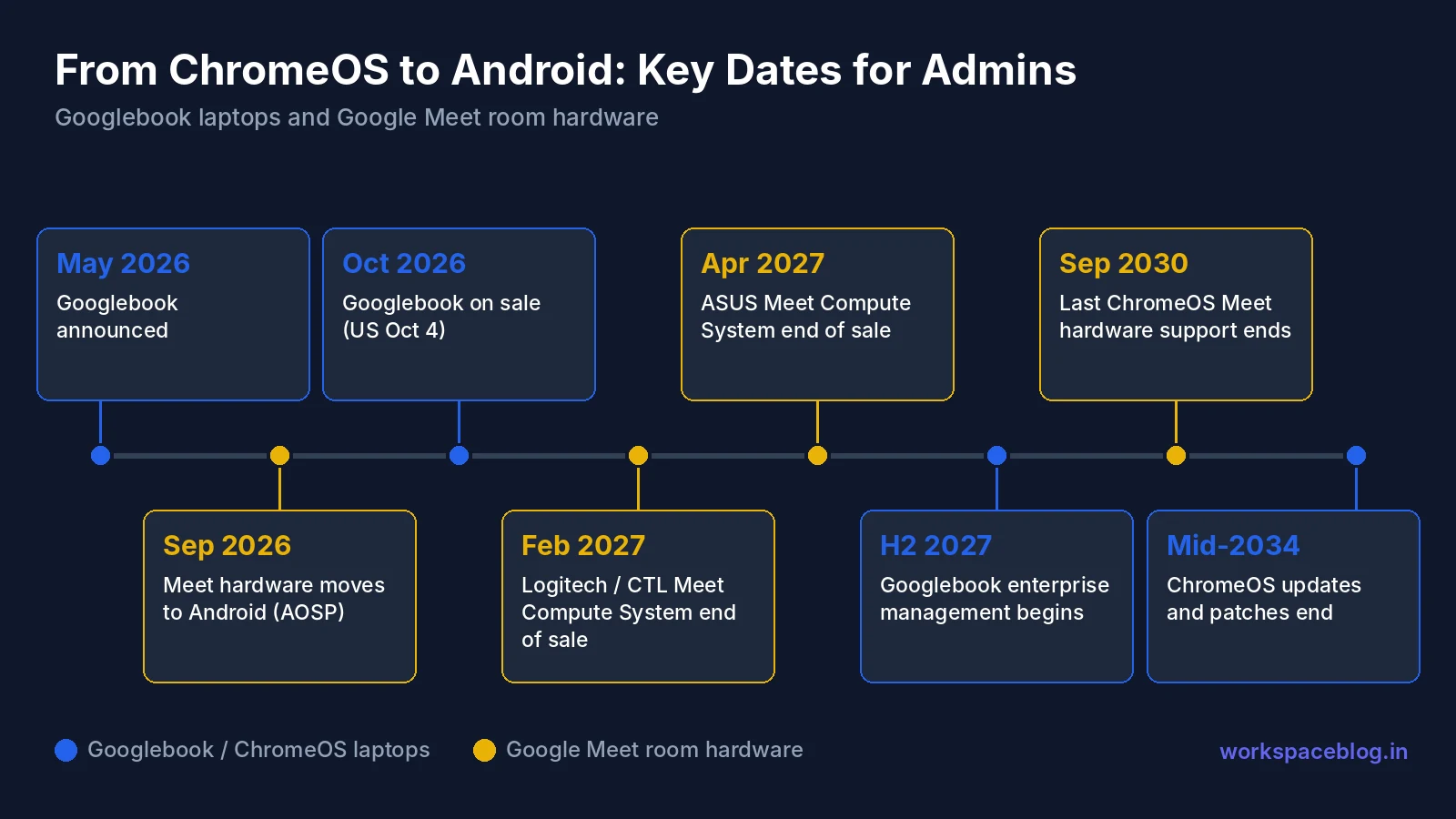
Key dates at a glance
| Date | What happens |
|---|---|
| May 12, 2026 | Googlebook announced at The Android Show: I/O Edition |
| Sep 1, 2026 | Google announces Meet room hardware is moving from ChromeOS to Android (AOSP) |
| Sep 21, 2026 | Googlebook pre-orders open |
| Oct 4–5, 2026 | Googlebook on sale in the US (Oct 4), then Canada, UK, Ireland, France, Germany, and Australia (Oct 5) |
| Feb 2027 | Logitech / CTL Google Meet Compute System (ChromeOS): end of manufacturing and sales |
| Apr 2027 | ASUS Google Meet Compute System (ChromeOS): end of manufacturing and sales |
| 2027 | New Android Meet devices for large-format spaces planned |
| H2 2027 | Googlebook enterprise management starts rolling out |
| Sep 2030 | Last ChromeOS Meet hardware reaches end of Meet support |
| Mid-2034 | ChromeOS regular updates and security patches end |
Part 1: Googlebook
What Googlebook is
Googlebook is a new laptop category that Google describes as designed for Gemini. Google doesn’t build the hardware itself: the first five models come from partners:
- Acer Googlebook 14
- ASUS Googlebook 14
- Dell XPS Googlebook
- HP Googlebook 14
- Lenovo Googlebook 15
Prices start at $899. Every model has a touchscreen (up to 2.8K OLED), a backlit keyboard, Intel or Qualcomm processors with NPUs rated above 45 TOPS, and up to 14 hours of battery life. Each comes with 12 months of Google AI Pro, and Google promises up to 10 years of updates for Googlebook OS.
Features your users will notice
- Magic Pointer: the user wiggles the cursor to call up Gemini suggestions based on what’s on screen, such as turning a date in an email into a calendar event. Google says it acts only when asked and can be turned off.
- Rambler: turns spoken notes into structured writing, including in more than one language.
- Create My Widget: builds desktop widgets from a plain-language prompt, pulling from the web, Gmail, and Calendar.
- Android phone continuity: at setup, phone settings, saved passwords, Wi-Fi networks, and messages transfer with end-to-end encryption. Continue On resumes phone tasks on the laptop, the Files app shows phone files and photos, and Cast My Apps streams phone apps into a desktop window.
- Apps and tools: desktop Chrome with extensions, Google Play apps, and a full Linux terminal environment.
Several of these features, notably Magic Pointer, Create My Widget, and phone sync, touch Gmail, Calendar, and other corporate data. That’s why the management story below matters.
Security model
Google says Googlebook keeps the ChromeOS security architecture: the Titan hardware root of trust, verified boot, defense in depth, and on-device malware detection. The Linux environment runs in an isolated virtual machine on a security-certified pKVM hypervisor.
Can you manage Googlebooks today? Not yet
This is the most important point for admins. Google’s admin guidance says the 2026 Googlebooks are aimed at personal use. They do not support domain enrollment or centralized fleet management.
| Capability | Today (2026) | Planned from H2 2027 |
|---|---|---|
| Sign in with a managed Workspace account | Yes, if the admin allows it | Yes |
| Chrome browser management (browser policies) | Yes, on by default | Yes |
| Enroll the device in your domain | No | Yes |
| Device and user policies from the Admin console | No | Yes |
| Reporting | No | Yes |
| Zero-touch enrollment | No | Yes |
| Third-party EMM support | No | APIs planned |
Google describes the management rollout as multi-year and phased, starting in the second half of 2027. Until then, treat a Googlebook like a personal laptop. Don’t buy Googlebooks as company-managed devices in 2026 expecting to enroll them later without checking the licensing and migration details first.
Controlling managed account sign-in on personal Googlebooks
Users may buy a Googlebook and try to add their work account. You decide whether they can.
Admin Console → Devices → Mobile & endpoints → Settings → Universal → Data access → Googlebook sign-in
- Select the top-level organizational unit, or a child OU for a pilot group
- Turn Allow managed users to sign in to Googlebooks without management on or off
- Click Save (or Override for a child OU)
You need the Mobile Device Management admin privilege. The default depends on your edition:
| Your edition | Default | What it means |
|---|---|---|
| Editions with advanced endpoint management or Context-Aware Access (for example Enterprise Standard and Plus, Education Standard and Plus, Cloud Identity Premium) | Off | If you turn it on, mobile device management policies don’t apply on the Googlebook. The account uses fundamental endpoint management and still reports device signals for Context-Aware Access. |
| Editions with fundamental endpoint management only (for example Business Starter, Business Standard, Enterprise Basic) | On | Users can add their account. Fundamental features apply, but Android rules such as screen lock or PIN requirements don’t. |
| Accounts that must be managed by a third-party EMM (for example Microsoft Intune) | Off | Sign-in is blocked; users see that the account type isn’t supported. |
Also note: for business domains, Google Play is allowed by default on Googlebooks but managed Google Play isn’t available. Education domains have Play blocked by default.
Recommendation: If your security baseline relies on screen lock, device approval, or Context-Aware Access device rules, leave Googlebook sign-in off for most users. If you allow it, allow it for a small OU, and use Context-Aware Access to keep sensitive apps limited to managed devices.
What happens to your Chromebooks
Google’s guidance for ChromeOS customers is clear on the main points:
- ChromeOS gets regular updates and security patches through mid-2034. Each device still follows its own Auto Update Expiration (AUE) date, so check the AUE date for each model.
- Chromebooks are still sold for business and education deployments.
- Many newer commercial Chromebooks are expected to be able to move to Googlebook OS. Google hasn’t published eligible models or migration steps yet.
- Licensing: active Chrome Enterprise Upgrade and Chrome Education Upgrade licenses stay active on ChromeOS devices with their current management capabilities. New Googlebooks, and Chromebooks migrated to Googlebook OS, will use a new licensing structure. Google says details will come before commercial availability.
In practice, a Chromebook you manage today keeps working exactly as it does now. Budget for possible new licensing costs when you eventually move to Googlebook OS, and don’t retire healthy ChromeOS devices early. See our endpoint management guide for how device policies are organized today.
Part 2: Google Meet Room Hardware Moves to Android (AOSP)
What Google announced
On September 1, 2026, Google announced it is transitioning its Google Meet hardware portfolio from ChromeOS to Android (AOSP). Hardware partners Logitech, Neat, and HP Poly already offer Meet-certified AOSP devices, and Google says several Android devices for large-format spaces are planned for 2027.
Google lists four reasons:
- More device choice: compact all-in-ones, video bars, and integrated room systems for focus rooms, huddle rooms, and boardrooms
- Enterprise stability: performance and responsiveness that Google says is comparable to ChromeOS
- Hardware flexibility: certified AOSP devices can run more than one video conferencing service, so a room can be repurposed without new hardware
- Long lifecycles: certified devices come with predictable software support
What happens to your ChromeOS Meet hardware
Your existing rooms keep working. Google will keep delivering security patches, stability updates, and ChromeOS releases to ChromeOS Meet hardware until each device’s end-of-support date. What stops is new sales:
| ChromeOS device | End of manufacturing and sales |
|---|---|
| Logitech / CTL Google Meet Compute System | February 2027 |
| ASUS Google Meet Compute System | April 2027 |
End of Meet support depends on the hardware generation:
| ChromeOS device | End of Meet support |
|---|---|
| ASUS / CTL Google Meet Compute System and Meet Compute System – Series One (original) | June 2028 |
| Series One Desk 27 and Series One Board 65 | June 2029 |
| ASUS / CTL / Series One compute systems (Intel 10th Gen) | June 2029 |
| ASUS / CTL / Series One compute systems (Intel 13th Gen) | September 2030 |
Large rooms: if you plan to add ChromeOS devices to an existing fleet (especially for large event spaces) Google recommends buying them as soon as possible, before sales end. The XL room size is currently supported on ChromeOS only.
Certified Meet hardware on Android (AOSP)
| Vendor | Certified AOSP devices | End of Meet support |
|---|---|---|
| HP Poly | Studio X32 / Studio X52 / Studio X72 | Feb 2033 / Jun 2031 / Sep 2032 |
| Logitech | Rally Bar / Rally Bar Mini | Oct 2029 |
| Logitech | Rally Bar 2 | Oct 2034 |
| Logitech | Rally Huddle | Oct 2028 (recertification pending, may be extended) |
| Logitech | Rally Board 65 | May 2033 |
| Neat | Bar Generation 2 / Bar Pro | May 2031 / Feb 2029 |
| Neat | Board 32 / Board 50 / Board Pro 65 | Oct 2033 / May 2031 / Oct 2032 |
Under Google’s certification program, a device typically gets a target of 8 years of Meet support from its general availability date, with a mandatory recertification at year 5 (premium devices can target up to 10 years). Google gives technical support only for certified devices, and the Admin console warns you before a device reaches end of support. Always check the live list before you buy: an older model can have far less support left than a new one, as the Rally Bar (2029) and Rally Bar 2 (2034) show.
ChromeOS vs AOSP: the differences admins should know
Most in-call features work on both platforms: joining and starting meetings, client-side encrypted meetings, hand raise, layouts, reactions, captions, Companion mode check-in, PSTN calling, HDMI content sharing, dual screens, proximity detection, and Zoom and Webex interoperability. The differences are mostly in high-end rooms and management:
| Area | ChromeOS | AOSP (Android) |
|---|---|---|
| Room sizes | Huddle to XL | Huddle to Large |
| Maximum video tiles | 49 | 16 |
| Video output | Up to 2 × 4K60 | Up to 2 × 1080p (device dependent) |
| Peripherals and third-party control systems | Supported through Google | Depend on the OEM |
| Camera “Set home” and camera switching | Yes | No (pan, tilt, zoom, Home, and Frame people are supported) |
| Bluetooth remote control | Yes | No |
| Spoken feedback (accessibility) | Yes | Use Companion mode |
| Admin console: release channel and time zone | Yes | Not supported |
Google notes that settings missing from the Admin console on AOSP can often be managed with the hardware vendor’s own tool, but then you no longer have a single place to manage everything. Factor that into your room standards.
Joining Microsoft Teams meetings from AOSP Meet hardware
Android (AOSP) Meet hardware can now join Microsoft Teams meetings, and Android-based Teams Rooms devices can join Meet meetings, the same interoperability ChromeOS Meet hardware already had. It is in Early Preview for devices enrolled in the Early Preview Program in Rapid Release domains. The setting is on by default, can be turned off per organizational unit, and does not replace existing Pexip settings on OUs that already use them.
Enrolling an AOSP Meet device
AOSP devices from Logitech and HP Poly enroll with a code rather than by signing in on the device:
- Power on the device and make sure its touch controller is paired and online. On Logitech devices, select Google Meet as the provider.
- In the Admin console, go to Devices → Google Meet hardware → Devices.
- Under More, click Enroll a device with a code and enter the code shown on the device.
- Assign the device to a calendar resource so the room shows its schedule and supports check-in.
Put Meet hardware in a dedicated organizational unit so settings stay consistent; see our organizational units guide. For room resources and booking rules, see the Calendar admin guide.
Licensing
Every Meet hardware device needs a Google Meet hardware license in addition to your Workspace subscription. A license is assigned automatically when you enroll a device, licenses run for a one-year term, and you can move a license from a retired device to a new one. Buy from a reseller if you need more than 10 licenses or want auto-renewal; buying directly from Google in the Admin console is limited to 10 licenses. Check your count under Billing → Subscriptions → Google Meet hardware before a hardware refresh, and see our license management guide for keeping subscriptions under control.
Admin Action Plan
Now (Q4 2026)
- Inventory your Meet hardware. In Devices → Google Meet hardware → Devices, list every room device and match it to its end-of-support date.
- Decide on large rooms. If you need more ChromeOS compute systems for XL or event spaces, buy before February 2027 (Logitech / CTL) or April 2027 (ASUS). Otherwise, wait for the 2027 Android large-format devices.
- Set your Googlebook sign-in policy. Decide per OU whether managed accounts may sign in to personal Googlebooks, and tell users what to expect.
- Check Chromebook AUE dates. Identify devices that expire before mid-2034 and plan replacements as usual.
2027
- Standardize new room purchases on certified AOSP devices. Pilot one device per room type (huddle, small, medium, large) before ordering in bulk.
- Watch for Googlebook licensing and migration details. Add a line item to your budget for the new licensing structure.
- Evaluate Googlebook management when it arrives (H2 2027). Run a small pilot with zero-touch enrollment and your security policies before allowing Googlebooks as company devices.
2028–2030
- Replace ChromeOS Meet compute systems as they reach end of support (June 2028, June 2029, and September 2030), reusing licenses on the new AOSP devices.
2030–2034
- Move remaining ChromeOS laptops to Googlebook OS (if eligible) or new hardware before regular ChromeOS updates end in mid-2034.
What We Still Don’t Know
- Googlebook licensing: the name, price, and terms of the new structure
- Migration eligibility: which Chromebook models can move to Googlebook OS, and whether migration needs a device wipe
- Management depth: how many ChromeOS device policies will exist for Googlebooks at launch in 2027
- Large-format Android Meet devices: models and dates beyond “2027”
We’ll update this guide as Google publishes those details.
Conclusion
Google is consolidating its endpoints on Android. For laptops, that means Googlebook. For meeting rooms, it means AOSP devices from Logitech, Neat, and HP Poly. Nothing you run today stops working: ChromeOS laptops get updates through mid-2034, and ChromeOS Meet hardware is supported until as late as September 2030.
The real deadlines are about purchasing: ChromeOS Meet compute systems go off sale in early 2027, and Googlebooks can’t be managed as company devices until the second half of 2027. Inventory your devices now, set your Googlebook sign-in policy, and make your next room purchase an Android one: your Google Workspace environment will be ready when the rest of the transition arrives.
Official Google documentation:
- Built-in interoperability between Google Meet and Microsoft Teams on Android (AOSP) devices
- Transitioning Google Meet room hardware to focus on Android (AOSP)
- Google Meet hardware certification program for ChromeOS and AOSP
- Compare Meet hardware on ChromeOS & AOSP
- Enroll and license Meet hardware devices
- Buy Meet hardware licenses
- What the Googlebook announcement means for your ChromeOS devices
- Manage work and school account access on personal Googlebooks
- Introducing Googlebook
Related reading:
- Google Meet Enterprise Admin Guide: recording, compliance, and policy controls for Meet.
- Google Workspace Endpoint Management Guide: how device policies work for ChromeOS, Android, and iOS today.
- Gemini for Google Workspace: Admin Guide: the Gemini features and admin controls behind Googlebook’s AI tools.
This guide contains referral or affiliate links. If you sign up through one, Workspace Blog may earn a commission at no extra cost to you. Learn more.
Frequently Asked Questions
- What is a Googlebook?
- Googlebook is a new category of laptop from Google that runs Googlebook OS, built on the Android technology stack with desktop foundations from ChromeOS. The first models come from Acer, ASUS, Dell, HP, and Lenovo, start at $899, and went on sale on October 4, 2026 in the US and October 5 in Canada, the UK, Ireland, France, Germany, and Australia.
- Can I manage Googlebooks from the Google Admin console?
- Not yet. The 2026 Googlebooks are aimed at personal use and don't support domain enrollment or fleet management. Admins can allow or block sign-in with managed Google Workspace accounts, and Chrome browser management applies when users sign in to Chrome. Google says full management, including device, user, and browser controls, reporting, zero-touch enrollment, and APIs for third-party EMMs, starts rolling out in the second half of 2027.
- Are Chromebooks being discontinued?
- Not immediately. Google says ChromeOS devices will receive regular updates and security patches through mid-2034, and each device still follows its own Auto Update Expiration date. Chromebooks remain available for business and education, and many newer commercial models are expected to be eligible to move to Googlebook OS, with eligibility details to be shared later.
- Do Chrome Enterprise Upgrade licenses work on Googlebooks?
- Existing Chrome Enterprise Upgrade and Chrome Education Upgrade licenses stay active on ChromeOS devices with their current management capabilities. New Googlebooks, and Chromebooks migrated to Googlebook OS, will use a new licensing structure that Google says it will publish before commercial availability.
- Will my ChromeOS Google Meet room hardware stop working?
- No. Existing ChromeOS Meet hardware keeps receiving security patches, stability updates, and ChromeOS releases until each device's end-of-support date. The latest models (Intel 13th Gen compute systems) are supported until September 2030. What ends is manufacturing and sales: the Logitech / CTL Google Meet Compute System in February 2027 and the ASUS Google Meet Compute System in April 2027.
- Which Google Meet hardware runs on Android (AOSP)?
- Google's certified AOSP devices include the HP Poly Studio X32, X52, and X72; the Logitech Rally Bar, Rally Bar 2, Rally Bar Mini, Rally Huddle, and Rally Board 65; and the Neat Bar Generation 2, Bar Pro, Board 32, Board 50, and Board Pro 65. Check Google's certification program page for the current list and each device's end-of-support date.